
SpreadsheetWeb blog
Practical thinking for spreadsheet-powered teams
Deep guides on Excel, Google Sheets, web applications, product workflows, and the quiet technical traps worth knowing about.
Page 48 of 55 · 1319 articles

How to create a year-by-year average calculator
AVERAGEIF(S) functions lack array abilities. Let us show you How to create a year-by-year average calculator using the SUMPRODUCT function.
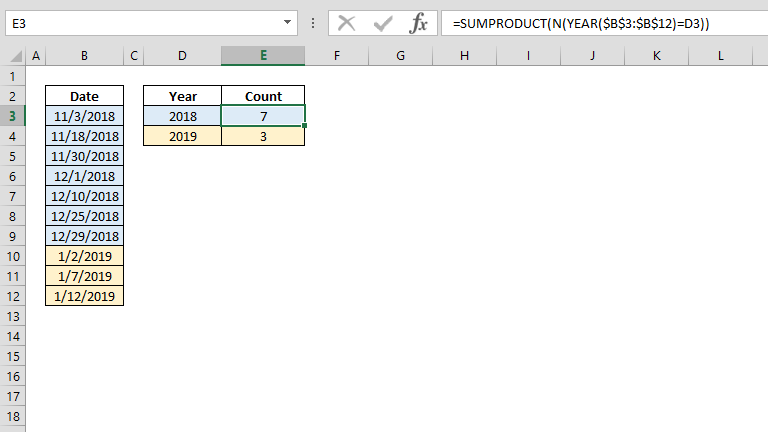
How to count cells in Excel by year
Grouping or counting items by date can be challenging. Learn how to count cells in Excel by year using SUMPRODUCT, YEAR and N functions!
How to use DAX Functions in Pivot Tables
DAX functions help manage and transform your data in Microsoft's data analysis tools like PowerPivot and Power BI Desktop.
Utilizing Web Services in Excel Using Formulas
User inputs, data exports, and even web services can provide data for your workbooks. Let us show you how to consume data using formulas.
What’s New in SpreadsheetWeb 6.3
the new dashboard platform is also included in all licenses of SpreadsheetWEB. This new tool features 12 charts, 25 diagrams, 7 maps, 4 gauges, and 2 data tables, each offering a unique and intuitive way to present your data.
Pagos Announces the Release of SpreadsheetWEB 6.3 Featuring a New Dashboard Module and Improved Calculation Engine
With this update, SpreadsheetWEB introduces a brand new dashboarding tool, an improved calculation engine, and Excel export.
Data Analysis in Excel: PivotTables versus COUNTIFS, SUMIFS, AVERAGEIFS formulas
Data analysis in Excel can be done by using formulas, but Excel’s PivotTables make it a breeze organizing and presenting data.

HubSpot Setup - Integrate SpreadsheetWeb applications with HubSpot
Your HubSpot instance can be accessed via RESTful web service calls.In this tutorial, we're going to show you hubspot setup.

What week of the year is it and how to get its start date
This method will help you answer the question - what week of the year is it, and give you the start date of each week.
3D References in Excel
Learn about 3D References in Excel in Excel, including the relevant formula or feature, setup steps, and practical usage.

Integrate SpreadsheetWeb with SalesForce
Follow the Integrate SpreadsheetWeb with SalesForce with a focused overview of the required setup, configuration steps, and expected result.
How to reduce file size of your Excel workbooks
In this article, we’re going to cover the most efficient ways to reduce file size of your Excel workbooks.

Count unique values Excel
This article shows How to count unique values by using SUMPRODUCT and COUNTIF functions.

How to get last match
Learn how to get last match. This practical guide covers the formula syntax, setup steps, and how the result is calculated in Excel.

How to find closest match
Learn how to find closest match. This practical guide covers the formula syntax, setup steps, and how the result is calculated in Excel.

How to sum every N rows
Adding certain cells in a table can be challenging. This article shows how to sum every n rows by using the SUM and the OFFSET functions.

How to calculate average by week number
This article focuses on to calculate average by week number with exact week number by using WEEKNUM and AVERAGEIFS functions.
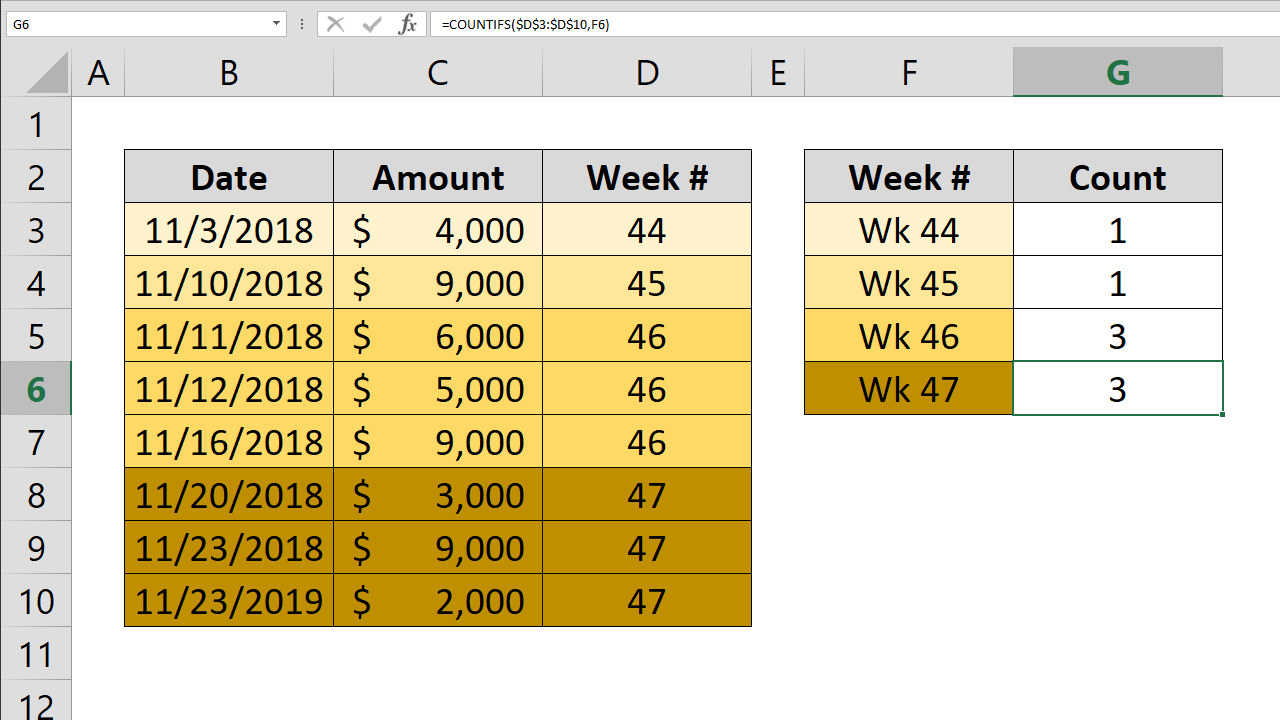
How to count by week number
This article focuses on to count by week number with exact week number by using COUNTIFS and WEEKNUM functions.

How to create conditional Excel drop down lists
Learn how to create conditional Excel drop down lists. This practical guide covers the required setup, step-by-step process, and useful Excel options.

How to highlight values based on item lists
You can highlight the duplicate values in a data set to help identify the outliers. Let's see how to highlight values based on item lists.

How to replace character in Excel by position
This article shows how to replace character in Excel by position using REPLACE function. If you are looking to replace a specific character please refer to article How to replace a character.
Excel Case Statements: SWITCH Function Versus Nested IF
Excel case statements can be handled via the SWITCH function which can essentially do what nested IF functions can, using only one function.

How to replace characters in Excel
In this article we're going to show you how to replace a character in Excel using the SUBSTITUTE function.

Grouping Dates in Pivot Table
Learn about grouping Dates in Pivot Table in Excel, including the relevant formula or feature, setup steps, and practical usage.