
Scored questionnaires
Scored questionnaires, built from the spreadsheet that does the scoring
Assessments, audits, intake forms and evaluations start life as a workbook because the scoring is the hard part. Publish that workbook and you get scored questionnaires on the web with the model untouched, while respondents see only the questions that apply to them.
Open one and score yourself
Rather than describe it, here is a live one. A security questionnaire with conditional sections, running from an ordinary workbook.
Security questionnaire, live
Sections appear and disappear based on your answers, every response is saved as its own record, and the score is calculated by formulas in the workbook rather than by code someone had to write.
The scoring is why it was a spreadsheet
Survey tools handle questions well and scoring badly. Anything past a simple point tally tends to end up back in Excel.
Weightings, bands and thresholds
Weighted sections, category subtotals, pass and fail thresholds, risk bands, normalised scores and lookup tables all keep working, because they are still your formulas. All 501 supported Excel functions run server-side.
Changed without a release
When a weighting changes or a new category is added, the person who owns the model edits the workbook and re-uploads it. No developer, no ticket, and no second copy of the scoring logic to keep in step.
Respondents never see the model
The workbook stays server-side. People answering the questionnaire see questions and a result, not the weightings, the thresholds or the lookup tables that produced it.
What a scored questionnaire adds around it
Configuration rather than code, which is what keeps these to weeks.
Questions that react to answers
Show and hide sections, enable and disable inputs, and set values based on what has been answered so far, so a long assessment only ever presents the part that applies to that respondent.
Validation before submission
Required fields, ranges and custom messages catch problems at the point of entry rather than during analysis, which is where most of the cleanup effort in spreadsheet-based surveys goes.
Every response as a record
Submissions are stored in a structured database rather than as returned files, so responses can be filtered, compared, ranked and exported, with full history and per-record permissions.
Review and sign-off
Record statuses move a response through review and approval, so an assessment can pass from the respondent to a reviewer with the state visible at each step, and email notifications can fire on the way.
A document at the end
Generate a scored PDF report from the response and email it automatically, which is usually the thing that turns a questionnaire into something people will actually complete.
Public, gated or internal
Publish openly to collect leads, put it behind a login for members and clients, or keep it inside your own network. Anonymous respondents are unlimited on every plan.
It should not look like a spreadsheet
A scored assessment carries more weight when the interface does not betray the workbook underneath it.
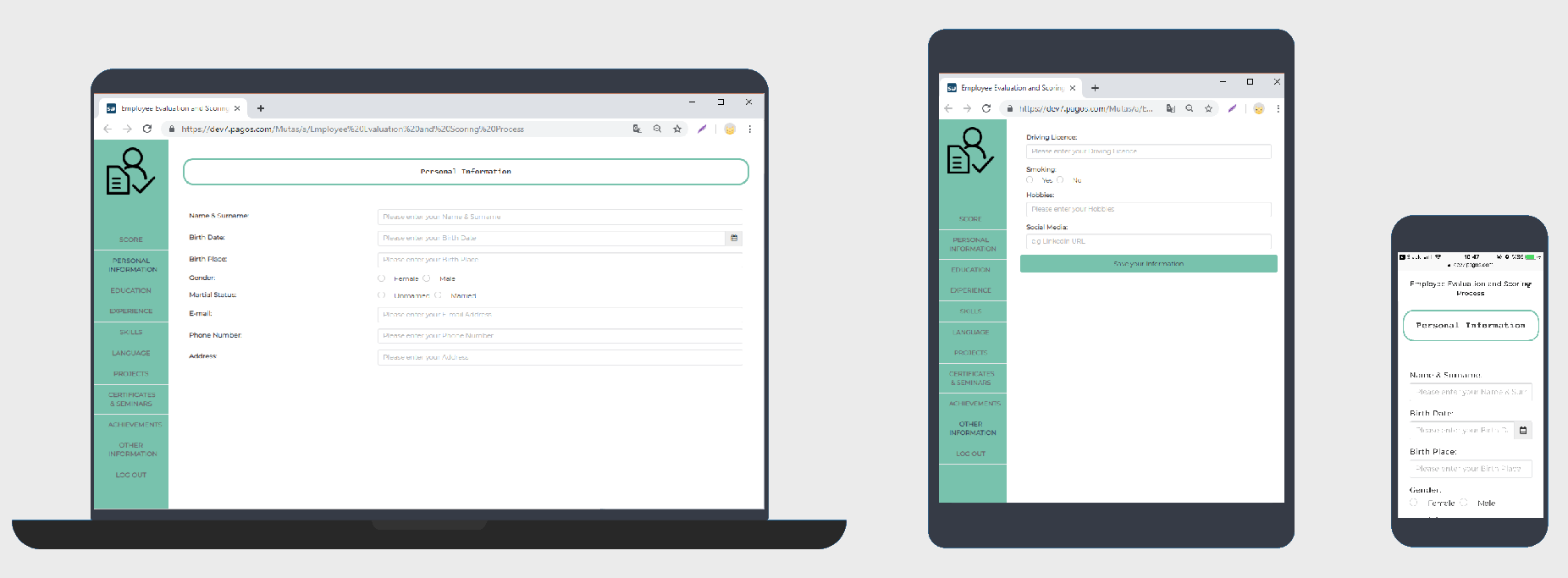
An employee evaluation and scoring process, with navigation between sections and a running score, laid out for desktop, tablet and phone from the same application.
A weighted assessment in production
Partin Appraisal has done residential appraisals in the Greater Houston Area since 1978. Their allocation and weighted appraisal spreadsheets became mobile web applications in a few days, so appraisers complete them on site rather than back at a desk.
We had a particular software designed by someone. However, they disbanded all their services and support. Our original tool was created in Excel, but if we kept using an Excel spreadsheet, it would be too easy to mess it up. We needed a way to make the application more user friendly.
Robert Partin
Owner
Partin Appraisal
Read the case study
Changes are made by the business rather than by developers, which matters when the criteria move. For a heavier example, Broker Village built a trade and compliance risk assessment that returns a recommendation after running thousands of simulations.
Start with the assessment you already scored in Excel
Upload the workbook on the free tier and build the questionnaire around it, or tell us how the scoring and sign-off work and we will tell you what it would take.