
SpreadsheetWeb blog
Practical thinking for spreadsheet-powered teams
Deep guides on Excel, Google Sheets, web applications, product workflows, and the quiet technical traps worth knowing about.
Page 50 of 55 · 1319 articles

How to sum by month
Learn how to sum by month. This practical guide covers the formula syntax, setup steps, and how the result is calculated in Excel.

How to find number of days in a month
Learn how to find number of days in a month. This practical guide covers the formula syntax, setup steps, and how the result is calculated in Excel.
Transforming Data Tables with Excel’s Text Formulas
In this article, we’re going to be taking a look at the text formulas in excel that can shorten data organization task.

How to make case sensitive match
Learn how to make case sensitive match. This practical guide covers the formula syntax, setup steps, and how the result is calculated in Excel.

How to check if a value exists in a list
Learn how to check if a value exists in a list. This practical guide covers the required setup, step-by-step process, and useful Excel options.

How to find smallest value in array using a criteria
Learn how to find the smallest value in an array using a criterion. This practical guide covers the formula syntax, setup steps, and how the result is calculated in Excel.

How to find nth smallest value in a data table
Learn how to find nth smallest value in a data table. This practical guide covers the formula syntax, setup steps, and how the result is calculated in Excel.

How to count values by length
Learn how to count values by length. This practical guide covers the formula syntax, setup steps, and how the result is calculated in Excel.

How to count years between two dates with the DATEDIF
This article show you how to get years between two dates and meets you with a hidden gem in Excel, the DATEDIF function.

How to count months between two dates with the DATEDIF
This article show you how to get months between two dates and meets you with a hidden gem in Excel, the DATEDIF function.

How to SUM 2d ranges with SUMPRODUCT
You can easily sum values by condition(s) with SUMIF and SUMIFS functions; with a limitation. The sum range and criteria ranges should have equal sizes.

How to SUM values across sheets
Learn how to sUM values across sheets. This practical guide covers the formula syntax, setup steps, and how the result is calculated in Excel.

How to count values if date is less than by using COUNTIF function
Learn how to count values if date is less than by using COUNTIF function. This practical guide covers the formula syntax, setup steps, and how the result is calculated in Excel.
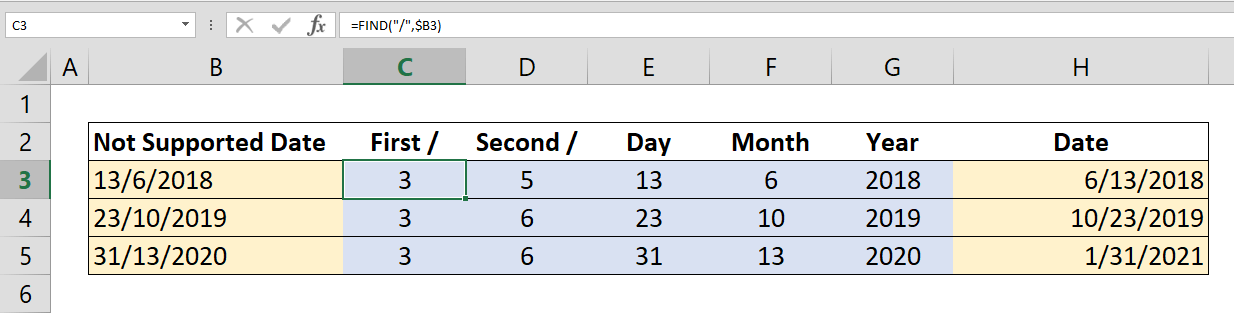
How to convert D/M/YYYY date to M/D/YYYY or vice versa
Data formats differ by locations in the world. They all have a standard. Once you understand the syntax of dates you can easily convert them from one locale to the other.

How to count values if date is greater than by using COUNTIF function
Learn how to count values if date is greater than by using COUNTIF function. This practical guide covers the formula syntax, setup steps, and how the result is calculated in Excel.
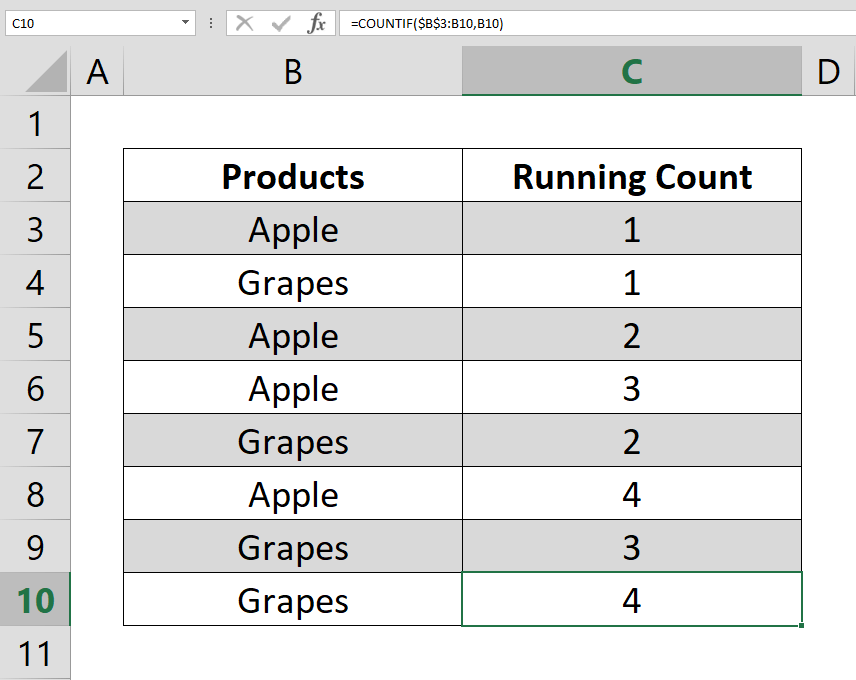
How to calculate running count
This article show how to calculate running count by using the COUNTIF and COUNTIFS functions. The running totals help you to track number of value occurrences in your data.

How to get nth match with VLOOKUP
This how-to article shows you how to get nth match with VLOOKUP. Unfortunately; Excel doesn't have a built-in function to find any value beyond first match. If your data is sorted, locating position with the MATCH function and increasing one-by-one.
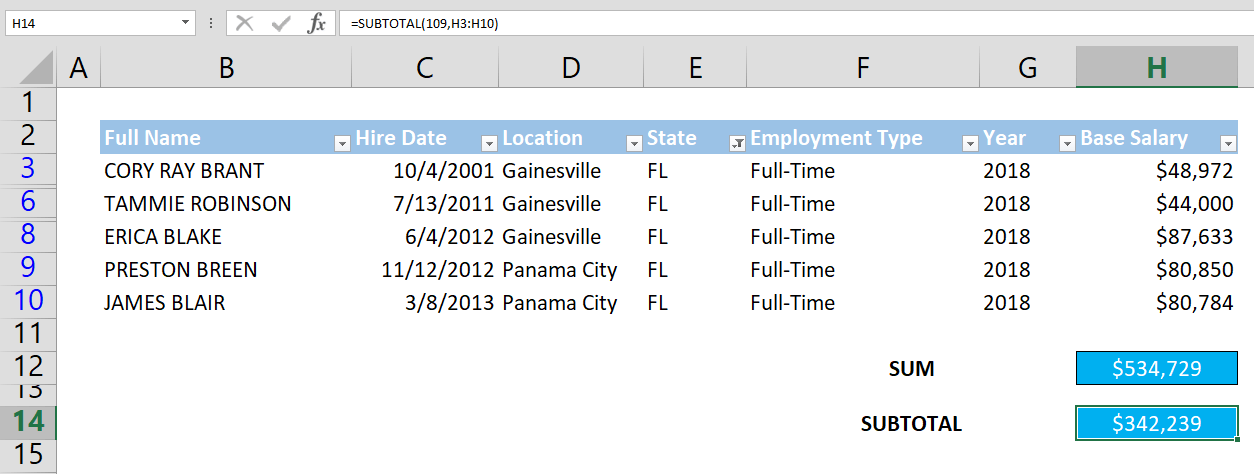
How to Excel SUM Formula Filtered Values in Datatables
Excel SUM formula includes all values in a range. Using he SUBTOTAL function is the easiest way to overcome limitations and filtered values.

How to Count the Number of Columns in Excel
In this article we're going to show you how to count the number of columns using the COLUMNS function in Excel.
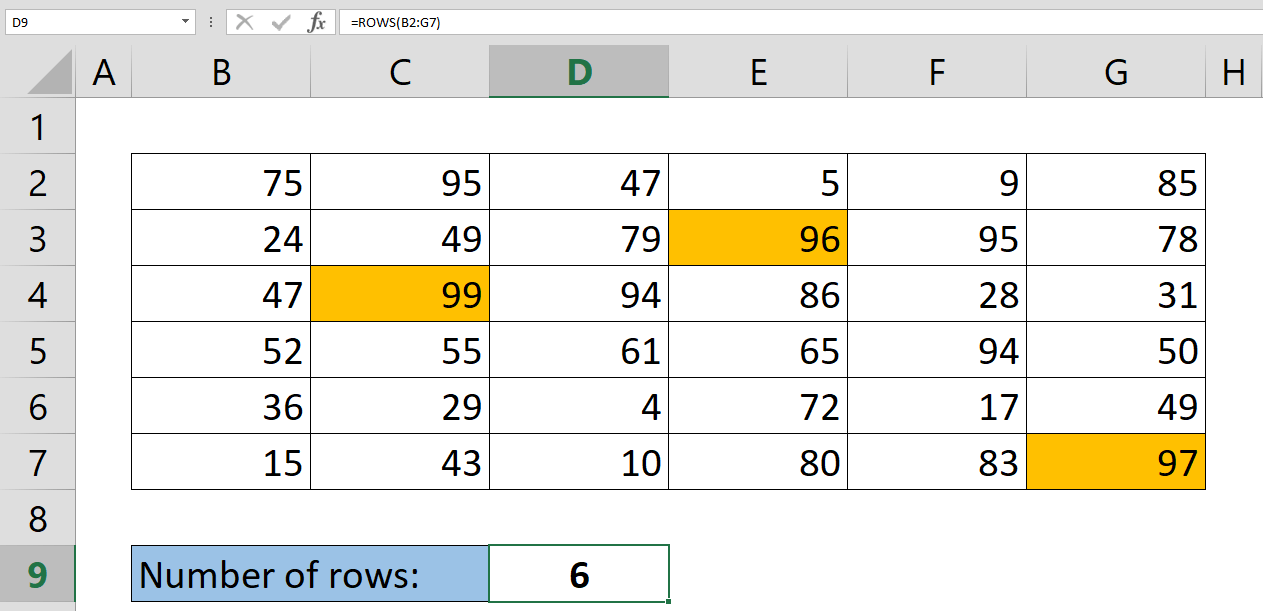
How to Get The Number of Rows Containing Data in Your Table
Counting the number of rows in Excel can be repetitive when done manually. However, you can use a simple formula to automate this task.
What's New in Version 6.1
Review What's New in Version 6.1, including the product features, platform improvements, and workflow enhancements covered in this update.
Pagos Just Released SpreadsheetWEB Version 6.1 That Introduces New Data Visualization and Workflow Features
This update enhances the designer module with new data visualization and workflow featrues that business professionals can use in their responsive web applications.

How to create dependent dropdowns
Learn how to create dependent dropdowns. This practical guide covers the formula syntax, setup steps, and how the result is calculated in Excel.

How to remove blanks from a list
Most of times raw data is not organized and may include empty cells. How to remove blanks from a list article will show you to eliminate those cells and create a new list without them by Excel formulas.