This guide will show you how to do linear regression in Excel, but first, let's learn what exactly linear regression is. Download Workbook Linear Regression Linear regression is a fundamental statistical method to determine the relationship between two variables. This...
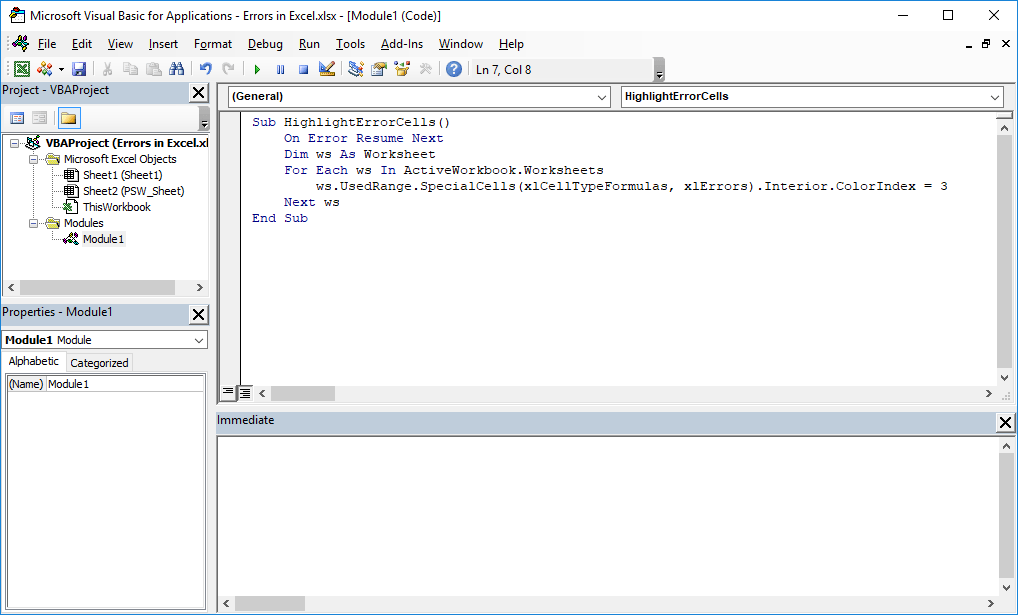
In complex Excel workbooks, locating cells that contain errors is often a challenging task. This guide aims to simplify this process by demonstrating the use of VBA (Visual Basic for Applications) to highlight formulas within Excel that result in errors. By leveraging...
Working with dates in Excel might sometimes seem tricky, mainly because Excel handles dates in its own unique way, which is different from our usual understanding. Once you get to know how Excel works with dates, you'll find it much easier to use them for your...
The Excel SORTBY function is an effective tool for organizing data in spreadsheets. It simplifies the process of arranging values within a specific range or array, using related data from another range or array to determine the order. One significant aspect of the...
The LARGE function in Excel is a fundamental tool in the realm of statistical analysis, designed to pinpoint the largest value within a given array or cell range. This article serves as an extensive guide on harnessing the power of the LARGE function in Excel. We will...
The CLEAN function in Excel is a Text formula designed to eliminate "non-printable" characters from a text string. This function proves exceptionally useful when dealing with text imported from external sources that may contain unsupported characters. In this guide,...
To effectively prevent duplicates in Excel, the Data Validation feature paired with the COUNTIF function serves as a robust solution. This guide illustrates how to harness these tools to ensure data integrity by eliminating the chance of duplicate entries....
Future Value as a Concept Future value (FV) is a finance concept that calculates how much an investment or a sum of money will be worth at a specific time in the future, considering interest or returns. It uses the principle of compound interest, where the interest...
Calculating the "Nth Root" of a Number In Algebra, calculating the nth root of a number is efficiently done by raising the number to a fractional power of 1/n. This method, using the caret symbol (^), offers a clearer and more readable approach, especially useful in...