
SpreadsheetWeb blog
Introducing Google Sheets Support: A Source-Aware Calculation Engine
SpreadsheetWeb now evaluates Google Sheets with source-aware rules, preserving the calculation behavior of the original spreadsheet.
The straightforward implementation
Google Sheets exports to .xlsx. Excel opens the resulting file, the formulas are present, and the values appear correct.
The fastest path to Google Sheets support was therefore available to us: accept the export, pass it to the calculation engine we have been refining since 2006, and announce support. The demonstration would have succeeded. The majority of customer files would have behaved correctly.
We chose not to implement it that way. The reasoning is worth setting out, because it constitutes the feature itself.
Twenty years of a single file format
SpreadsheetWeb has been converting spreadsheets into web applications since 2006. For all twenty of those years, the platform accepted exactly one kind of file. You uploaded an Excel workbook, the engine read its formulas, and it evaluated them according to Excel’s rules.
That constraint was the product. A pricing model that returns one figure in the workbook and a different figure in the browser is not a functioning application, and the discrepancy is rarely discovered by the person who built it. Our customers place quoting tools in front of their sales teams and calculators in front of their own clients. Neither is viable unless the two environments agree, on every input, every time.
Twenty years of maintaining that standard leads to a specific conclusion: calculation fidelity is not a capability that can be added after the fact. It is a property that was either designed into the system or was not.
The differences are real, and they are quiet
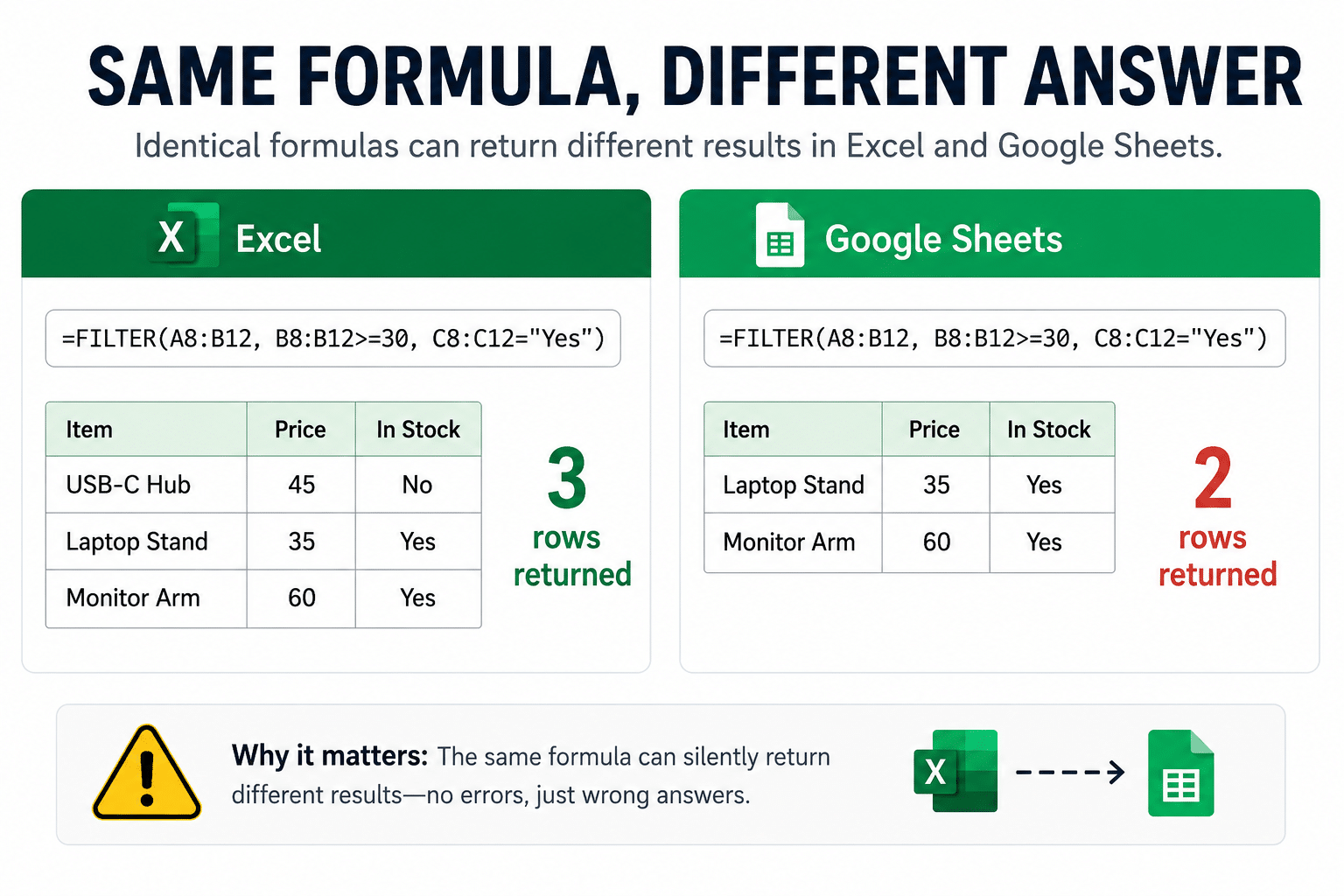
Excel and Google Sheets share hundreds of function names, the same syntax, and the same grid, which is exactly why the exceptions are so easy to miss. Move a file between them and some formulas come back as #NAME?, though the usual explanation, an out-of-date version of Excel, is almost never the real reason. Those are the visible failures. Other cells cease calculating without any indication, holding a number that looks entirely reasonable and is simply frozen. The quietest failures of all run cleanly in both applications, raise no error in either, and return two different answers. Put a real file through the trip and some combination of all of it is what arrives. The full account is in our guide to the formula differences between the two platforms.
Our team spent the past month publishing those findings. The series was not written as marketing material. It documented the problem we were engineering the solution to.
A single engine is a decision, not a default
Every platform that turns a spreadsheet into a web application has to answer one question: when this file says =SOMEFUNCTION(A1:A10), what number comes out?
The conventional answer is to build a single engine, equip it with a large function library, and route every file through it. This is efficient. It is also a decision most vendors never revisit, because the failure mode it produces does not surface during testing. If the engine reasons in Excel and the file originated in Google Sheets, the application evaluates that file as Excel would have. In most cases the two agree. Occasionally they do not, and when they do not, nothing fails visibly. There is no error, no warning, and no flagged cell. There is only a number.
That number then appears in a quote sent to a customer.
The shape of that failure should be familiar. It is the same one described in Why You Should Never Vibe Code an Excel Spreadsheet, where a generative model rebuilds a working workbook as new code. The mechanism is different, regeneration rather than misinterpretation, but the result is indistinguishable. The rebuilt application compiles, renders a clean interface, and returns reasonable figures on the inputs someone happened to test. It does not report the cases where it diverges from the workbook it replaced. A polished interface and confident output are evidence of fluency, not correctness. An engine fluent in the wrong dialect produces the same class of error as a model that rewrote the logic from scratch: two systems that disagree, and no indication of which one to trust.
A calculation engine should be a function of the file, not of the vendor’s convenience. This is the principle the release is built on, and it is why converting a Sheet to .xlsx and describing the result as support was never a serious option. The approach would have produced correct results in the large majority of cases, which is precisely what makes it unsuitable.
Source-aware calculation in practice
The engine determines the origin of the file before it evaluates anything. A Google Sheets file is calculated according to Google Sheets behavior. An Excel file is calculated according to Excel behavior. Two rule sets, one platform, selected by source.
Nothing changes for the Excel applications already running in production. What is new is that a Google Sheet is no longer treated as an Excel file with a different extension.
The practical consequence can be stated in a single sentence: the application returns the same values as the source file, regardless of which spreadsheet program produced it.
How it works
Open the menu for any Sheet in Google Drive and select Open with, then SpreadsheetWeb. The application accesses only the file you select.
SpreadsheetWeb then reads the structure of the spreadsheet and proposes which cells are inputs, the values your users will supply, and which are outputs, the results they should receive. You review the proposal, add anything the detection missed, and remove anything that does not belong in the interface. You then publish, answer two brief questions regarding user data storage and interface settings, and the application is available at a shareable URL.
Your users receive the tool rather than the file. The published link exposes only the inputs and outputs you selected; your formulas, pricing logic, and underlying data remain inaccessible. Sharing a Sheet, even with view-only permissions, reveals every formula it contains. Sharing an application reveals none of them.
The complete sequence takes approximately ninety seconds:
Where to start
SpreadsheetWeb for Google Sheets is available now on the Google Workspace Marketplace. The free plan is sufficient to build, publish, and share production applications.
We would encourage a direct test: install the application, open one of your own Sheets, and compare the results against the source file. For a claim of this kind, verification is more persuasive than description.