
Excel resources
Excel Tips & Tricks
Articles, examples, and practical guidance from the SpreadsheetWeb team.
Page 43 of 60 · 540 articles

5 Ways to Create an Excel Named Range
Using named ranges make formulas easier to read and maintain. We're going to show you 5 different ways to create an Excel named range.

How to create calculated columns in Excel tables
Excel Tables are useful in managing and analyzing data in tabular format. Let us show you how to create calculated columns in Excel tables.

How to name multiple cells at once using the Create from Selection feature
Named ranges can be extremely useful in Excel models. Let us show you how to name multiple cells at once using Create from Selection feature.

How to Get Excel Stock Quotes
In this article, we are going to show how to get Excel stock quotes, along with tips and tricks about the new Data Types feature.

How to get top values from a list or a table in Excel
In this article, we are going to show you how to get top values from a list or a table in Excel with using new SORT and SEQUENCE formulas.

How to Generate a General Ledger (GL) List using SEQUENCE
Preparing a general ledger (GL) table can be a daunting task, especially when dealing with lots of category codes.
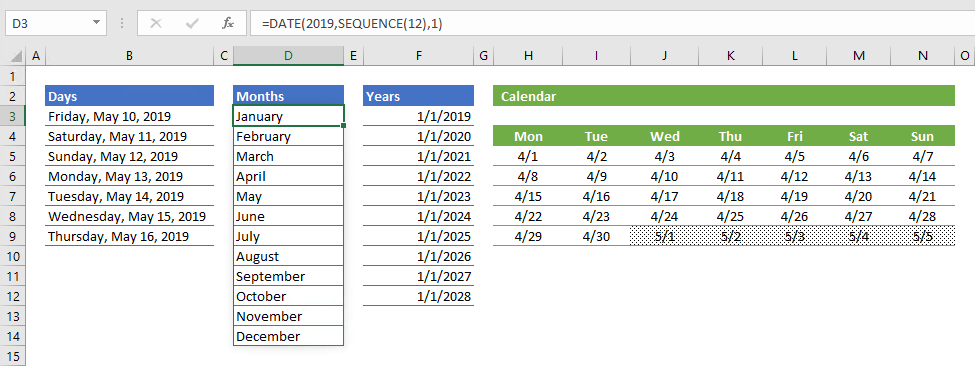
How to generate a date list using the SEQUENCE function
In this guide, we’re going to show you how to generate various date list for days, months, and years using the SEQUENCE function.
Stock Charts (Candlestick) in Excel
Learn about stock Charts (Candlestick) in Excel in Excel, including the relevant formula or feature, setup steps, and practical usage.
Surface Chart in Excel
Learn how Surface Chart in Excel works, including its structure, available chart types, and the steps for creating it in Excel.