
Excel resources
Excel Tips & Tricks
Articles, examples, and practical guidance from the SpreadsheetWeb team.
Page 41 of 60 · 540 articles

Enhancing Gridline Colors: How to Make Gridlines Darker/Brighter in Excel
In this article, we are going to show you to make Excel change gridline color to your liking in Excel 2016, 2013, 2010, and 2007.

How to print header row in Excel and repeat on every page
In this article, we are going to show you how to print header row in Excel to repeat on every printed page 2016, 2013, 2010, and 2007 versions.

How to print gridlines in Excel
In this article, we are going to show you two ways to print gridlines in Excel 2016, Excel 2013, Excel 2010, and Excel 2007.

Excel Comparison Operators
In this guide, we are going to show you various types of Excel comparison operators available, and go over some tips and examples.

How to insert today's date in Excel
Automated time tracking can be useful in creating timestamps. In this article, we are going to show you how to insert Excel today's date.

Find the Work Hours between Two Dates for a Business Day Calculator
In this guide, we are going to show you how to calculate work hours between two dates in Excel, and create your own business day calculator.

Excel Nested IF Alternative: The CHOOSE Function
In this article, we’re going to show you how to use the CHOOSE function as an Excel nested IF alternative and also go over some examples.
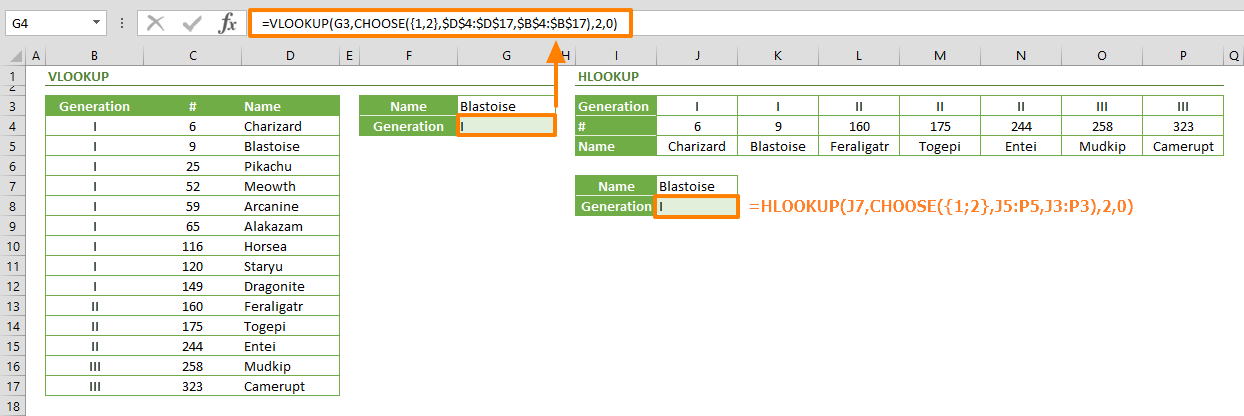
How to perform reverse lookup with CHOOSE function
In this guide, we are going to show you how to perform an Excel reverse lookup using the CHOOSE function, instead of the traditional VLOOKUP.

How to create a dynamic drop down list Excel using the UNIQUE and FILTER functions
In this article, we are going to show you how to create a dynamic drop down list Excel using the dynamic array functions UNIQUE and FILTER.