
SpreadsheetWeb blog
Practical thinking for spreadsheet-powered teams
Deep guides on Excel, Google Sheets, web applications, product workflows, and the quiet technical traps worth knowing about.
Page 52 of 55 · 1319 articles
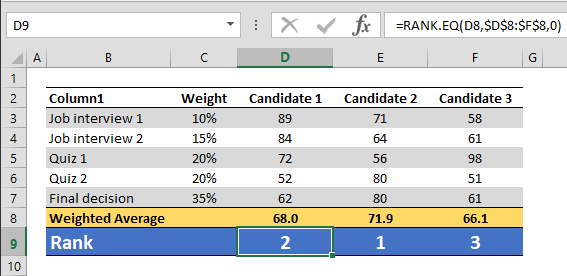
How to rank data in Excel tables
Learn how to rank data in Excel tables. This practical guide covers the formula syntax, setup steps, and how the result is calculated in Excel.
Number Formatting in Excel - All You Need to Know
The main advantage of custom number formatting is that you can alter the look of your data without changing the actual values. This means that you do not need to use additional spaces or formulas to create the layout you want and preserve the raw data.

How to calculate weighted average with SUMPRODUCT
Learn how to calculate weighted average with SUMPRODUCT. This practical guide covers the formula syntax, setup steps, and how the result is calculated in Excel.

How to COUNT values between two dates
Learn how to cOUNT values between two dates. This practical guide covers the formula syntax, setup steps, and how the result is calculated in Excel.
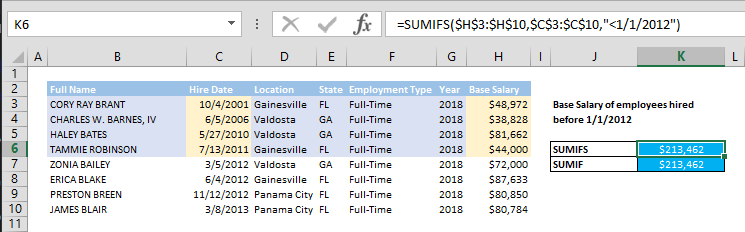
How to SUM values if date is less than
SUMIF and SUMIFS functions can be used to sum values that meet a criteria. They search a given criteria in a criteria range, this processes result is an array of TRUE/FALSE.

How to SUM values if date is greater than
Learn how to sUM values if date is greater than. This practical guide covers the formula syntax, setup steps, and how the result is calculated in Excel.

How to SUM values between two dates using SUMIFS formula
Learn how to sUM values between two dates using SUMIFS formula. This practical guide covers the formula syntax, setup steps, and how the result is calculated in Excel.
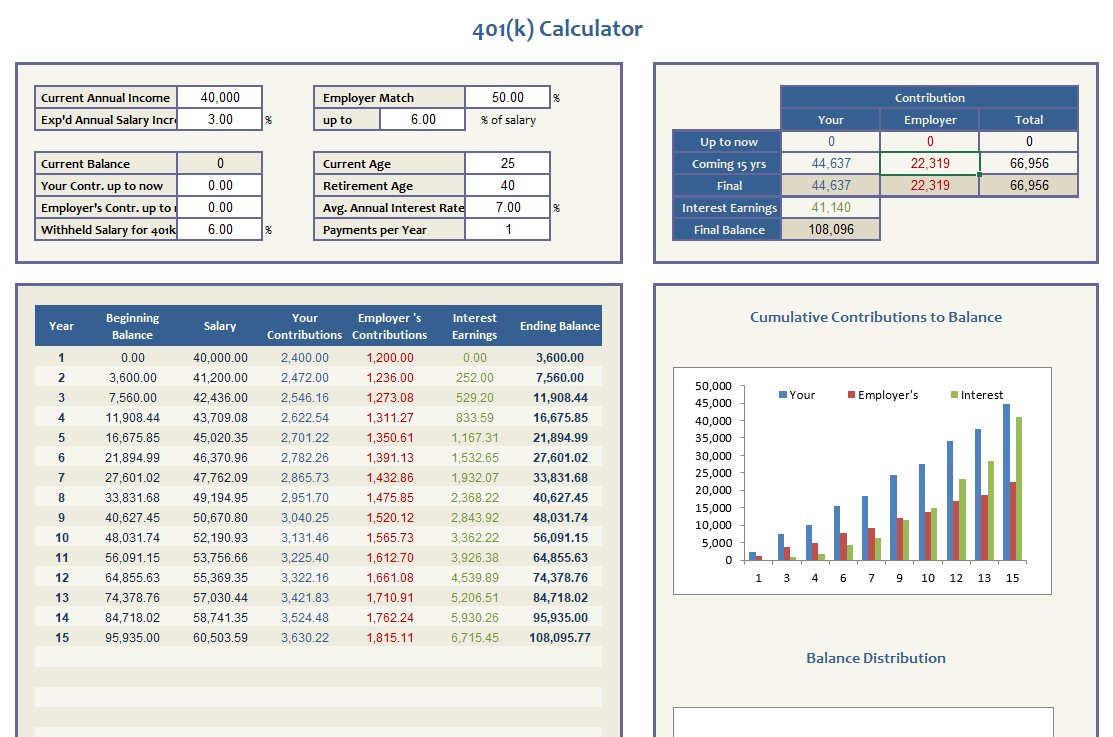
401k Calculator
This 401k calculator template evaluates your 401k plan position and simulates future contributions by you and your employer.

How to calculate running totals with SUM
Learn how to calculate running totals with SUM. This practical guide covers the formula syntax, setup steps, and how the result is calculated in Excel.
How to Use Logic Statements in Excel: IF – AND – OR – NOT
The beauty of Excel lies in its flexibility to create any data model with little effort. Logic gates can be established within any spreadsheet element.
Working with Large Data Grids in SpreadsheetWEB Applications
Although used widely in many data models, submitting tables with significant amount of data have always been a problem in web application projects.
Crunch Data Even Faster with Excel SUMIFS Function
In this guide, we’re going to show you how to use Excel SUMIFS function and also throw in some tips and error handling methods.
Comparing the Performance of SpreadsheetWEB's Calculation Engine with Excel
Explore Comparing the Performance of SpreadsheetWEB's Calculation Engine with Excel, with a focused look at testing Methodology, testing Setup, and test Results.
Improvements in Workbook Loading Times in Version 6.0
In version 6.0, we have included significant improvements to our core engine to facilitate significantly faster initial workbook loading times.
Performance Improvements in Version 6.0
Review Performance Improvements in Version 6.0, including the product features, platform improvements, and workflow enhancements covered in this update.
Transforming a Complex Pricing List into a Quoting Tool in Excel – Part 2
In this guide, we’re going to transform a pricing list into a full blown web application that can be published and shared with other users.
Transforming a Complex Pricing List into a Quoting Tool in Excel – Part 1
In this two-part guide, we’re going to show you how you can convert that huge table into an interactive quoting tool using Excel.
Subscription-based Licensing of SpreadsheetWEB
subscription based licensing of SpreadsheetWEB server will be replacing the traditional perpetual licensing model as of February 5th, 2018.
Power Query 101 - Data Scrub and Analysis in Microsoft Excel
Power Query 101 - Data Scrub and Analysis in Microsoft Excel • This article covers an introduction on transforming data with Power Query.
CONCATENATE Function in Excel with Examples
The CONCATENATE function is used for merging multiple strings. It can take up to 255 arguments to merge them in a single cell.
Formulas for Data Analysis
We’ve compiled the most common formulas used in data analysis tasks and created this guide to give you examples as how you can use them.
How to Handle Circular References in Excel
Circular Reference means that your formula is trying to calculate the origin cell. Typically, this is considered an error, but it can actually be useful.
Here is How You Can Crunch Data of Any Size with Excel Power Pivot
Excel Power Pivot is a very powerful tool that can handle a vast amount of data, while allowing you to manage connections and manipulate data.
How to Show Formulas in Excel: A Comprehensive Guide To Maximize Formula Efficiency:
Everyone can write formulas in Excel, however it doesn't automatically translate to the ability to show 'efficient' formulas in Excel.