
SpreadsheetWeb blog
How to SUM values if date is less than
SUMIF and SUMIFS functions can be used to sum values that meet a criteria. They search a given criteria in a criteria range, this processes result is an array of TRUE/FALSE.
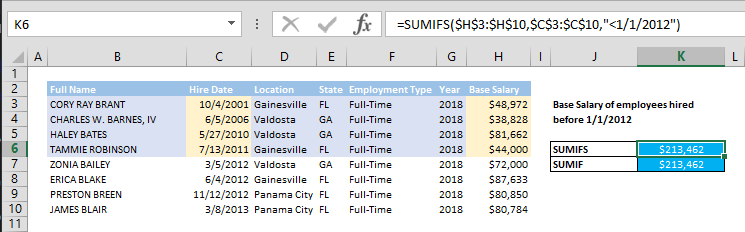
How much did you spend until last year, or what is the total of X until Y? SUMIF and SUMIFS functions can help you to sum values in your data tables.
Date-bounded sums are how most cut-off reporting works. Where the same calculation runs every period for the same audience, a published application does it once and stays current.
Syntax
=SUMIFS(values to sum range, date range, <maximum date)
=SUMIF(date range, <maximum date, values to sum range)
Steps
- Type in =SUMIFS(
- Select or type in the range reference that contains the cells to add (i.e. $H$3:$H$10)
- Select or type in the range reference that contains the date values you want to apply the criteria against (i.e. $C$3:$C$10)
- Enter the minimum date criteria with greater than operator "<1/1/2010"
- Type in ) and press Enter to complete the formula
Note: When using SUMIF, follow steps according to syntax of SUMIF.
How
Both functions can be used to sum values that meet a criteria. They search a given criteria in a criteria range, this processes result is an array of TRUE/FALSE. Ability to use criteria with logical operators, like less than (<), allows adding values between other values.
We used "<1/1/2012" criteria to define the minimum date and search is made on $C$3:$C$10.
=SUMIFS($H$3:$H$10,$C$3:$C$10, "<1/1/2012")
=SUMIF($C$3:$C$10, "<1/1/2012",$H$3:$H$10)
An alternative way to write this formula is by using cell references instead of static dates. For example, if your minimum date value is in cell K9, then the criteria would be “<”&K9.
=SUMIFS($H$3:$H$10,$C$3:$C$10,"<"&$K$9)
=SUMIF($C$3:$C$10,"<"&$K$9,$H$3:$H$10)