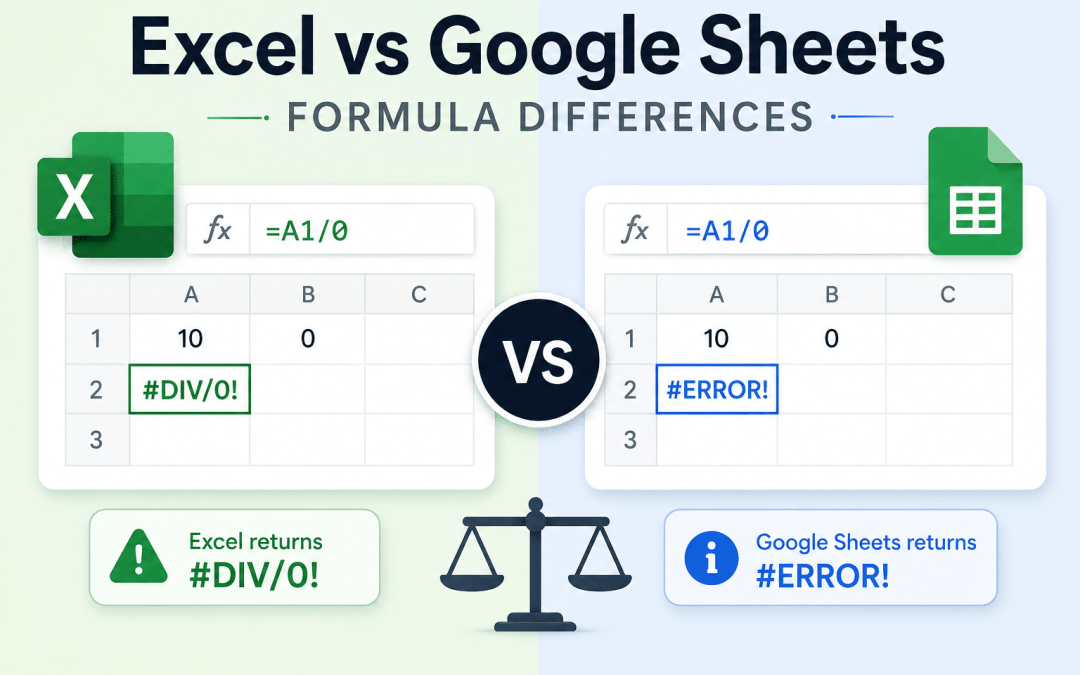
If you have ever opened a Google Sheets file in Excel and been greeted by a wall of #NAME? errors, or watched a formula that worked perfectly in Excel fall apart after an import into Sheets, you already know the problem this guide solves. The two dominant spreadsheet platforms share a common ancestry and hundreds of identical functions, but each has carved out its own territory, and the differences are exactly where migrations, collaborations, and cross-platform workflows break.
This guide maps the entire formula landscape of both platforms as of July 2026, based on the official function references published by Microsoft and Google. The headline numbers:
- Excel ships roughly 530 worksheet functions (including legacy, add-in, and Insider preview functions).
- Google Sheets ships 515 functions.
- 468 functions are shared by name across both platforms.
- 47 functions exist only in Google Sheets.
- 62 functions exist only in Excel.
Every one of those functions is listed in this article, either in the category breakdowns below or in the two alphabetical appendices at the end.
1. Introduction
1.1 Why formula compatibility matters in 2026
Spreadsheets rarely live on one platform anymore. Finance teams model in Excel while marketing reports in Sheets. Clients send .xlsx attachments to teams that live in Google Workspace. Files cross the boundary constantly, and every crossing is a chance for formulas to silently change meaning or loudly fail. Knowing which functions travel safely, which need translation, and which have no counterpart at all is the difference between a five-minute import and an afternoon of debugging.
1.2 Who this guide is for
- Migrators moving a workbook or an entire organization from one platform to the other.
- Dual-platform users who switch between Excel and Sheets daily and need a mental map of what works where.
- Teams that collaborate across both ecosystems and want to author files that survive the round trip.
1.3 Methodology
The function inventories in this guide were built by comparing the official Microsoft Excel function reference against the official Google Sheets function list, then cross-checking against each vendor's 2025 and 2026 release announcements. Functions were matched by name; Section 6 then covers the cases where a match by name is not a match by behavior, and Section 7 flags the cases where identical-looking formulas can still return different results.
1.4 A note on release channels
Not every Excel function is available in every Excel. Several of the newest functions require a Microsoft 365 subscription, and a few (noted below) are still in the Insiders preview channel. Perpetual-license versions such as Excel 2021 and Excel 2024 freeze the function set at their release date. Google Sheets updates roll out to everyone, though features can take a couple of weeks to reach all accounts across rapid and scheduled release domains.
2. What's New in 2025 and 2026
The gap between the two platforms has been narrowing fast, and both vendors have been shipping functions at a pace worth summarizing before we get to the full lists.
2.1 Excel's recent additions
Excel's 2025 and 2026 releases brought a wave of new functions:
COPILOT: an AI function that reads cell content inside a formula and returns structured output such as categories, ratings, summaries, or sentiment labels. It unlocks calculation types that were previously very difficult to express in formulas.PY: runs Python code inside the grid (Python in Excel).TRANSLATEandDETECTLANGUAGE: native language functions, closing a gap Google held for over a decade.REGEXTEST,REGEXEXTRACT,REGEXREPLACE: a full regular-expression suite. Two of the three names collide with long-standing Sheets functions, with different parameters (see Section 6).GROUPBY,PIVOTBY,PERCENTOF: formula-based aggregation that behaves like a pivot table in a single cell.TRIMRANGE: trims trailing empty rows and columns from a reference, making whole-column references practical in dynamic array formulas.IMPORTTEXTandIMPORTCSV(Insiders preview): load delimited text data into a refreshable dynamic array with one formula, a direct answer to Google's IMPORT family.
2.2 Google Sheets' recent additions
AI: Gemini-powered text generation, categorization, sentiment analysis, and data extraction directly in a cell. It became one of Google's fastest-adopted features and gained Google Search grounding in late 2025.SHEETandSHEETS(added February 2026): return a tab's position number and the total sheet count, matching functions Excel has had for years.
2.3 Recent crossovers: the shrinking exclusives list
If you last compared these platforms a few years ago, your mental model is out of date. The following functions used to be platform exclusives and are now available on both:
XLOOKUP,LET,LAMBDAand the full helper family (MAP,SCAN,REDUCE,BYROW,BYCOL,MAKEARRAY,ISOMITTEDremains Excel-only)- The reshaping set:
TOCOL,TOROW,HSTACK,VSTACK,WRAPROWS,WRAPCOLS,CHOOSECOLS,CHOOSEROWS - Dynamic array staples:
FILTER,SORT,UNIQUE,SEQUENCE,RANDARRAY,SORTBY(still Excel-only),XMATCH(still Excel-only) - Regex:
REGEXEXTRACTandREGEXREPLACEnow exist in Excel too, though with different parameters IMAGE,EPOCHTODATE(still Sheets-only),LAMBDA-era error helpers
Any article, course, or checklist that lists XLOOKUP or LAMBDA as an Excel exclusive is working from stale data.
3. Formulas Common to Both Platforms (468 functions)
These functions exist under the same name on both platforms, and in the overwhelming majority of cases they take the same arguments and return the same results. This is the safe zone: formulas built exclusively from this list will almost always survive a platform crossing intact. (For the handful of exceptions, see Sections 6 and 7.)
Here is the complete shared inventory, grouped by category.
3.1 Math (83 shared functions)
The everyday arithmetic toolkit plus trigonometry, rounding, and number theory.
ABS, ACOS, ACOSH, ACOT, ACOTH, ASIN, ASINH, ATAN, ATAN2, ATANH, BASE, CEILING, CEILING.MATH, CEILING.PRECISE, COMBIN, COMBINA, COS, COSH, COT, COTH, COUNTBLANK, COUNTIF, COUNTIFS, CSC, CSCH, DECIMAL, DEGREES, ERFC, ERFC.PRECISE, EVEN, EXP, FACT, FACTDOUBLE, FLOOR, FLOOR.MATH, FLOOR.PRECISE, GAMMALN, GAMMALN.PRECISE, GCD, IMLN, IMPOWER, IMSQRT, INT, ISEVEN, ISO.CEILING, ISODD, LCM, LN, LOG, LOG10, MOD, MROUND, MULTINOMIAL, MUNIT, ODD, PI, POWER, PRODUCT, QUOTIENT, RADIANS, RAND, RANDARRAY, RANDBETWEEN, ROUND, ROUNDDOWN, ROUNDUP, SEC, SECH, SEQUENCE, SERIESSUM, SIGN, SIN, SINH, SQRT, SQRTPI, SUBTOTAL, SUM, SUMIF, SUMIFS, SUMSQ, TAN, TANH, TRUNC
3.2 Statistical (134 shared functions)
The largest shared category: averages, distributions, regression, ranking, and hypothesis testing, including both the modern dotted names (such as NORM.DIST) and their legacy pre-2010 equivalents (such as NORMDIST).
AVEDEV, AVERAGE, AVERAGEA, AVERAGEIF, AVERAGEIFS, BETA.DIST, BETA.INV, BETADIST, BETAINV, BINOM.DIST, BINOM.INV, BINOMDIST, CHIDIST, CHIINV, CHISQ.DIST, CHISQ.DIST.RT, CHISQ.INV, CHISQ.INV.RT, CHISQ.TEST, CHITEST, CONFIDENCE, CONFIDENCE.NORM, CONFIDENCE.T, CORREL, COUNT, COUNTA, COVAR, COVARIANCE.P, COVARIANCE.S, CRITBINOM, DEVSQ, EXPON.DIST, EXPONDIST, F.DIST, F.DIST.RT, F.INV, F.INV.RT, F.TEST, FDIST, FINV, FISHER, FISHERINV, FORECAST, FORECAST.LINEAR, FTEST, GAMMA, GAMMA.DIST, GAMMA.INV, GAMMADIST, GAMMAINV, GAUSS, GEOMEAN, HARMEAN, HYPGEOM.DIST, HYPGEOMDIST, INTERCEPT, KURT, LARGE, LOGINV, LOGNORM.DIST, LOGNORM.INV, LOGNORMDIST, MAX, MAXA, MAXIFS, MEDIAN, MIN, MINA, MINIFS, MODE, MODE.MULT, MODE.SNGL, NEGBINOM.DIST, NEGBINOMDIST, NORM.DIST, NORM.INV, NORM.S.DIST, NORM.S.INV, NORMDIST, NORMINV, NORMSDIST, NORMSINV, PEARSON, PERCENTILE, PERCENTILE.EXC, PERCENTILE.INC, PERCENTRANK, PERCENTRANK.EXC, PERCENTRANK.INC, PERMUT, PERMUTATIONA, PHI, POISSON, POISSON.DIST, PROB, QUARTILE, QUARTILE.EXC, QUARTILE.INC, RANK, RANK.AVG, RANK.EQ, RSQ, SKEW, SKEW.P, SLOPE, SMALL, STANDARDIZE, STDEV, STDEV.P, STDEV.S, STDEVA, STDEVP, STDEVPA, STEYX, T.DIST, T.DIST.2T, T.DIST.RT, T.INV, T.INV.2T, T.TEST, TDIST, TINV, TRIMMEAN, TTEST, VAR, VAR.P, VAR.S, VARA, VARP, VARPA, WEIBULL, WEIBULL.DIST, Z.TEST, ZTEST
3.3 Financial (50 shared functions)
Time value of money, depreciation, securities, and cash-flow analysis.
ACCRINT, ACCRINTM, AMORLINC, COUPDAYBS, COUPDAYS, COUPDAYSNC, COUPNCD, COUPNUM, COUPPCD, CUMIPMT, CUMPRINC, DB, DDB, DISC, DOLLARDE, DOLLARFR, DURATION, EFFECT, FV, FVSCHEDULE, INTRATE, IPMT, IRR, ISPMT, MDURATION, MIRR, NOMINAL, NPER, NPV, PDURATION, PMT, PPMT, PRICE, PRICEDISC, PRICEMAT, PV, RATE, RECEIVED, RRI, SLN, SYD, TBILLEQ, TBILLPRICE, TBILLYIELD, VDB, XIRR, XNPV, YIELD, YIELDDISC, YIELDMAT
3.4 Engineering (44 shared functions)
Base conversion, bitwise operations, error functions, and complex numbers.
BIN2DEC, BIN2HEX, BIN2OCT, BITAND, BITLSHIFT, BITOR, BITRSHIFT, BITXOR, COMPLEX, DEC2BIN, DEC2HEX, DEC2OCT, DELTA, ERF, ERF.PRECISE, GESTEP, HEX2BIN, HEX2DEC, HEX2OCT, IMABS, IMAGINARY, IMARGUMENT, IMCONJUGATE, IMCOS, IMCOSH, IMCOT, IMCSC, IMCSCH, IMDIV, IMEXP, IMLOG10, IMLOG2, IMPRODUCT, IMREAL, IMSEC, IMSECH, IMSIN, IMSINH, IMSUB, IMSUM, IMTAN, OCT2BIN, OCT2DEC, OCT2HEX
3.5 Logical (13 shared functions)
Branching and boolean logic.
AND, FALSE, IF, IFERROR, IFNA, IFS, LAMBDA, LET, NOT, OR, SWITCH, TRUE, XOR
3.6 Lookup (17 shared functions)
Finding and retrieving data, from the classic VLOOKUP to the modern XLOOKUP.
ADDRESS, CHOOSE, COLUMN, COLUMNS, FORMULATEXT, GETPIVOTDATA, HLOOKUP, INDEX, INDIRECT, LOOKUP, MATCH, OFFSET, ROW, ROWS, SHEET, VLOOKUP, XLOOKUP
3.7 Filter (2 shared functions)
Dynamic array filtering and deduplication.
FILTER, SORT
3.8 Array (27 shared functions)
Array construction, reshaping, and the LAMBDA helper family.
BYCOL, BYROW, CHOOSECOLS, CHOOSEROWS, FREQUENCY, GROWTH, HSTACK, LINEST, LOGEST, MAKEARRAY, MAP, MDETERM, MINVERSE, MMULT, REDUCE, SCAN, SUMPRODUCT, SUMX2MY2, SUMX2PY2, SUMXMY2, TOCOL, TOROW, TRANSPOSE, TREND, VSTACK, WRAPCOLS, WRAPROWS
3.9 Text (38 shared functions)
String manipulation, including the regex functions both platforms now share.
ARABIC, ASC, CHAR, CLEAN, CODE, CONCATENATE, DOLLAR, EXACT, FIND, FINDB, FIXED, LEFT, LEFTB, LEN, LENB, LOWER, MID, MIDB, PROPER, REGEXEXTRACT, REGEXREPLACE, REPLACE, REPLACEB, REPT, RIGHT, RIGHTB, ROMAN, SEARCH, SEARCHB, SUBSTITUTE, T, TEXT, TEXTJOIN, TRIM, UNICHAR, UNICODE, UPPER, VALUE
3.10 Date (25 shared functions)
Date and time math.
DATE, DATEDIF, DATEVALUE, DAY, DAYS, DAYS360, EDATE, EOMONTH, HOUR, ISOWEEKNUM, MINUTE, MONTH, NETWORKDAYS, NETWORKDAYS.INTL, NOW, SECOND, TIME, TIMEVALUE, TODAY, WEEKDAY, WEEKNUM, WORKDAY, WORKDAY.INTL, YEAR, YEARFRAC
3.11 Info (16 shared functions)
Type checking and cell inspection.
CELL, ERROR.TYPE, ISBLANK, ISERR, ISERROR, ISFORMULA, ISLOGICAL, ISNA, ISNONTEXT, ISNUMBER, ISREF, ISTEXT, N, NA, SHEETS, TYPE
3.12 Database (12 shared functions)
The classic D-functions for criteria-based aggregation over structured ranges.
DAVERAGE, DCOUNT, DCOUNTA, DGET, DMAX, DMIN, DPRODUCT, DSTDEV, DSTDEVP, DSUM, DVAR, DVARP
3.13 Parser (1 shared functions)
Value conversion.
CONVERT
3.14 Web (2 shared functions)
URL encoding and hyperlinks.
ENCODEURL, HYPERLINK
3.15 Operator (2 shared functions)
Named operator functions.
CONCAT, UNIQUE
3.16 Google (2 shared functions)
Functions Google categorizes under its own brand that Excel now also implements.
DETECTLANGUAGE, IMAGE
3.17 A warning before you relax
Sharing a name is not the same as sharing behavior. A small number of the functions above take different parameters or behave differently at the edges: FILTER, REGEXEXTRACT, REGEXREPLACE, and CONCAT are the headline cases, along with subtler differences in date systems and rounding. Sections 6 and 7 cover these in detail.
4. Formulas Exclusive to Google Sheets (47 functions)
This is where Sheets' web-native DNA shows. Its exclusives cluster around pulling live data from the internet, querying data with SQL-like syntax, and a family of named operator functions.
4.1 Math functions (2)
COUNTUNIQUE counts distinct values directly, and ISBETWEEN tests whether a value falls within a range. (Google's official reference files ISBETWEEN under Operator functions, but conceptually it belongs here.)
COUNTUNIQUE, ISBETWEEN
4.2 Statistical functions (2)
AVERAGE.WEIGHTED computes weighted averages without a SUMPRODUCT workaround, and MARGINOFERROR calculates polling-style error margins.
AVERAGE.WEIGHTED, MARGINOFERROR
4.3 Engineering functions (3)
A few complex-number helpers Excel lacks.
IMCOTH, IMLOG, IMTANH
4.4 Filter functions (1)
SORTN returns the top or bottom N rows with tie-handling modes, something Excel needs a SORTBY plus TAKE combination to replicate.
SORTN
4.5 Array functions (3)
ARRAYFORMULA applies non-array formulas across entire ranges, FLATTEN collapses any range into a single column, and ARRAY_CONSTRAIN clips a result to a given size.
ARRAYFORMULA, ARRAY_CONSTRAIN, FLATTEN
4.6 Text functions (3)
SPLIT divides text by a delimiter (Excel's counterpart is TEXTSPLIT), and JOIN concatenates with a delimiter (Excel's counterpart is TEXTJOIN, which Sheets also has).
JOIN, REGEXMATCH, SPLIT
4.7 Date functions (1)
EPOCHTODATE converts Unix timestamps to dates, a small function that saves a lot of manual arithmetic.
EPOCHTODATE
4.8 Info functions (2)
Validators with no Excel equivalents: ISDATE, ISEMAIL, and ISURL.
ISDATE, ISEMAIL
4.9 Parser and conversion functions (5)
Quick converters between numbers, dates, percentages, dollar values, and text.
TO_DATE, TO_DOLLARS, TO_PERCENT, TO_PURE_NUMBER, TO_TEXT
4.10 Web and data import functions (6)
The IMPORT family pulls external data straight into the grid with no add-ins: IMPORTRANGE links other spreadsheets, IMPORTHTML scrapes tables and lists from web pages, IMPORTXML extracts arbitrary page content via XPath, IMPORTDATA loads CSV or TSV files from a URL, and IMPORTFEED reads RSS and Atom feeds.
IMPORTDATA, IMPORTFEED, IMPORTHTML, IMPORTRANGE, IMPORTXML, ISURL
4.11 Operator functions (14)
Named function equivalents of the arithmetic and comparison operators, useful inside functions that expect a function argument. Excel has no counterparts; you simply use the symbols.
ADD, DIVIDE, EQ, GT, GTE, LT, LTE, MINUS, MULTIPLY, NE, POW, UMINUS, UNARY_PERCENT, UPLUS
4.12 Google ecosystem functions (4)
The signature Sheets exclusives. GOOGLEFINANCE streams market data, GOOGLETRANSLATE handles languages (though Excel now has its own TRANSLATE), QUERY runs SQL-like queries against ranges, and SPARKLINE draws in-cell charts. (Google's official reference also files ARRAYFORMULA here, but this guide lists it with the Array functions in Section 4.5, where it conceptually belongs.)
GOOGLEFINANCE, GOOGLETRANSLATE, QUERY, SPARKLINE
4.13 AI functions (1)
The Gemini-powered AI function described in Section 2.
AI
4.14 What happens on export to .xlsx
When you download a Sheets file as .xlsx, formulas using these functions generally arrive as #NAME? errors or as frozen last-calculated values. IMPORTRANGE and the other IMPORT functions lose their live connections entirely. Plan to replace them before migrating, using the cheat sheet in Section 8.
5. Formulas Exclusive to Excel (62 functions)
Excel's exclusives skew toward enterprise data connections, advanced forecasting, financial edge cases, and a long tail of legacy compatibility functions that Google never implemented.
5.1 Aggregation (4)
Formula-based summarization. GROUPBY and PIVOTBY replicate pivot table output in a single formula, PERCENTOF computes share-of-total, and AGGREGATE applies any of 19 operations while optionally ignoring errors and hidden rows.
AGGREGATE, GROUPBY, PERCENTOF, PIVOTBY
5.2 Array and reshaping (4)
TAKE, DROP, and EXPAND slice and pad arrays; TRIMRANGE strips empty trailing rows and columns from references.
DROP, EXPAND, TAKE, TRIMRANGE
5.3 Lookup and reference (4)
XMATCH is the modern MATCH, SORTBY sorts one array by others, AREAS counts reference areas, and SINGLE is the legacy implicit-intersection function.
AREAS, SINGLE, SORTBY, XMATCH
5.4 Text (11)
TEXTSPLIT, TEXTBEFORE, and TEXTAFTER are the modern text-carving trio, REGEXTEST is the regex matcher, ARRAYTOTEXT and VALUETOTEXT serialize arrays, and the remainder are locale-specific text utilities (BAHTTEXT, DBCS, JIS, PHONETIC, NUMBERVALUE).
ARRAYTOTEXT, BAHTTEXT, DBCS, JIS, NUMBERVALUE, PHONETIC, REGEXTEST, TEXTAFTER, TEXTBEFORE, TEXTSPLIT, VALUETOTEXT
5.5 Data import and web (7)
STOCKHISTORY pulls historical market data, IMPORTCSV and IMPORTTEXT (Insiders) load delimited files, WEBSERVICE and FILTERXML fetch and parse web data, FIELDVALUE extracts fields from linked data types, and RTD streams real-time data from COM servers.
FIELDVALUE, FILTERXML, IMPORTCSV, IMPORTTEXT, RTD, STOCKHISTORY, WEBSERVICE
5.6 AI and language (3)
COPILOT for AI in a formula, PY for Python in Excel, and TRANSLATE for language translation.
COPILOT, PY, TRANSLATE
5.7 Statistical (5)
The FORECAST.ETS family provides exponential-smoothing time-series forecasting with seasonality detection, and BINOM.DIST.RANGE computes binomial probabilities over a range of outcomes.
BINOM.DIST.RANGE, FORECAST.ETS, FORECAST.ETS.CONFINT, FORECAST.ETS.SEASONALITY, FORECAST.ETS.STAT
5.8 Financial (5)
Odd-period bond pricing (ODDFPRICE, ODDFYIELD, ODDLPRICE, ODDLYIELD) and French-accounting depreciation (AMORDEGRC).
AMORDEGRC, ODDFPRICE, ODDFYIELD, ODDLPRICE, ODDLYIELD
5.9 Engineering (4)
The Bessel functions, used in physics and signal processing.
BESSELI, BESSELJ, BESSELK, BESSELY
5.10 Math and trigonometry (1)
ECMA.CEILING, a standards-compliance variant of ceiling rounding.
ECMA.CEILING
5.11 Logical (1)
ISOMITTED, which tests whether a LAMBDA argument was supplied.
ISOMITTED
5.12 Information (1)
INFO, which reports on the operating environment.
INFO
5.13 Cube (7)
The CUBE functions query OLAP data models and Power Pivot, a capability with no Sheets counterpart (Connected Sheets with BigQuery is the closest philosophical relative).
CUBEKPIMEMBER, CUBEMEMBER, CUBEMEMBERPROPERTY, CUBERANKEDMEMBER, CUBESET, CUBESETCOUNT, CUBEVALUE
5.14 Legacy, add-in and automation (5)
Functions kept for backward compatibility with very old workbooks and add-ins.
CALL, EUROCONVERT, REGISTER.ID, SQL.REQUEST, TABLE
5.15 What happens on import into Sheets
Uploading an .xlsx that uses these functions produces #NAME? errors for the unknown names. Data-connection functions (STOCKHISTORY, RTD, CUBE functions, FIELDVALUE) lose their connections and typically arrive as static values. Section 8 maps each one to its nearest Sheets workaround.
6. Same Job, Different Formula: Cross-Platform Equivalents
This is the section most readers will bookmark. These functions accomplish the same task on both platforms but under different names, with different parameters, or both. The table below puts them side by side; the notes column flags the traps.
| Task | Google Sheets | Excel | Notes |
|---|---|---|---|
| AI in a cell | AI(prompt, [range]) |
COPILOT(prompt, [context]) |
Sheets uses Gemini, Excel uses Copilot. Both return text or structured labels. |
| Translate text | GOOGLETRANSLATE(text, , [target]) |
TRANSLATE(text, , [target]) |
Excel's version arrived in 2025. Language code support differs slightly. |
| Test a regex match | REGEXMATCH(text, regex) |
REGEXTEST(text, pattern, [case_sensitivity]) |
Same job, different name. Excel adds a case-sensitivity argument. |
| Extract with regex | REGEXEXTRACT(text, regex) |
REGEXEXTRACT(text, pattern, [return_mode], [case_sensitivity]) |
Same name, different parameters. Excel can return all matches or capture groups via return_mode; Sheets returns the first match or capture groups defined in the pattern. |
| Replace with regex | REGEXREPLACE(text, regex, replacement) |
REGEXREPLACE(text, pattern, replacement, [occurrence], [case_sensitivity]) |
Same name, Excel adds occurrence targeting and case control. |
| Split text | SPLIT(text, delimiter, [split_by_each], [remove_empty]) |
TEXTSPLIT(text, col_delim, [row_delim], [ignore_empty], [match_mode], [pad_with]) |
Sheets splits by each character of the delimiter by default; Excel treats the delimiter as a whole string and can split into rows and columns simultaneously. |
| Text before/after a delimiter | REGEXEXTRACT or SPLIT + INDEX |
TEXTBEFORE(text, delim), TEXTAFTER(text, delim) |
Excel has dedicated functions; Sheets composes them. |
| Join text with delimiter | JOIN(delimiter, values...) |
TEXTJOIN(delimiter, ignore_empty, texts...) |
TEXTJOIN exists on both platforms; JOIN is the older Sheets-only form. |
| Flatten a range to one column | FLATTEN(range1, [range2...]) |
TOCOL(array, [ignore], [scan_by_column]) |
TOCOL/TOROW now exist on both platforms, but FLATTEN remains the idiomatic Sheets form and accepts multiple ranges. |
| Filter rows by condition | FILTER(range, condition1, [condition2...]) |
FILTER(array, include, [if_empty]) |
Same name, incompatible signatures. Sheets takes multiple condition ranges (implicitly ANDed); Excel takes one boolean array and an if-empty fallback. Formulas do not transfer without editing. |
| Top or bottom N rows | SORTN(range, [n], [ties_mode], [sort_col], [asc]...) |
TAKE(SORTBY(array, by_array, order), n) |
Sheets has tie-handling modes built in; Excel composes it. |
| Match position (modern) | MATCH or XLOOKUP |
XMATCH(value, array, [match_mode], [search_mode]) |
XMATCH is Excel-only. |
| Sort by another range | SORT(range, sort_column, is_ascending, ...) |
SORTBY(array, by_array1, [order1], ...) |
Sheets' SORT accepts external sort columns directly; Excel splits the job between SORT and SORTBY. |
| Stock and market data | GOOGLEFINANCE(ticker, [attribute], [start], [end], [interval]) |
STOCKHISTORY(stock, start, [end], [interval], [headers], [props]) plus Stocks data types |
GOOGLEFINANCE covers live quotes and history in one function; Excel splits live data (data types, FIELDVALUE) from history (STOCKHISTORY). |
| Import CSV from URL | IMPORTDATA(url, [delimiter], [locale]) |
IMPORTCSV(url, ...) / IMPORTTEXT(url, ...) (Insiders) or Power Query |
Excel's formula versions are new and still in preview; Power Query is the production path. |
| Scrape a web page | IMPORTHTML(url, query, index), IMPORTXML(url, xpath) |
WEBSERVICE(url) + FILTERXML(xml, xpath), or Power Query |
Excel's WEBSERVICE/FILTERXML are Windows-only and less forgiving of real-world HTML. |
| Link another spreadsheet | IMPORTRANGE(url, range) |
External workbook references or Power Query | Excel links break more easily across cloud storage; there is no true IMPORTRANGE equivalent. |
| SQL-style querying | QUERY(data, "SELECT A, SUM(B) GROUP BY A", [headers]) |
GROUPBY / PIVOTBY / FILTER combinations, Power Query, or PivotTables |
QUERY is arguably the single biggest Sheets exclusive; Excel's 2025 aggregation functions close much of the gap. |
| Count distinct values | COUNTUNIQUE(values...) |
ROWS(UNIQUE(range)) or COUNTA(UNIQUE(range)) |
One function versus a composition. |
| Weighted average | AVERAGE.WEIGHTED(values, weights, ...) |
SUMPRODUCT(values, weights) / SUM(weights) |
The classic workaround is still the Excel way. |
| Apply a formula down a column | ARRAYFORMULA(expression) |
Native spilling, MAP, or BYROW |
Modern Excel spills automatically; ARRAYFORMULA remains required for many Sheets patterns. |
| Unix timestamp to date | EPOCHTODATE(ts, [unit]) |
ts/86400 + DATE(1970,1,1) |
Manual arithmetic in Excel. |
| In-cell mini chart | SPARKLINE(data, [options]) |
Sparklines feature (Insert menu, not a formula) | Same visual, different mechanism. Sheets' version survives as a formula; Excel's does not copy as one. |
| Range membership test | ISBETWEEN(value, low, high, [low_incl], [high_incl]) |
AND(value>=low, value<=high) |
Composition in Excel. |
| Constrain array size | ARRAY_CONSTRAIN(array, rows, cols) |
TAKE(array, rows, cols) |
Near-identical behavior. |
| Margin of error | MARGINOFERROR(range, confidence) |
CONFIDENCE.NORM / CONFIDENCE.T |
Different statistical framing of the same need. |
| Validate emails and URLs | ISEMAIL(value), ISURL(value) |
REGEXTEST with a pattern |
No dedicated Excel validators. |
| Arithmetic as functions | ADD, MINUS, MULTIPLY, DIVIDE, POW, EQ, NE, GT, GTE, LT, LTE, UMINUS, UPLUS, UNARY_PERCENT |
The operators + - * / ^ = <> > >= < <= |
Excel never wrapped its operators in named functions. |
| Convert value types | TO_DATE, TO_TEXT, TO_DOLLARS, TO_PERCENT, TO_PURE_NUMBER |
TEXT, VALUE, DATEVALUE, NUMBERVALUE, or cell formatting |
Sheets treats conversion as functions; Excel leans on formatting. |
| Trim empty rows/cols from a reference | Open-ended references like A2:A handle most cases |
TRIMRANGE(range, [trim_rows], [trim_cols]) |
Different philosophies for the same problem. |
| Exponential-smoothing forecast | Manual modeling or add-ons | FORECAST.ETS family |
No Sheets equivalent. |
| Python in the grid | Apps Script (JavaScript) or Gemini code generation | PY(python_code) |
Different languages, same extensibility instinct. |

Example based on the “Test a regex match” entry in Section 6: Same Job, Different Formula — Cross-Platform Equivalents.

Example based on the “Split text” entry in Section 6: Same Job, Different Formula — Cross-Platform Equivalents.
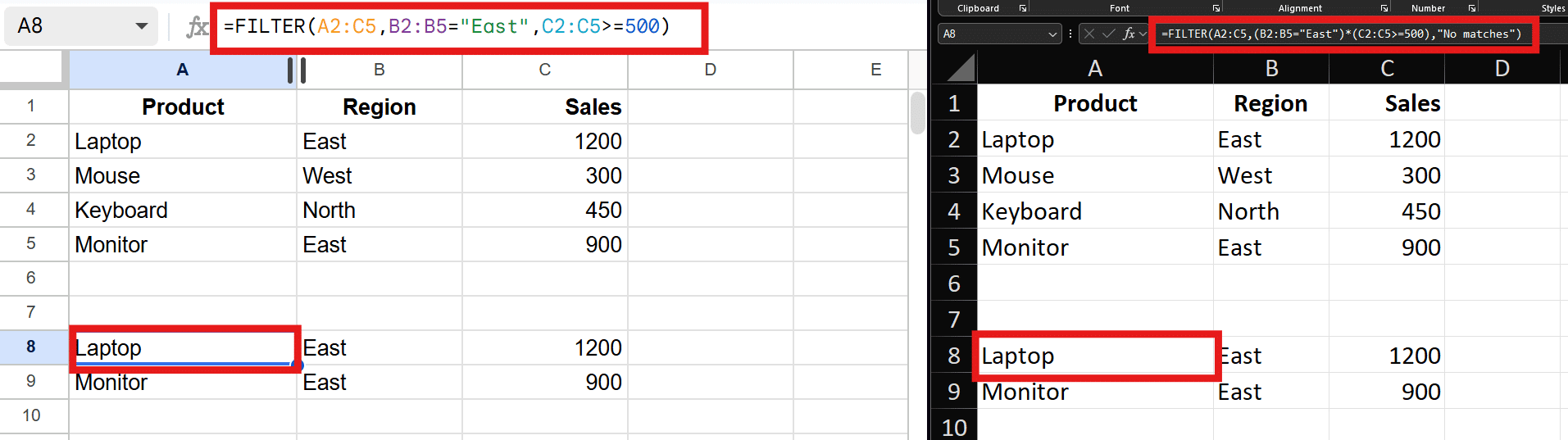
Example based on the “Filter rows by condition” entry in Section 6: Same Job, Different Formula — Cross-Platform Equivalents.
7. Edge Cases: When Identical Formulas Disagree
Even inside the 468 shared functions, a formula that is character-for-character identical on both platforms can return different results in specific circumstances. This section catalogs the categories of divergence. Full worked examples for each case are coming in a future revision of this article.
7.1 The 1900 date system quirk
Excel intentionally preserves a historical bug in which the year 1900 is treated as a leap year, so February 29, 1900 is a valid date in Excel but not in Sheets. Date serial numbers before March 1, 1900 are offset by one between the platforms, which can shift the results of date arithmetic on very early dates.
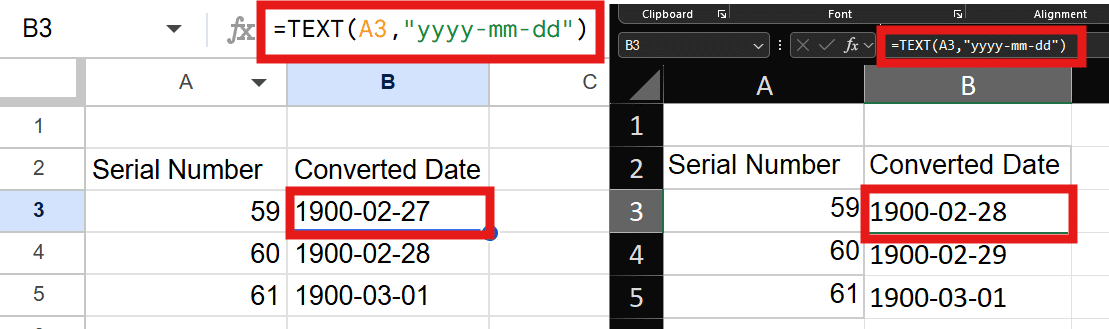
The same serial numbers produce different dates before March 1900. Excel assigns serial number 60 to the nonexistent date February 29, 1900, while Google Sheets maps the early serial values without reproducing Excel’s historical leap-year compatibility error.
7.2 CONCAT is not the same function
Excel's CONCAT accepts any number of arguments and ranges. Sheets' CONCAT accepts exactly two values; for more, Sheets expects CONCATENATE or TEXTJOIN. An Excel CONCAT over a range imports into Sheets as an error or truncated result.

The formula =CONCAT(A2,B2,C2) successfully combines all three values in Excel, returning RedBluePurple. Google Sheets returns #N/A because its CONCAT implementation accepts exactly two arguments rather than an arbitrary number of values.
7.3 Rounding and floating-point display
Both platforms use IEEE 754 double-precision arithmetic, but Excel applies additional display-level rounding heuristics in some cases, so long decimal tails can render differently even when the underlying math agrees.

The same arithmetic expression displays -2.22E-16 in Google Sheets but 0.00E+00 in Excel. This demonstrates how Sheets may expose a very small floating-point residual while Excel applies additional rounding behavior that presents the result as zero.
7.3 Exponentiation order and operator associativity
Both platforms use ^ for exponentiation, but chained powers are evaluated in different orders. Google Sheets evaluates exponentiation from right to left, while Excel evaluates chained exponentiation from left to right, so formulas containing multiple ^ operators can return different results unless parentheses are used explicitly.

The same formula =2^1^4 returns 2 in Google Sheets and 16 in Excel. Sheets interprets the expression as 2^(1^4), whereas Excel evaluates it as (2^1)^4, demonstrating a genuine operator-precedence incompatibility between the two platforms.
7.5 TEXT format codes and locale sensitivity
TEXT is shared, but the format code vocabulary is not identical, and both platforms reinterpret codes based on the file's locale. Formats involving day and month names, fractions, or thousands separators are the usual suspects.

The same TEXT format code produces slightly different spacing between the currency symbol and the number. Google Sheets returns $ 1,234, while Excel returns $1,234, showing that the * formatting character is interpreted differently by the two platforms.
7.6 Wildcards, regex, and matching conventions
Excel's matching functions (COUNTIF, SUMIF, MATCH) use * and ? wildcards. Sheets supports the same wildcards in those functions but leans on regex elsewhere, and its FIND/SEARCH edge behavior differs subtly with empty search strings.
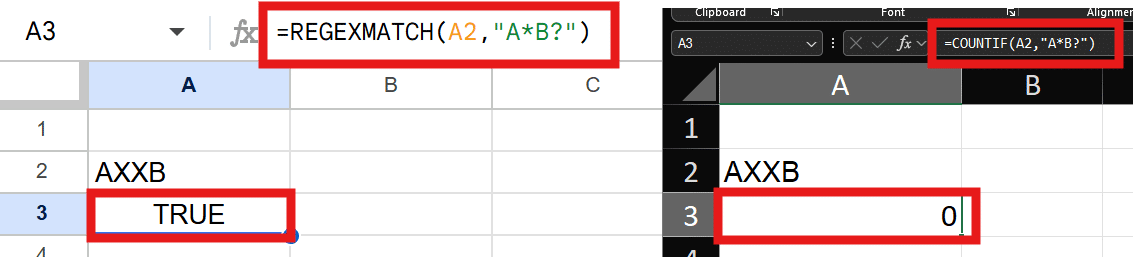
The pattern A*B? produces different results because Google Sheets interprets it as a regular expression, while Excel interprets it using wildcard rules inside COUNTIF. Sheets returns TRUE, whereas Excel returns 0, since ? means an optional preceding character in regex but exactly one required character in Excel wildcard syntax.
7.7 Whole-column references and performance semantics
A:A in Excel and Sheets both work, but the platforms trim and evaluate them differently, and functions over open-ended ranges can include or exclude trailing empty cells differently, changing counts and averages.
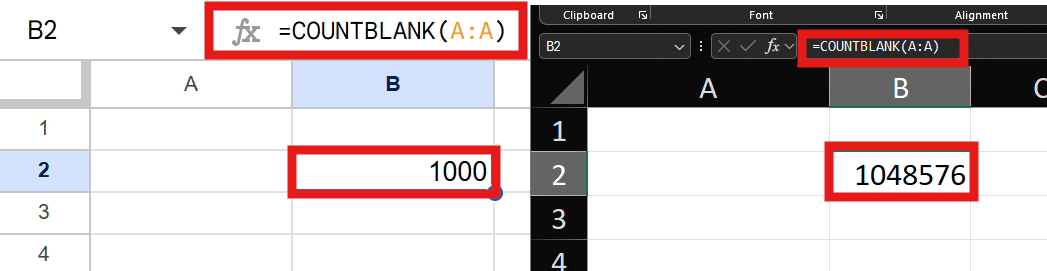
COUNTBLANK(A:A) returns 1000 in the default Google Sheets worksheet but 1,048,576 in Excel. The result reflects the different physical sizes of a whole-column reference: Sheets evaluates only the rows currently available in the sheet, while Excel always includes its fixed maximum row count.
7.8 Iterative calculation and volatile function timing
Both platforms support iterative calculation for circular references, but default settings, iteration caps, and the recalculation timing of volatile functions (NOW, RAND, TODAY) differ, so dependent chains can settle to different values.

The circular formula converges to approximately 99.95117188 in Google Sheets and 99.99961853 in Excel. By default, Google Sheets uses a maximum of 50 iterations and a 0.05 convergence threshold, while Excel uses a maximum of 100 iterations and a 0.001 maximum-change threshold. Because Excel allows more iterations and requires a smaller change before stopping, its result converges closer to 100.
7.9 INDIRECT and reference-style differences
INDIRECT on both platforms accepts A1 and R1C1 styles, but defaults, sheet-name quoting rules, and behavior with closed or external references differ. Excel's INDIRECT cannot see closed workbooks; Sheets has no concept of a closed file but has its own cross-file limits via IMPORTRANGE.

Google Sheets cannot use INDIRECT to retrieve a value from another spreadsheet and instead requires IMPORTRANGE, although INDIRECT works for references inside the same file. Excel can use INDIRECT with an external workbook reference only while the source workbook is open; once the source file is closed, the formula returns #REF!.
8. Conversion Cheat Sheet
Two lookup tables covering every exclusive function and its nearest equivalent on the other platform. "No equivalent" means exactly that: plan a redesign, not a substitution.
8.1 Google Sheets formula to Excel equivalent (all 47)
| Sheets function | Nearest Excel equivalent |
|---|---|
ADD |
+ operator |
AI |
COPILOT |
ARRAYFORMULA |
native spilling, MAP, or BYROW |
ARRAY_CONSTRAIN |
TAKE |
AVERAGE.WEIGHTED |
SUMPRODUCT(values, weights)/SUM(weights) |
COUNTUNIQUE |
ROWS(UNIQUE(range)) |
DIVIDE |
/ operator |
EPOCHTODATE |
ts/86400 + DATE(1970,1,1) |
EQ |
= operator |
FLATTEN |
TOCOL (per range) or TOCOL(VSTACK(...)) |
GOOGLEFINANCE |
STOCKHISTORY and Stocks data types |
GOOGLETRANSLATE |
TRANSLATE |
GT |
> operator |
GTE |
>= operator |
IMCOTH |
IMDIV(IMCOSH(z), IMSINH(z)) |
IMLOG |
IMLN, IMLOG10, or IMLOG2 |
IMPORTDATA |
IMPORTCSV/IMPORTTEXT (Insiders) or Power Query |
IMPORTFEED |
Power Query |
IMPORTHTML |
Power Query From Web |
IMPORTRANGE |
external workbook references or Power Query |
IMPORTXML |
WEBSERVICE + FILTERXML or Power Query |
IMTANH |
IMDIV(IMSINH(z), IMCOSH(z)) |
ISBETWEEN |
AND(v>=low, v<=high) |
ISDATE |
ISNUMBER(DATEVALUE(v)) pattern |
ISEMAIL |
REGEXTEST with an email pattern |
ISURL |
REGEXTEST with a URL pattern |
JOIN |
TEXTJOIN |
LT |
< operator |
LTE |
<= operator |
MARGINOFERROR |
CONFIDENCE.NORM / CONFIDENCE.T |
MINUS |
- operator |
MULTIPLY |
* operator |
NE |
<> operator |
POW |
^ operator or POWER |
QUERY |
GROUPBY/PIVOTBY/FILTER combos, PivotTables, or Power Query |
REGEXMATCH |
REGEXTEST |
SORTN |
TAKE(SORTBY(...), n) |
SPARKLINE |
Sparklines feature (Insert menu) |
SPLIT |
TEXTSPLIT |
TO_DATE |
DATEVALUE or number formatting |
TO_DOLLARS |
DOLLAR or currency formatting |
TO_PERCENT |
percent formatting |
TO_PURE_NUMBER |
VALUE or NUMBERVALUE |
TO_TEXT |
TEXT or VALUETOTEXT |
UMINUS |
unary - |
UNARY_PERCENT |
% or divide by 100 |
UPLUS |
unary + |
8.2 Excel formula to Google Sheets equivalent (all 62)
| Excel function | Nearest Sheets equivalent |
|---|---|
AGGREGATE |
SUBTOTAL or IFERROR-wrapped functions with FILTER |
AMORDEGRC |
AMORLINC (available in Sheets) with adjustments |
AREAS |
no equivalent |
ARRAYTOTEXT |
TEXTJOIN or TO_TEXT |
BAHTTEXT |
no equivalent |
BESSELI |
no equivalent |
BESSELJ |
no equivalent |
BESSELK |
no equivalent |
BESSELY |
no equivalent |
BINOM.DIST.RANGE |
difference of two BINOM.DIST cumulative values |
CALL |
legacy, no equivalent |
COPILOT |
AI |
CUBEKPIMEMBER |
no equivalent (Connected Sheets for BigQuery is the closest concept) |
CUBEMEMBER |
no equivalent |
CUBEMEMBERPROPERTY |
no equivalent |
CUBERANKEDMEMBER |
no equivalent |
CUBESET |
no equivalent |
CUBESETCOUNT |
no equivalent |
CUBEVALUE |
no equivalent |
DBCS |
no equivalent |
DROP |
OFFSET-based slicing or ARRAY_CONSTRAIN from the other end |
ECMA.CEILING |
CEILING.PRECISE |
EUROCONVERT |
manual rate table |
EXPAND |
VSTACK/HSTACK padding patterns |
FIELDVALUE |
GOOGLEFINANCE for securities |
FILTERXML |
IMPORTXML |
FORECAST.ETS |
manual smoothing model or add-ons |
FORECAST.ETS.CONFINT |
manual |
FORECAST.ETS.SEASONALITY |
manual |
FORECAST.ETS.STAT |
manual |
GROUPBY |
QUERY with GROUP BY |
IMPORTCSV |
IMPORTDATA |
IMPORTTEXT |
IMPORTDATA |
INFO |
no equivalent |
ISOMITTED |
optional-argument IF(ISBLANK(...)) patterns in named functions |
JIS |
no equivalent |
NUMBERVALUE |
VALUE (locale-sensitive) |
ODDFPRICE |
no equivalent |
ODDFYIELD |
no equivalent |
ODDLPRICE |
no equivalent |
ODDLYIELD |
no equivalent |
PERCENTOF |
value/SUM(range) |
PHONETIC |
no equivalent |
PIVOTBY |
QUERY with PIVOT |
PY |
Apps Script or Gemini-generated analysis |
REGEXTEST |
REGEXMATCH |
REGISTER.ID |
legacy, no equivalent |
RTD |
no equivalent (Apps Script polling at best) |
SINGLE |
implicit; Sheets @ behavior differs |
SORTBY |
SORT(range, sort_column, ascending) |
SQL.REQUEST |
legacy, no equivalent |
STOCKHISTORY |
GOOGLEFINANCE |
TABLE |
legacy Data Table artifact, no equivalent |
TAKE |
ARRAY_CONSTRAIN |
TEXTAFTER |
REGEXEXTRACT or SPLIT+INDEX |
TEXTBEFORE |
REGEXEXTRACT or SPLIT+INDEX |
TEXTSPLIT |
SPLIT |
TRANSLATE |
GOOGLETRANSLATE |
TRIMRANGE |
open-ended references like A2:A |
VALUETOTEXT |
TO_TEXT |
WEBSERVICE |
IMPORTDATA/IMPORTXML |
XMATCH |
MATCH or XLOOKUP |
8.3 Common #NAME? errors when crossing platforms
The #NAME? error is the platform's way of saying it has never heard of a function. The fastest triage workflow: search the broken file for #NAME?, note the function names involved, and look each one up in the two tables above. When a function has a same-name-different-parameters twin (notably FILTER, REGEXEXTRACT, REGEXREPLACE, and CONCAT), the formula may not error at all, which is worse: it computes something plausible but wrong. Audit those four by name after every migration.
8.4 Functions with no equivalent at all
Going from Excel to Sheets, the hardest walls are the CUBE functions (OLAP models), the FORECAST.ETS family, odd-period bond functions, Bessel functions, and real-time data via RTD. Going from Sheets to Excel, IMPORTRANGE's frictionless spreadsheet-to-spreadsheet linking and QUERY's in-formula SQL have workarounds (Power Query chief among them) but no true drop-in replacements.
9. Conclusion
9.1 Choosing the right platform for formula-heavy work
The 2026 picture is more balanced than it has ever been. Choose Excel when the work involves large models, OLAP or Power Pivot data, time-series forecasting, exotic financial instruments, or Python-augmented analysis. Choose Google Sheets when the work is web-connected, collaborative, built on live imported data, or benefits from QUERY's expressiveness. For everything in the shared 468, either platform will do, and the choice comes down to where your team already lives.
9.2 Best practices for cross-platform compatibility
Build with the shared function list when a file is likely to cross platforms. Avoid the four same-name traps (FILTER, CONCAT, REGEXEXTRACT, REGEXREPLACE) in shared files, preferring compositions that behave identically. Replace live-data functions with static snapshots before exporting. And when in doubt, test the round trip early with a copy of the file rather than discovering the breakage at delivery time.
9.3 Keeping up
Both vendors ship functions continuously. Microsoft announces new Excel functions in its monthly "What's New in Excel" posts on the Microsoft 365 Insider and Tech Community blogs; Google announces Sheets functions on the Google Workspace Updates blog. The exclusives lists in this article will shrink again; the same-name-different-behavior list, history suggests, will grow.
Appendix A: All 515 Google Sheets functions, A to Z
ABS, ACCRINT, ACCRINTM, ACOS, ACOSH, ACOT, ACOTH, ADD, ADDRESS, AI, AMORLINC, AND, ARABIC, ARRAYFORMULA, ARRAY_CONSTRAIN, ASC, ASIN, ASINH, ATAN, ATAN2, ATANH, AVEDEV, AVERAGE, AVERAGE.WEIGHTED, AVERAGEA, AVERAGEIF, AVERAGEIFS, BASE, BETA.DIST, BETA.INV, BETADIST, BETAINV, BIN2DEC, BIN2HEX, BIN2OCT, BINOM.DIST, BINOM.INV, BINOMDIST, BITAND, BITLSHIFT, BITOR, BITRSHIFT, BITXOR, BYCOL, BYROW, CEILING, CEILING.MATH, CEILING.PRECISE, CELL, CHAR, CHIDIST, CHIINV, CHISQ.DIST, CHISQ.DIST.RT, CHISQ.INV, CHISQ.INV.RT, CHISQ.TEST, CHITEST, CHOOSE, CHOOSECOLS, CHOOSEROWS, CLEAN, CODE, COLUMN, COLUMNS, COMBIN, COMBINA, COMPLEX, CONCAT, CONCATENATE, CONFIDENCE, CONFIDENCE.NORM, CONFIDENCE.T, CONVERT, CORREL, COS, COSH, COT, COTH, COUNT, COUNTA, COUNTBLANK, COUNTIF, COUNTIFS, COUNTUNIQUE, COUPDAYBS, COUPDAYS, COUPDAYSNC, COUPNCD, COUPNUM, COUPPCD, COVAR, COVARIANCE.P, COVARIANCE.S, CRITBINOM, CSC, CSCH, CUMIPMT, CUMPRINC, DATE, DATEDIF, DATEVALUE, DAVERAGE, DAY, DAYS, DAYS360, DB, DCOUNT, DCOUNTA, DDB, DEC2BIN, DEC2HEX, DEC2OCT, DECIMAL, DEGREES, DELTA, DETECTLANGUAGE, DEVSQ, DGET, DISC, DIVIDE, DMAX, DMIN, DOLLAR, DOLLARDE, DOLLARFR, DPRODUCT, DSTDEV, DSTDEVP, DSUM, DURATION, DVAR, DVARP, EDATE, EFFECT, ENCODEURL, EOMONTH, EPOCHTODATE, EQ, ERF, ERF.PRECISE, ERFC, ERFC.PRECISE, ERROR.TYPE, EVEN, EXACT, EXP, EXPON.DIST, EXPONDIST, F.DIST, F.DIST.RT, F.INV, F.INV.RT, F.TEST, FACT, FACTDOUBLE, FALSE, FDIST, FILTER, FIND, FINDB, FINV, FISHER, FISHERINV, FIXED, FLATTEN, FLOOR, FLOOR.MATH, FLOOR.PRECISE, FORECAST, FORECAST.LINEAR, FORMULATEXT, FREQUENCY, FTEST, FV, FVSCHEDULE, GAMMA, GAMMA.DIST, GAMMA.INV, GAMMADIST, GAMMAINV, GAMMALN, GAMMALN.PRECISE, GAUSS, GCD, GEOMEAN, GESTEP, GETPIVOTDATA, GOOGLEFINANCE, GOOGLETRANSLATE, GROWTH, GT, GTE, HARMEAN, HEX2BIN, HEX2DEC, HEX2OCT, HLOOKUP, HOUR, HSTACK, HYPERLINK, HYPGEOM.DIST, HYPGEOMDIST, IF, IFERROR, IFNA, IFS, IMABS, IMAGE, IMAGINARY, IMARGUMENT, IMCONJUGATE, IMCOS, IMCOSH, IMCOT, IMCOTH, IMCSC, IMCSCH, IMDIV, IMEXP, IMLN, IMLOG, IMLOG10, IMLOG2, IMPORTDATA, IMPORTFEED, IMPORTHTML, IMPORTRANGE, IMPORTXML, IMPOWER, IMPRODUCT, IMREAL, IMSEC, IMSECH, IMSIN, IMSINH, IMSQRT, IMSUB, IMSUM, IMTAN, IMTANH, INDEX, INDIRECT, INT, INTERCEPT, INTRATE, IPMT, IRR, ISBETWEEN, ISBLANK, ISDATE, ISEMAIL, ISERR, ISERROR, ISEVEN, ISFORMULA, ISLOGICAL, ISNA, ISNONTEXT, ISNUMBER, ISO.CEILING, ISODD, ISOWEEKNUM, ISPMT, ISREF, ISTEXT, ISURL, JOIN, KURT, LAMBDA, LARGE, LCM, LEFT, LEFTB, LEN, LENB, LET, LINEST, LN, LOG, LOG10, LOGEST, LOGINV, LOGNORM.DIST, LOGNORM.INV, LOGNORMDIST, LOOKUP, LOWER, LT, LTE, MAKEARRAY, MAP, MARGINOFERROR, MATCH, MAX, MAXA, MAXIFS, MDETERM, MDURATION, MEDIAN, MID, MIDB, MIN, MINA, MINIFS, MINUS, MINUTE, MINVERSE, MIRR, MMULT, MOD, MODE, MODE.MULT, MODE.SNGL, MONTH, MROUND, MULTINOMIAL, MULTIPLY, MUNIT, N, NA, NE, NEGBINOM.DIST, NEGBINOMDIST, NETWORKDAYS, NETWORKDAYS.INTL, NOMINAL, NORM.DIST, NORM.INV, NORM.S.DIST, NORM.S.INV, NORMDIST, NORMINV, NORMSDIST, NORMSINV, NOT, NOW, NPER, NPV, OCT2BIN, OCT2DEC, OCT2HEX, ODD, OFFSET, OR, PDURATION, PEARSON, PERCENTILE, PERCENTILE.EXC, PERCENTILE.INC, PERCENTRANK, PERCENTRANK.EXC, PERCENTRANK.INC, PERMUT, PERMUTATIONA, PHI, PI, PMT, POISSON, POISSON.DIST, POW, POWER, PPMT, PRICE, PRICEDISC, PRICEMAT, PROB, PRODUCT, PROPER, PV, QUARTILE, QUARTILE.EXC, QUARTILE.INC, QUERY, QUOTIENT, RADIANS, RAND, RANDARRAY, RANDBETWEEN, RANK, RANK.AVG, RANK.EQ, RATE, RECEIVED, REDUCE, REGEXEXTRACT, REGEXMATCH, REGEXREPLACE, REPLACE, REPLACEB, REPT, RIGHT, RIGHTB, ROMAN, ROUND, ROUNDDOWN, ROUNDUP, ROW, ROWS, RRI, RSQ, SCAN, SEARCH, SEARCHB, SEC, SECH, SECOND, SEQUENCE, SERIESSUM, SHEET, SHEETS, SIGN, SIN, SINH, SKEW, SKEW.P, SLN, SLOPE, SMALL, SORT, SORTN, SPARKLINE, SPLIT, SQRT, SQRTPI, STANDARDIZE, STDEV, STDEV.P, STDEV.S, STDEVA, STDEVP, STDEVPA, STEYX, SUBSTITUTE, SUBTOTAL, SUM, SUMIF, SUMIFS, SUMPRODUCT, SUMSQ, SUMX2MY2, SUMX2PY2, SUMXMY2, SWITCH, SYD, T, T.DIST, T.DIST.2T, T.DIST.RT, T.INV, T.INV.2T, T.TEST, TAN, TANH, TBILLEQ, TBILLPRICE, TBILLYIELD, TDIST, TEXT, TEXTJOIN, TIME, TIMEVALUE, TINV, TOCOL, TODAY, TOROW, TO_DATE, TO_DOLLARS, TO_PERCENT, TO_PURE_NUMBER, TO_TEXT, TRANSPOSE, TREND, TRIM, TRIMMEAN, TRUE, TRUNC, TTEST, TYPE, UMINUS, UNARY_PERCENT, UNICHAR, UNICODE, UNIQUE, UPLUS, UPPER, VALUE, VAR, VAR.P, VAR.S, VARA, VARP, VARPA, VDB, VLOOKUP, VSTACK, WEEKDAY, WEEKNUM, WEIBULL, WEIBULL.DIST, WORKDAY, WORKDAY.INTL, WRAPCOLS, WRAPROWS, XIRR, XLOOKUP, XNPV, XOR, YEAR, YEARFRAC, YIELD, YIELDDISC, YIELDMAT, Z.TEST, ZTEST
Appendix B: All 530 Excel functions, A to Z
Includes legacy compatibility, add-in, and Insider preview functions.
ABS, ACCRINT, ACCRINTM, ACOS, ACOSH, ACOT, ACOTH, ADDRESS, AGGREGATE, AMORDEGRC, AMORLINC, AND, ARABIC, AREAS, ARRAYTOTEXT, ASC, ASIN, ASINH, ATAN, ATAN2, ATANH, AVEDEV, AVERAGE, AVERAGEA, AVERAGEIF, AVERAGEIFS, BAHTTEXT, BASE, BESSELI, BESSELJ, BESSELK, BESSELY, BETA.DIST, BETA.INV, BETADIST, BETAINV, BIN2DEC, BIN2HEX, BIN2OCT, BINOM.DIST, BINOM.DIST.RANGE, BINOM.INV, BINOMDIST, BITAND, BITLSHIFT, BITOR, BITRSHIFT, BITXOR, BYCOL, BYROW, CALL, CEILING, CEILING.MATH, CEILING.PRECISE, CELL, CHAR, CHIDIST, CHIINV, CHISQ.DIST, CHISQ.DIST.RT, CHISQ.INV, CHISQ.INV.RT, CHISQ.TEST, CHITEST, CHOOSE, CHOOSECOLS, CHOOSEROWS, CLEAN, CODE, COLUMN, COLUMNS, COMBIN, COMBINA, COMPLEX, CONCAT, CONCATENATE, CONFIDENCE, CONFIDENCE.NORM, CONFIDENCE.T, CONVERT, COPILOT, CORREL, COS, COSH, COT, COTH, COUNT, COUNTA, COUNTBLANK, COUNTIF, COUNTIFS, COUPDAYBS, COUPDAYS, COUPDAYSNC, COUPNCD, COUPNUM, COUPPCD, COVAR, COVARIANCE.P, COVARIANCE.S, CRITBINOM, CSC, CSCH, CUBEKPIMEMBER, CUBEMEMBER, CUBEMEMBERPROPERTY, CUBERANKEDMEMBER, CUBESET, CUBESETCOUNT, CUBEVALUE, CUMIPMT, CUMPRINC, DATE, DATEDIF, DATEVALUE, DAVERAGE, DAY, DAYS, DAYS360, DB, DBCS, DCOUNT, DCOUNTA, DDB, DEC2BIN, DEC2HEX, DEC2OCT, DECIMAL, DEGREES, DELTA, DETECTLANGUAGE, DEVSQ, DGET, DISC, DMAX, DMIN, DOLLAR, DOLLARDE, DOLLARFR, DPRODUCT, DROP, DSTDEV, DSTDEVP, DSUM, DURATION, DVAR, DVARP, ECMA.CEILING, EDATE, EFFECT, ENCODEURL, EOMONTH, ERF, ERF.PRECISE, ERFC, ERFC.PRECISE, ERROR.TYPE, EUROCONVERT, EVEN, EXACT, EXP, EXPAND, EXPON.DIST, EXPONDIST, F.DIST, F.DIST.RT, F.INV, F.INV.RT, F.TEST, FACT, FACTDOUBLE, FALSE, FDIST, FIELDVALUE, FILTER, FILTERXML, FIND, FINDB, FINV, FISHER, FISHERINV, FIXED, FLOOR, FLOOR.MATH, FLOOR.PRECISE, FORECAST, FORECAST.ETS, FORECAST.ETS.CONFINT, FORECAST.ETS.SEASONALITY, FORECAST.ETS.STAT, FORECAST.LINEAR, FORMULATEXT, FREQUENCY, FTEST, FV, FVSCHEDULE, GAMMA, GAMMA.DIST, GAMMA.INV, GAMMADIST, GAMMAINV, GAMMALN, GAMMALN.PRECISE, GAUSS, GCD, GEOMEAN, GESTEP, GETPIVOTDATA, GROUPBY, GROWTH, HARMEAN, HEX2BIN, HEX2DEC, HEX2OCT, HLOOKUP, HOUR, HSTACK, HYPERLINK, HYPGEOM.DIST, HYPGEOMDIST, IF, IFERROR, IFNA, IFS, IMABS, IMAGE, IMAGINARY, IMARGUMENT, IMCONJUGATE, IMCOS, IMCOSH, IMCOT, IMCSC, IMCSCH, IMDIV, IMEXP, IMLN, IMLOG10, IMLOG2, IMPORTCSV, IMPORTTEXT, IMPOWER, IMPRODUCT, IMREAL, IMSEC, IMSECH, IMSIN, IMSINH, IMSQRT, IMSUB, IMSUM, IMTAN, INDEX, INDIRECT, INFO, INT, INTERCEPT, INTRATE, IPMT, IRR, ISBLANK, ISERR, ISERROR, ISEVEN, ISFORMULA, ISLOGICAL, ISNA, ISNONTEXT, ISNUMBER, ISO.CEILING, ISODD, ISOMITTED, ISOWEEKNUM, ISPMT, ISREF, ISTEXT, JIS, KURT, LAMBDA, LARGE, LCM, LEFT, LEFTB, LEN, LENB, LET, LINEST, LN, LOG, LOG10, LOGEST, LOGINV, LOGNORM.DIST, LOGNORM.INV, LOGNORMDIST, LOOKUP, LOWER, MAKEARRAY, MAP, MATCH, MAX, MAXA, MAXIFS, MDETERM, MDURATION, MEDIAN, MID, MIDB, MIN, MINA, MINIFS, MINUTE, MINVERSE, MIRR, MMULT, MOD, MODE, MODE.MULT, MODE.SNGL, MONTH, MROUND, MULTINOMIAL, MUNIT, N, NA, NEGBINOM.DIST, NEGBINOMDIST, NETWORKDAYS, NETWORKDAYS.INTL, NOMINAL, NORM.DIST, NORM.INV, NORM.S.DIST, NORM.S.INV, NORMDIST, NORMINV, NORMSDIST, NORMSINV, NOT, NOW, NPER, NPV, NUMBERVALUE, OCT2BIN, OCT2DEC, OCT2HEX, ODD, ODDFPRICE, ODDFYIELD, ODDLPRICE, ODDLYIELD, OFFSET, OR, PDURATION, PEARSON, PERCENTILE, PERCENTILE.EXC, PERCENTILE.INC, PERCENTOF, PERCENTRANK, PERCENTRANK.EXC, PERCENTRANK.INC, PERMUT, PERMUTATIONA, PHI, PHONETIC, PI, PIVOTBY, PMT, POISSON, POISSON.DIST, POWER, PPMT, PRICE, PRICEDISC, PRICEMAT, PROB, PRODUCT, PROPER, PV, PY, QUARTILE, QUARTILE.EXC, QUARTILE.INC, QUOTIENT, RADIANS, RAND, RANDARRAY, RANDBETWEEN, RANK, RANK.AVG, RANK.EQ, RATE, RECEIVED, REDUCE, REGEXEXTRACT, REGEXREPLACE, REGEXTEST, REGISTER.ID, REPLACE, REPLACEB, REPT, RIGHT, RIGHTB, ROMAN, ROUND, ROUNDDOWN, ROUNDUP, ROW, ROWS, RRI, RSQ, RTD, SCAN, SEARCH, SEARCHB, SEC, SECH, SECOND, SEQUENCE, SERIESSUM, SHEET, SHEETS, SIGN, SIN, SINGLE, SINH, SKEW, SKEW.P, SLN, SLOPE, SMALL, SORT, SORTBY, SQL.REQUEST, SQRT, SQRTPI, STANDARDIZE, STDEV, STDEV.P, STDEV.S, STDEVA, STDEVP, STDEVPA, STEYX, STOCKHISTORY, SUBSTITUTE, SUBTOTAL, SUM, SUMIF, SUMIFS, SUMPRODUCT, SUMSQ, SUMX2MY2, SUMX2PY2, SUMXMY2, SWITCH, SYD, T, T.DIST, T.DIST.2T, T.DIST.RT, T.INV, T.INV.2T, T.TEST, TABLE, TAKE, TAN, TANH, TBILLEQ, TBILLPRICE, TBILLYIELD, TDIST, TEXT, TEXTAFTER, TEXTBEFORE, TEXTJOIN, TEXTSPLIT, TIME, TIMEVALUE, TINV, TOCOL, TODAY, TOROW, TRANSLATE, TRANSPOSE, TREND, TRIM, TRIMMEAN, TRIMRANGE, TRUE, TRUNC, TTEST, TYPE, UNICHAR, UNICODE, UNIQUE, UPPER, VALUE, VALUETOTEXT, VAR, VAR.P, VAR.S, VARA, VARP, VARPA, VDB, VLOOKUP, VSTACK, WEBSERVICE, WEEKDAY, WEEKNUM, WEIBULL, WEIBULL.DIST, WORKDAY, WORKDAY.INTL, WRAPCOLS, WRAPROWS, XIRR, XLOOKUP, XMATCH, XNPV, XOR, YEAR, YEARFRAC, YIELD, YIELDDISC, YIELDMAT, Z.TEST, ZTEST
Function inventories verified against the official Microsoft Excel and Google Sheets function references, July 2026. Availability of the newest Excel functions varies by license and release channel.