
SpreadsheetWeb blog
Practical thinking for spreadsheet-powered teams
Deep guides on Excel, Google Sheets, web applications, product workflows, and the quiet technical traps worth knowing about.
Page 40 of 55 · 1319 articles

Function: FACT
In this guide, we’re going to show you how to use Excel factorial (FACT) function and also go over some tips and error handling methods.

Function: LCM
In this guide, we’re going to show you how to use the Excel LCM function and also go over some tips and error handling methods.

Function: GCD
In this guide, we’re going to show you how to use the GCD function and also go over some tips and error handling methods.

What’s New in SpreadsheetWeb 6.10
Review What’s New in SpreadsheetWeb 6.10, including the product features, platform improvements, and workflow enhancements covered in this update.
Pagos Releases SpreadsheetWEB 6.10 with the New Queries Module to Create Database Queries without Any Coding
Introducing the ability to create database queries on the designer interface and pull data from other database tables with ease.

How to name multiple cells at once using the Create from Selection feature
Named ranges can be extremely useful in Excel models. Let us show you how to name multiple cells at once using Create from Selection feature.

Function: CEILING
In this guide, we’re going to show you how to use the Excel CEILING function and also go over some tips and error handling methods.

Function: FLOOR
In this guide, we’re going to show you how to use the Excel FLOOR function and also go over some tips and error handling methods.

Function: CEILING.MATH
In this guide, we’re going to show you how to use the CEILING MATH (CEILING.MATH) function and go over some tips and error handling methods.

How to Get Excel Stock Quotes
In this article, we are going to show how to get Excel stock quotes, along with tips and tricks about the new Data Types feature.
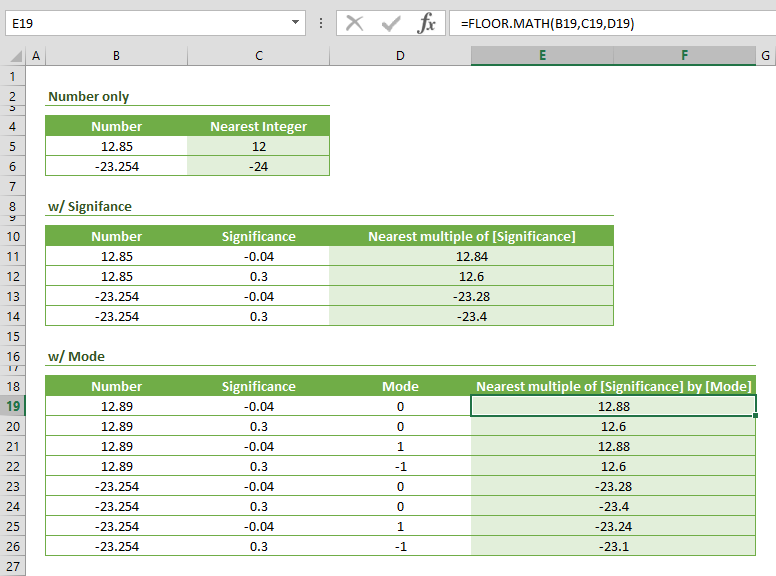
Function: FLOOR.MATH
In this guide, we’re going to show you how to use the FLOOR MATH (FLOOR.MATH) function and also go over some tips and error handling methods.

Function: INT
In this guide, we’re going to show you how to use the INT function and also go over some tips and error handling methods.

Function: TRUNC
In this guide, we’re going to show you how to use the Excel TRUNC function and also go over some tips and error handling methods.

How to get top values from a list or a table in Excel
In this article, we are going to show you how to get top values from a list or a table in Excel with using new SORT and SEQUENCE formulas.

How to Generate a General Ledger (GL) List using SEQUENCE
Preparing a general ledger (GL) table can be a daunting task, especially when dealing with lots of category codes.
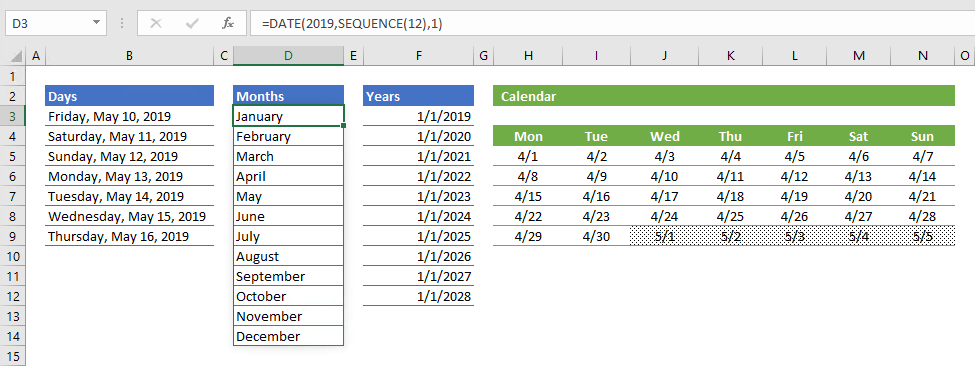
How to generate a date list using the SEQUENCE function
In this guide, we’re going to show you how to generate various date list for days, months, and years using the SEQUENCE function.

Function: TRANSPOSE
In this guide, we’re going to show you how to use TRANSPOSE Excel function and also go over some tips and error handling methods.
Stock Charts (Candlestick) in Excel
Learn about stock Charts (Candlestick) in Excel in Excel, including the relevant formula or feature, setup steps, and practical usage.

Function: CONCATENATE
In this guide, we’re going to show you how to use the CONCATENATE Excel function and also go over some tips and error handling methods.

Function: TEXTJOIN
In this guide, we’re going to show you how to use the TEXTJOIN Excel function and also throw in some tips and error handling methods.
Surface Chart in Excel
Learn how Surface Chart in Excel works, including its structure, available chart types, and the steps for creating it in Excel.

Excel Function: SUBSTITUTE
In this guide, we’re going to show you how to use the Excel SUBSTITUTE function and also go over some tips and error handling methods.

How to Use Excel SMALL Function
In this guide, we’re going to show you how to use the Excel SMALL function and also go over some tips and error handling methods.
How to Add Secondary Axis in Excel and Create a Combination Chart
A combination chart can visualize mutliple data fields in a single chart area. Let us show you how to add a secondary axis in Excel.