
SpreadsheetWeb blog
Practical thinking for spreadsheet-powered teams
Deep guides on Excel, Google Sheets, web applications, product workflows, and the quiet technical traps worth knowing about.
Page 32 of 55 · 1319 articles

Formula Override Feature in Designer Applications
Formula Override feature in Designer allows the users to override the value of a formula-generated output control during runtime.

How to sort dates by month in Excel
Sorting is an important process in organizing a data. In this article, we are going to show you how to sort dates by month in Excel.
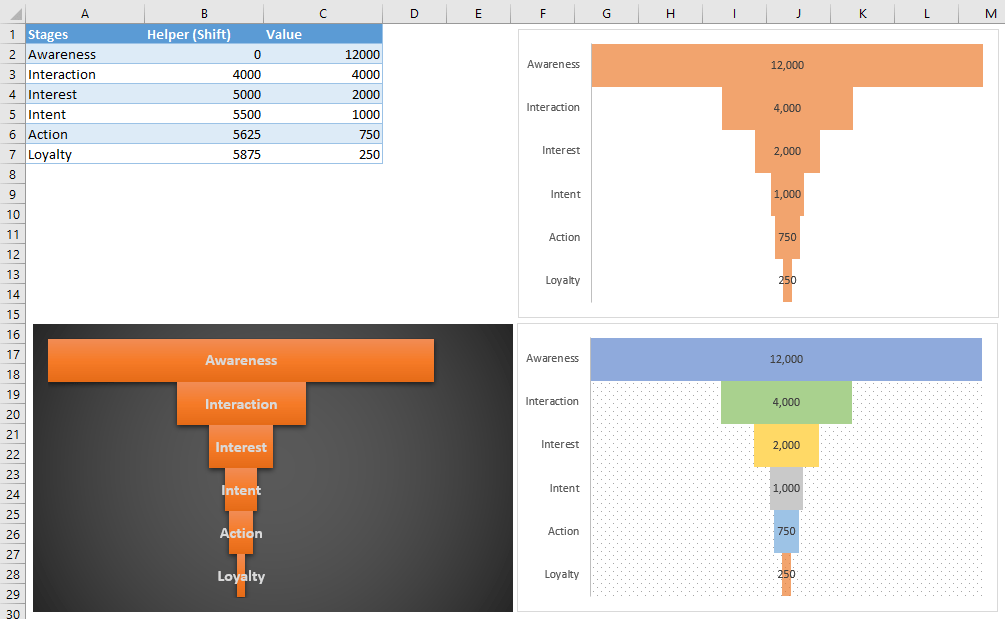
How to create a Funnel chart in Excel without Microsoft 365
Learn how to create a Funnel chart in Excel without Microsoft 365. This practical guide covers the required setup, step-by-step process, and useful Excel options.
Funnel Chart in Excel
A funnel chart visualizes progress through different stages of a process. This guide going to show you to create a funnel chart in Excel.
.
Read a SpreadsheetWeb customer story about turning spreadsheet-driven work into a maintainable web application.
..
Read a SpreadsheetWeb customer story about turning spreadsheet-driven work into a maintainable web application.
Matt G.
See how Matt G. used SpreadsheetWeb to turn spreadsheet-driven work into a web application and improve its business process.
Robert P.
See how Robert P. used SpreadsheetWeb to turn spreadsheet-driven work into a web application and improve its business process.
Salvatore C.
See how Salvatore C. used SpreadsheetWeb to turn spreadsheet-driven work into a web application and improve its business process.
Angela Z.
See how Angela Z. used SpreadsheetWeb to turn spreadsheet-driven work into a web application and improve its business process.
Kim B.
See how Kim B. used SpreadsheetWeb to turn spreadsheet-driven work into a web application and improve its business process.
Caitlin B.
See how Caitlin B. used SpreadsheetWeb to turn spreadsheet-driven work into a web application and improve its business process.
Asbjorn L.
See how Asbjorn L. used SpreadsheetWeb to turn spreadsheet-driven work into a web application and improve its business process.
Alex C.
See how Alex C. used SpreadsheetWeb to turn spreadsheet-driven work into a web application and improve its business process.
...
Read a SpreadsheetWeb customer story about turning spreadsheet-driven work into a maintainable web application.

What's New in 6.18: Formula Override and Advanced Data Filters
SpreadsheetWeb 6.18 version introduces new key features like Formula Override, Advanced Data Filters, and Google Sheets Connector.
Pagos Announces the Release of SpreadsheetWeb 6.18 with Formula Override and Advanced Data Filters
Version 6.18 introduces the ability to override formula-generated fields during runtime, enhanced filter options on the Data page.
Sunburst Chart in Excel
A sunburst chart is a type of visualization that works great for displaying hierarchical data. They are available in Excel 2016 or newer.

STANDARDIZE Function
In this guide, we’re going to show you how to use the STANDARDIZE Excel function and also go over some tips and error handling methods.

How to normalize data in Excel
Normalizing (or standardizing) is an essential step in analyzing large datasets. Let us show you how to normalize data in Excel.
Building a COVID-19 Dashboard in Excel
In this guide, we're going to show you tips of building a COVID-19 Dashboard in Excel to track and present the data more effectively.
Tracking COVID-19 Data in Excel using Power Query
In this guide, we're going to show you way of tracking COVID-19 Data in Excel using Power Query.
SpreadsheetWEB named one of the "5 Best Application Development Tools" by GetApp
We are thrilled to announce that SpreadsheetWEB was named one of “5 Best Application Development Tools” in GetApp's shortlist.
How to create an Excel map chart
A map chart help visualizing data in a map. In this article, we are going to show you how to insert a map chart in Excel.