
SpreadsheetWeb blog
Practical thinking for spreadsheet-powered teams
Deep guides on Excel, Google Sheets, web applications, product workflows, and the quiet technical traps worth knowing about.
Page 31 of 55 · 1319 articles

How to cut and paste transpose in Excel
Excel doesn’t support transpose paste after cutting. In this article, we are going to show you how to cut and paste transpose in Excel.

Safety Stock Inventory Template
Safety Stock Inventory Template provides a practical spreadsheet model. This overview explains what it calculates and how it can be used with SpreadsheetWeb.

Retirement Savings Calculator
Retirement Savings Calculator provides a practical spreadsheet model. This overview explains what it calculates and how it can be used with SpreadsheetWeb.

Mortgage Calculator
Mortgage Calculator provides a practical spreadsheet model. This overview explains what it calculates and how it can be used with SpreadsheetWeb.

How to find the first blank cell in a range in Excel
In this article, we are going to show you how to find the first blank cell in a range in Excel. You can create a hyperlink to that cell too.
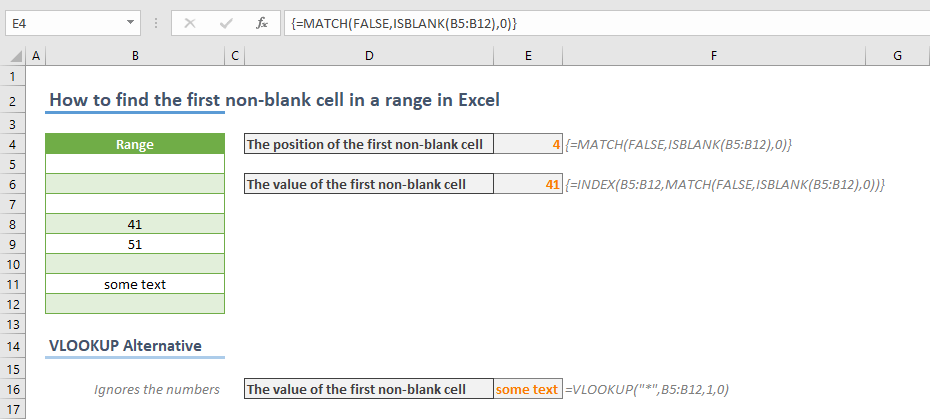
How to find the first non-blank cell in a range in Excel
In this article, we are going to show you how to find the first non-blank cell in a range in Excel with MATCH and ISBLANK functions.
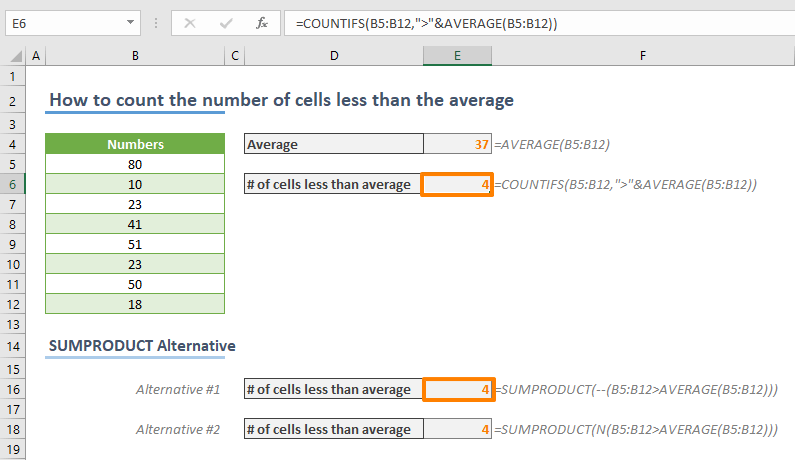
How to count the number of cells greater than the average in Excel
Learn how to count the number of cells greater than the average in Excel. This practical guide covers the formula syntax, setup steps, and how the result is calculated in Excel.
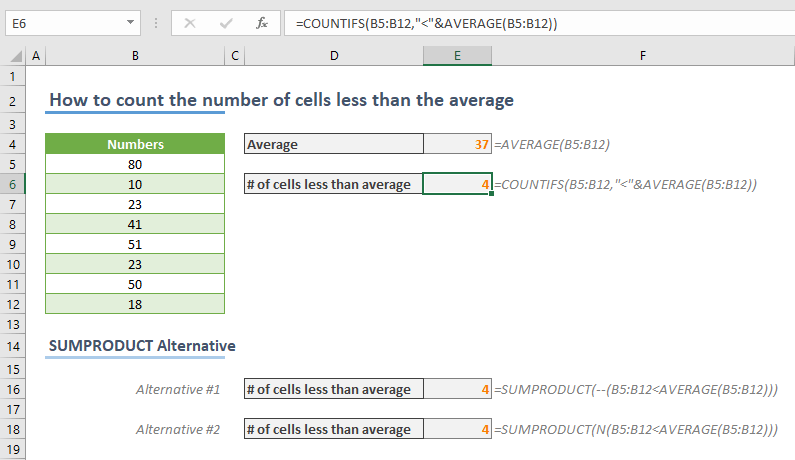
How to count the number of cells less than the average in Excel
Learn how to count the number of cells less than the average in Excel. This practical guide covers the formula syntax, setup steps, and how the result is calculated in Excel.

Function: CELL
In this guide, we’re going to show you how to use the CELL function and also go over some tips and error handling methods.
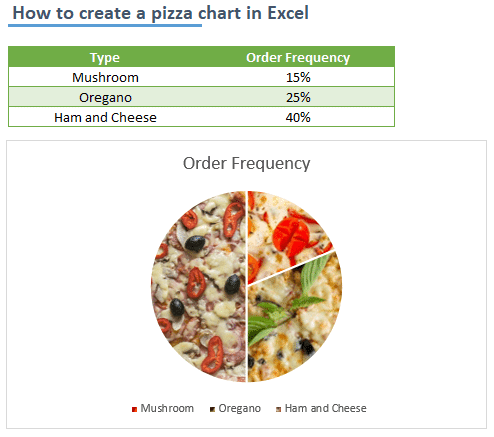
How to create a pizza chart in Excel
In this article, we are going to show you how to create a pizza chart in Excel. You can give your charts a fancy look.
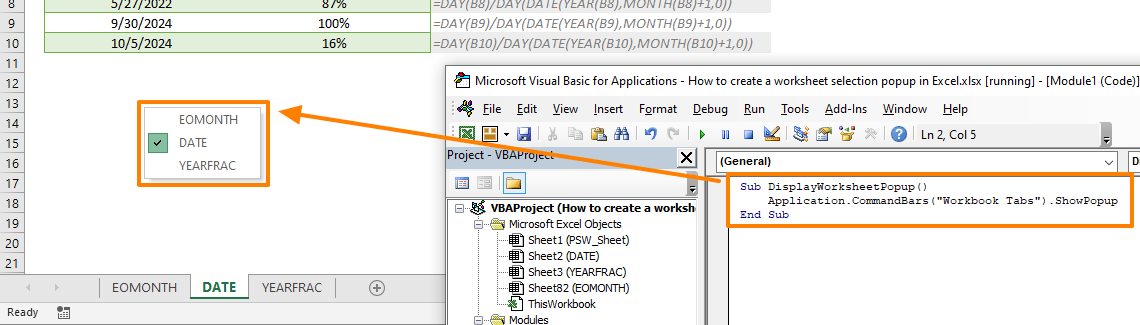
How to create a worksheet selection popup in Excel
In this article, we are going to show you how to create a worksheet selection popup in Excel by using VBA.
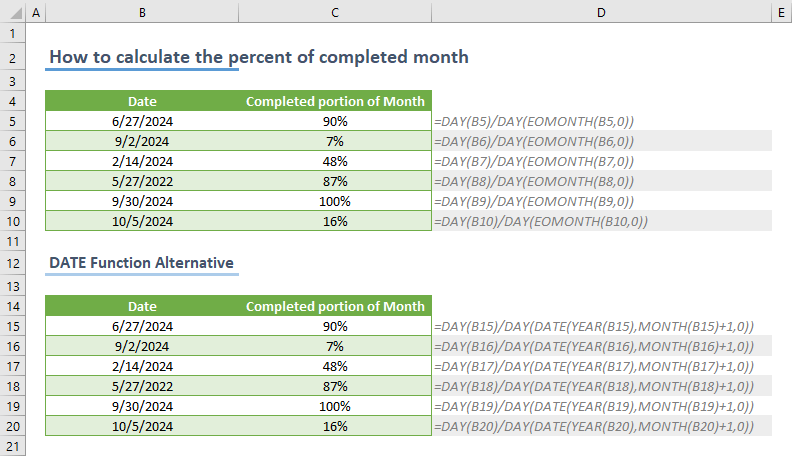
How to calculate the percent of completed month
In this article, we are going to show you how to calculate the percent of completed month in Excel. The article uses DAY and EOMONTH.

Function: YEARFRAC
In this guide, we’re going to show you how to use the YEARFRAC function and also go over some tips and error handling methods.
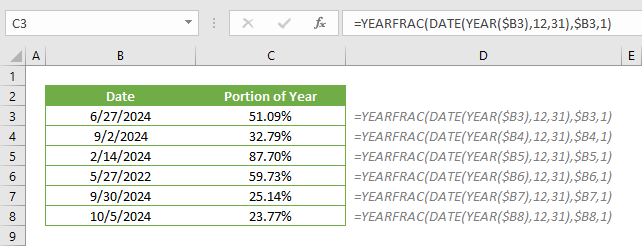
How to calculate the percent of completed year
In this article, you'll learn how to calculate the percent of completed year in Excel. Formula is using YEARFRAC, DATE and YEAR functions.
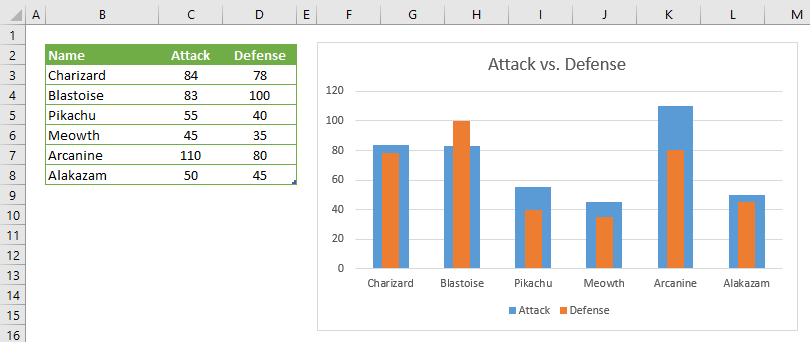
How to create a thermometer chart in Excel
A thermometer chart is a way of comparing two values. In this article, we are going to show you how to create a thermometer chart in Excel.

How to modify a Comment Box in Excel
The default comment box style in Excel is fairly outdated. In this article, we are going to show you how to modify a Comment Box in Excel.

What's New in 6.19: Offline Application Capabilities
Using the Import from Excel file feature, you can create a new record with the uploaded data or overwrite the data in an existing record.

How to use Clipboard in Excel
Clipboard feature lists the items you copied and allow you to paste. In this article, we are going to show you how to use Clipboard in Excel.
SpreadsheetWeb 6.19 Features Offline Application Capabilities
Version 6.19 welcomes the “Import from Excel file” feature that allows offline usage and update records by uploading an Excel file.

How to copy sheet in Excel with VBA
In this guide, we're going to show you how to copy sheet in Excel with VBA. You can can copy any sheet into any position.

How to customize ribbon in Excel
The Excel ribbon displays commands as icons in a strip. In this article, we are going to show you how to customize ribbon in Excel.
Building Customer-Facing NoCode Portals with SpreadsheetWeb
The purpose of customer-facing nocode portals is to automate a specific business function by providing the customers with a web and/or mobile presence to submit their information, and get results without having to interact with customer representatives.

How to select a random item from a list in Excel
In this article, we are going to show you how to select a random Item from a list in Excel in two ways with examples.

How to sort birthdays in Excel
Excel lacks of sorting dates by month and day. In this article, we are going to show you how to sort birthdays in Excel.