
Excel + AI Coding Agents vs. SpreadsheetWeb: What Actually Works in Production?
The idea of handing an Excel file to an AI coding agent and instantly getting a working application is compelling. With advances from OpenAI, GitHub, and Anthropic, this is no longer hypothetical. AI can generate APIs, applications, and even full systems from structured inputs like spreadsheets.
However, when applied to real-world Excel models, especially those that continue to evolve in the hands of business users, the gap between possibility and practicality becomes clear. The real question is not whether AI can build an application. It is whether it can build and maintain one reliably over time.
Two Approaches: Translate Excel or Operationalize It
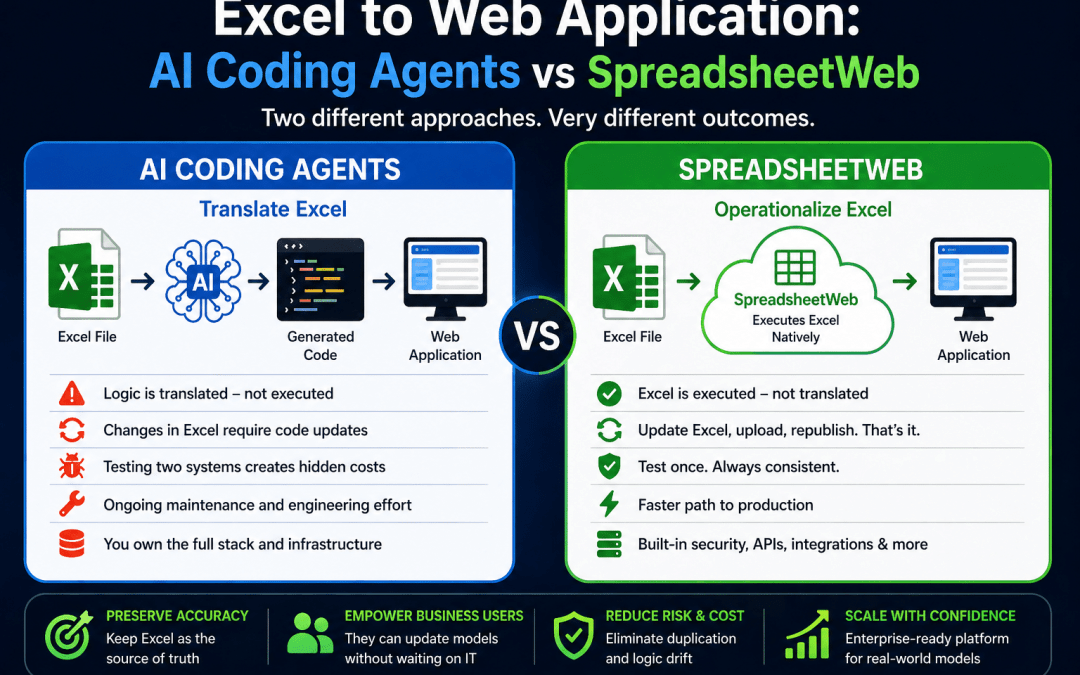
There are two fundamentally different ways to turn Excel into an application. The first is translation, where an AI coding agent reads the workbook and generates a new system in code. In this model, Excel becomes a reference artifact, while the generated application becomes the system of record. This can work well for initial builds, especially when creating custom interfaces or integrating into broader software systems. However, it also introduces a separation between the original model and the running application, which must be managed over time.
The second approach is operationalization. Instead of translating Excel into something else, platforms like SpreadsheetWeb keep the workbook at the center and execute it directly as a web application or API. This preserves the original logic and ensures that the application always reflects the latest version of the model. By eliminating the need to recreate or synchronize logic in code, this approach reduces complexity and provides a more reliable foundation for systems that depend on continuously evolving Excel models.
What Happens When Excel Changes?
In most organizations, Excel models are constantly evolving. Business users update formulas, adjust assumptions, and expand logic as requirements change. In an AI-generated system, this creates an immediate challenge because the application is no longer running the Excel file itself but a translated version of it. Every change to the workbook requires reinterpretation, code updates, and regression testing to ensure the application still behaves correctly. Even small formula adjustments can introduce inconsistencies, leading to “logic drift” where the spreadsheet and the application gradually fall out of sync. Over time, maintaining alignment becomes an ongoing engineering effort rather than a simple business update.
SpreadsheetWeb avoids this problem by keeping Excel as the execution layer. The workbook remains the single source of truth, and the application reflects it directly. When changes are needed, the process is straightforward: update the Excel file, upload it, and republish. There is no translation step, no duplicated logic, and no need to reconcile two systems. This preserves the flexibility of Excel while adding the structure of a web application, allowing business users to continue evolving their models without introducing maintenance complexity or dependency on engineering teams.
Speed: Prototype vs. Production
AI coding agents are extremely effective when it comes to rapid prototyping. They can generate working applications, APIs, and interfaces in a short amount of time, making them ideal for experimentation or early-stage concepts. This creates the impression that building with AI is significantly faster overall. However, that speed primarily applies to the initial build. Once you move beyond a demo and into a production-ready system, additional work is required to validate logic, ensure security, handle edge cases, and maintain consistency over time. This validation layer often offsets the initial speed advantage.
SpreadsheetWeb approaches speed differently by starting with a production-ready foundation. Instead of generating everything from scratch, it provides built-in infrastructure for application logic, data handling, security, and deployment. This reduces the gap between prototype and production because the core components are already in place. As a result, while AI may help you get to a quick demo faster, SpreadsheetWeb typically provides a faster and more reliable path to a stable, maintainable application.
The Hard Problem: Complex Excel Models
Real-world Excel models are rarely simple. They often include multiple worksheets with cross-sheet dependencies, deeply nested formulas, layered lookup logic, and conditional calculations that evolve over time. These models behave less like spreadsheets and more like interconnected systems, where a single change in one area can cascade across many others. Understanding the full dependency structure is difficult even for experienced users, which is why these models are typically maintained incrementally rather than redesigned from scratch.
AI coding agents can handle simpler spreadsheets reasonably well, especially when the logic is linear and clearly structured. However, as complexity increases, their ability to correctly interpret and translate the model declines. The challenge is not generating code, but preserving the full set of dependencies, edge cases, and calculation paths accurately. Missing or misinterpreting even a small part of the logic can lead to incorrect outputs, and these errors are often difficult to detect without extensive testing.
SpreadsheetWeb avoids this challenge entirely by not translating the model. It executes the Excel logic directly, preserving all formulas and relationships exactly as they exist. This approach is particularly important for complex, layered models, where reliability depends on maintaining the integrity of the original calculation structure rather than attempting to recreate it in code.
Testing: The Hidden Cost of AI Translation
When Excel is translated into code using AI, testing becomes significantly more complex. You are no longer validating a single system. You must verify the original Excel model, the generated application, and most importantly, the equivalence between the two. This requires building comprehensive test cases, including edge scenarios, and continuously comparing outputs to ensure consistency. As the Excel model evolves, this process must be repeated, creating an ongoing testing burden that grows over time.
SpreadsheetWeb simplifies this by eliminating the translation layer entirely. Since the application executes the original Excel logic, there is no need to validate equivalence between two systems. Testing can focus on the accuracy of the spreadsheet itself and the behavior of the application environment. This reduces both the scope and complexity of testing, making it far more manageable to maintain reliability as the model changes.
Deterministic vs. Probabilistic Systems
AI-generated systems are inherently probabilistic. Their outputs depend on how the model interprets inputs, prompts, and context, which can introduce variability even when the same task is repeated. While this flexibility is useful for generating code or handling ambiguous scenarios, it becomes a concern when precision and consistency are required. In applications such as pricing, financial modeling, or engineering calculations, even small variations in logic or output can lead to significant downstream impact.
SpreadsheetWeb operates on deterministic Excel calculations. It executes defined formulas exactly as written, producing consistent and repeatable results for the same inputs. This predictability is essential for business-critical applications where accuracy, auditability, and trust are non-negotiable. By relying on a fixed logic layer rather than generated interpretations, it ensures that results remain stable over time.
Built-In Capabilities vs. Custom Development
Using an AI coding agent to generate an application means you are responsible for building much more than just the core logic. A complete solution also requires authentication, database management, role-based access control, API security, reporting, exports, and integrations with external systems. While AI can help generate parts of this infrastructure, each component still needs to be designed, tested, secured, and maintained. Over time, this turns into a full custom software stack that your team must own and support.
SpreadsheetWeb provides these capabilities out of the box as part of the platform. It includes built-in features for data storage, user management, security, APIs, and integrations, allowing you to focus on the business logic rather than the surrounding infrastructure. This significantly reduces development effort and operational complexity, making it easier to move from an Excel model to a fully functional, production-ready application without building everything from scratch.
Where AI Fits Best: A Hybrid Approach
AI is not the wrong solution. It is simply not the complete one when it comes to Excel-driven applications. Its strengths lie in speed, flexibility, and the ability to generate interfaces, integrations, and supporting code quickly. However, relying on AI alone to translate and maintain complex Excel logic introduces challenges around accuracy, consistency, and long-term maintenance. This is why a pure AI approach often struggles as systems grow more complex and evolve over time.
The most effective approach today is a hybrid model. SpreadsheetWeb can serve as the stable execution layer for Excel logic, ensuring consistency and reliability, while AI tools are used to enhance the system. This includes generating custom user interfaces, building integrations, and accelerating development around the core application. By combining both, organizations can take advantage of AI’s speed without sacrificing the determinism and maintainability required for production systems.
When AI-Only Makes Sense
An AI-only approach makes sense when Excel is no longer intended to remain the source of truth and the organization is prepared to fully transition ownership of the logic to an engineering team. This typically applies to cases where the goal is to build a highly customized product, redesign the underlying model, or integrate deeply into a broader software ecosystem. In these scenarios, the Excel file serves as a starting point rather than a living system, and the long-term investment in development, testing, and maintenance is justified.
Final Thoughts: Do Not Translate Excel, Operationalize It
If Excel remains central to your business logic, translating it into code is often the wrong move. It introduces unnecessary complexity, creates duplication of logic, and shifts ownership away from the people who understand the model best. What begins as a fast, AI-assisted build can quickly turn into a long-term maintenance challenge, where every change requires engineering involvement, testing cycles, and synchronization between systems. Over time, this erodes the very advantage that made Excel valuable in the first place, its flexibility and accessibility to business users.
Operationalizing Excel takes a fundamentally different approach. Instead of replacing the model, it extends its reach. Platforms like SpreadsheetWeb allow you to preserve your existing logic while delivering it as a secure, scalable, and user-friendly application. This keeps the source of truth intact, enables business users to continue evolving the model, and adds the structure needed for production use, including security, data management, and integrations.
AI still plays an important role, but not as a replacement for the execution layer. Its strengths lie in acceleration, helping generate interfaces, automate integrations, and improve user experience around the core system. When used this way, AI becomes a powerful complement rather than a fragile dependency.
The most effective strategy is not choosing between AI and a platform. It is combining them thoughtfully. Let Excel remain the engine. Let SpreadsheetWeb operationalize it. And let AI enhance everything around it.
