In today’s fast-paced development world, leveraging the power of AI and low-code tools can drastically speed up the process of building data-driven applications. In this article, we’ll walk through a comprehensive example of how Claude AI was used to generate a custom application integrated with SpreadsheetWeb API, using Chart.js for data visualization. The app calculates scheduled mortgage payments and displays an amortization schedule both in table format and as an interactive chart.
The primary objective is to take a model created in Excel, transform it into a web API using SpreadsheetWeb Hub, and then build a frontend UI that interacts with it seamlessly.
Why Claude AI
To determine the most capable AI tool for generating this application, we tested an identical prompt across four leading AI platforms: ChatGPT, Gemini, Claude, and Perplexity. Each platform was instructed to develop a single-page application featuring integration with SpreadsheetWeb and visualizing data through interactive charts.
In a previous exploration, detailed in our article "Transform Your Excel Models into AI Applications with SpreadsheetWeb API – A Step-by-Step Guide," we specifically reviewed the capabilities of ChatGPT for similar integrations. Building on this foundation, our comparative analysis in this test revealed Claude AI as the standout performer. Claude not only delivered precise and robust HTML, CSS, and JavaScript code but also excelled in generating fully operational charts—both through custom logic and using Chart.js when explicitly specified.
Claude's proficiency in accurately interpreting API documentation, adhering to WordPress compatibility constraints, and providing dynamic output formatting significantly elevated its performance and reliability, distinguishing it from other tested AI solutions.
Step 1: Transforming Excel into an API

Using SpreadsheetWeb Hub, we start with an Excel mortgage calculation model containing input fields (like interest rate, loan amount, loan period, and start date) and outputs (like the scheduled payment amount and amortization schedule).
This model is published as a web application using SpreadsheetWeb Hub, which generates:
workspaceIdapplicationId- a dedicated API endpoint:
https://private.spreadsheetweb.com/api/calculations/calculatesinglesimple
This endpoint is ready to accept JSON requests and return computed values based on the model.
Step 2: Using Claude AI to Generate the Application

Claude AI was prompted to generate a mortgage calculator Single Page Application (SPA) using:
- HTML, CSS, and JavaScript
- Bootstrap for styling
- Chart.js for visualizing amortization
- WordPress compatibility, ensuring all code is written in a single line to avoid unwanted tag injection (e.g.,
<p>tags) from WordPress themes
Claude produced a fully functional one-line HTML/JS code that:
- collects user inputs
- sends API requests with proper formatting
- renders both a table and a chart from the API response
Step 3: API Communication – Sample Request and Response
Sample API Request:
{
  "request": {
    "applicationId": "YOUR-APPLICATIONID",
    "workspaceId": "YOUR-WORKSPACEID",
    "inputs": {
      "interest_rate": "5.5",
      "loan_amount": "750000",
      "loan_period": "20",
      "loan_start_date": "12-05-2025"
    },
    "outputs": [
      "scheduled_payment_amt",
      "amortization_chart"
    ]
  }
}
Sample API Response:
{
  "response": {
    "outputs": {
      "scheduled_payment_amt": "3800.1398236941",
      "amortization_chart": [
        {
          "year": "Year",
          "remaining": "Remaining",
          "interest Paid": "Interest Paid",
          "principal Paid": "Principal Paid"
        },
        {
          "year": "0",
          "remaining": "750000",
          "interest Paid": "2812.5",
          "principal Paid": "1987.6398236941"
        },
        {
          "year": "1",
          "remaining": "725650.179801542",
          "interest Paid": "35973.0458601271",
          "principal Paid": "26428.7718478963"
        },
        {
          "year": "2",
          "remaining": "700181.733123397",
          "interest Paid": "68010.7703912683",
          "principal Paid": "51992.7252010843"
        },
        {
          "year": "3",
          "remaining": "673543.270460802",
          "interest Paid": "98874.0913780183",
          "principal Paid": "78731.0820986636"
        },
        {
          "year": "4",
          "remaining": "645681.041484138",
          "interest Paid": "128509.056927021",
          "principal Paid": "106697.794433991"
        },
        {
          "year": "5",
          "remaining": "616538.826583044",
          "interest Paid": "156859.236604377",
          "principal Paid": "135949.292640963"
        },
        {
          "year": "6",
          "remaining": "586057.8234281",
          "interest Paid": "183865.607571931",
          "principal Paid": "166544.599557739"
        },
        {
          "year": "7",
          "remaining": "554176.528321155",
          "interest Paid": "209466.435492664",
          "principal Paid": "198545.449521334"
        },
        {
          "year": "8",
          "remaining": "520830.61209493",
          "interest Paid": "233597.14996492",
          "principal Paid": "232016.412933408"
        },
        {
          "year": "9",
          "remaining": "485952.790311454",
          "interest Paid": "256190.214234085",
          "principal Paid": "267025.026548572"
        },
        {
          "year": "10",
          "remaining": "449472.687497448",
          "interest Paid": "277174.988918856",
          "principal Paid": "303641.92974813"
        },
        {
          "year": "11",
          "remaining": "411316.695142704",
          "interest Paid": "296477.589477111",
          "principal Paid": "341941.007074205"
        },
        {
          "year": "12",
          "remaining": "371407.823174933",
          "interest Paid": "314020.73712379",
          "principal Paid": "381999.537311855"
        },
        {
          "year": "13",
          "remaining": "329665.544611395",
          "interest Paid": "329723.602899968",
          "principal Paid": "423898.349420006"
        },
        {
          "year": "14",
          "remaining": "286005.633073853",
          "interest Paid": "343501.644578489",
          "principal Paid": "467721.985625815"
        },
        {
          "year": "15",
          "remaining": "240339.992838988",
          "interest Paid": "355266.436077073",
          "principal Paid": "513558.87201156"
        },
        {
          "year": "16",
          "remaining": "192576.481081367",
          "interest Paid": "364925.48903469",
          "principal Paid": "561501.496938272"
        },
        {
          "year": "17",
          "remaining": "142618.721950277",
          "interest Paid": "372382.066191188",
          "principal Paid": "611646.597666104"
        },
        {
          "year": "18",
          "remaining": "90365.9121052841",
          "interest Paid": "377534.986193606",
          "principal Paid": "664095.355548015"
        },
        {
          "year": "19",
          "remaining": "35712.6173181334",
          "interest Paid": "380278.419435332",
          "principal Paid": "718953.600190618"
        },
        {
          "year": "20",
          "remaining": "0",
          "interest Paid": "380722.23087855",
          "principal Paid": "750000"
        },
        {
          "year": "",
          "remaining": "",
          "interest Paid": "",
          "principal Paid": ""
        },
        {
          "year": "",
          "remaining": "",
          "interest Paid": "",
          "principal Paid": ""
        },
        {
          "year": "",
          "remaining": "",
          "interest Paid": "",
          "principal Paid": ""
        },
        {
          "year": "",
          "remaining": "",
          "interest Paid": "",
          "principal Paid": ""
        },
        {
          "year": "",
          "remaining": "",
          "interest Paid": "",
          "principal Paid": ""
        },
        {
          "year": "",
          "remaining": "",
          "interest Paid": "",
          "principal Paid": ""
        },
        {
          "year": "",
          "remaining": "",
          "interest Paid": "",
          "principal Paid": ""
        },
        {
          "year": "",
          "remaining": "",
          "interest Paid": "",
          "principal Paid": ""
        },
        {
          "year": "",
          "remaining": "",
          "interest Paid": "",
          "principal Paid": ""
        }
      ]
    }
  },
  "timingsSeconds": {
    "hubApiApplication": 0.0817865,
    "designerApplication": 0.1957489
  },
  "performanceInformation": null,
  "isError": false,
  "messages": null
}
Step 4: Adding Charts
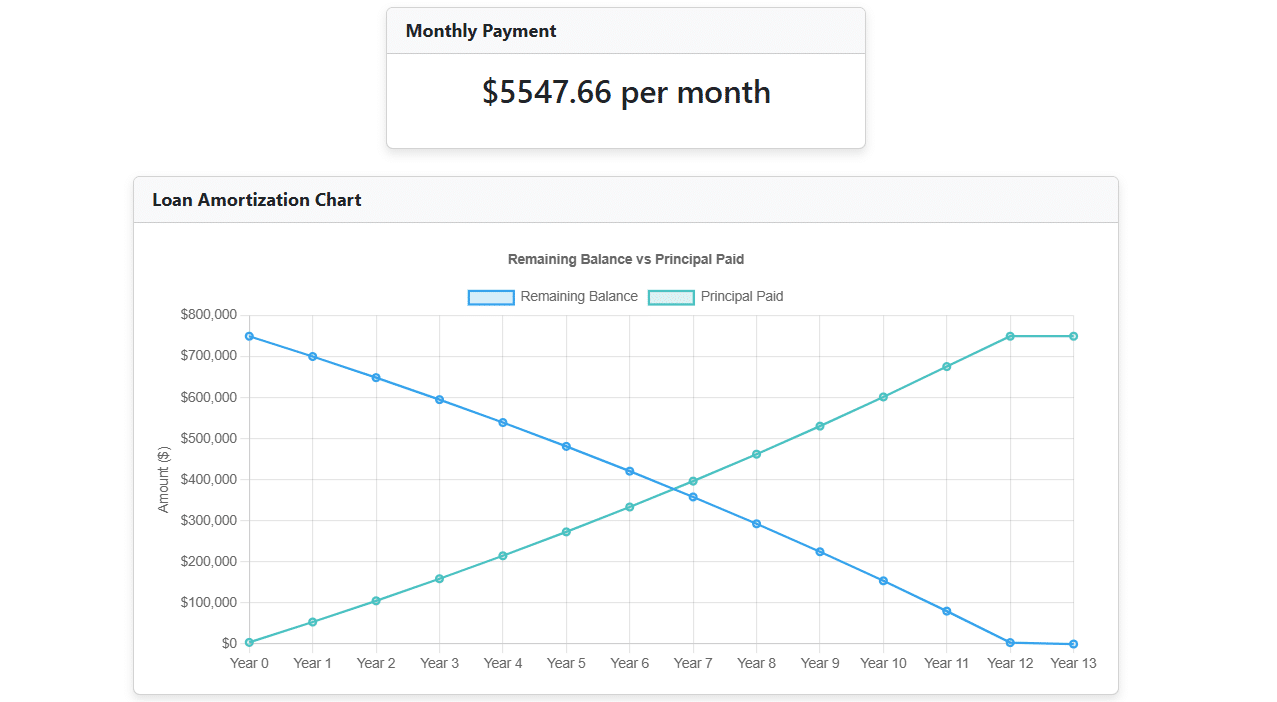
Initially, we tested chart creation without specifying a charting library. Impressively, Claude AI successfully produced functional JavaScript chart logic using native canvas and dynamic DOM manipulation. Later, we instructed Claude to use Chart.js explicitly, and it adapted the code accordingly with great accuracy.
This implementation renders:
- A line chart with remaining balance on the X-axis and principal paid on the Y-axis
- Interactive tooltips and clean styling
These visualizations enhance usability, allowing users to interpret amortization schedules at a glance.
Step 5: Special Considerations for WordPress
When deploying this SPA on a WordPress site, several constraints had to be considered:
- Single-line code to prevent WordPress from auto-formatting the HTML (e.g., inserting
<p>tags) - Case-insensitive JSON key handling to accommodate any variation in casing returned by the API
- Date input conversion to send
dd-mm-yyyyformatted strings instead of ISO format
Claude AI’s Prompt
Below is the final prompt used with Claude AI to generate this application:
Final Prompt:
I would like to build a single-page application using only HTML, CSS, and JavaScript. The application should allow users to enter a series of inputs, trigger a calculation by calling a SpreadsheetWeb Hub endpoint, and display a series of outputs.

Target API Endpoint: https://private.spreadsheetweb.com/api/calculations/calculatesinglesimple

Styling: Use Bootstrap for styling the page.

API Structure Sample API Request:
{
  "request": {
    "applicationId": "YOUR-APPLICATIONID",
    "inputs": {
      "interest_rate": null,
      "loan_amount": null,
      "loan_period": null,
      "loan_start_date": null
    },
    "outputs": [
      "scheduled_payment_amt",
      "amortization_chart"
    ],
    "workspaceId": "YOUR-WORKSPACEID"
  }
}

Sample API Response:
{
  "response": {
    "outputs": {
      "scheduled_payment_amt": "3800.1398236941",
      "amortization_chart": [
        {
          "year": "Year",
          "remaining": "Remaining",
          "interest Paid": "Interest Paid",
          "principal Paid": "Principal Paid"
        },
        {
          "year": "0",
          "remaining": "750000",
          "interest Paid": "2812.5",
          "principal Paid": "1987.6398236941"
        },
        {
          "year": "1",
          "remaining": "725650.179801542",
          "interest Paid": "35973.0458601271",
          "principal Paid": "26428.7718478963"
        },
        {
          "year": "2",
          "remaining": "700181.733123397",
          "interest Paid": "68010.7703912683",
          "principal Paid": "51992.7252010843"
        },
        {
          "year": "3",
          "remaining": "673543.270460802",
          "interest Paid": "98874.0913780183",
          "principal Paid": "78731.0820986636"
        },
        {
          "year": "4",
          "remaining": "645681.041484138",
          "interest Paid": "128509.056927021",
          "principal Paid": "106697.794433991"
        },
        {
          "year": "5",
          "remaining": "616538.826583044",
          "interest Paid": "156859.236604377",
          "principal Paid": "135949.292640963"
        },
        {
          "year": "6",
          "remaining": "586057.8234281",
          "interest Paid": "183865.607571931",
          "principal Paid": "166544.599557739"
        },
        {
          "year": "7",
          "remaining": "554176.528321155",
          "interest Paid": "209466.435492664",
          "principal Paid": "198545.449521334"
        },
        {
          "year": "8",
          "remaining": "520830.61209493",
          "interest Paid": "233597.14996492",
          "principal Paid": "232016.412933408"
        },
        {
          "year": "9",
          "remaining": "485952.790311454",
          "interest Paid": "256190.214234085",
          "principal Paid": "267025.026548572"
        },
        {
          "year": "10",
          "remaining": "449472.687497448",
          "interest Paid": "277174.988918856",
          "principal Paid": "303641.92974813"
        },
        {
          "year": "11",
          "remaining": "411316.695142704",
          "interest Paid": "296477.589477111",
          "principal Paid": "341941.007074205"
        },
        {
          "year": "12",
          "remaining": "371407.823174933",
          "interest Paid": "314020.73712379",
          "principal Paid": "381999.537311855"
        },
        {
          "year": "13",
          "remaining": "329665.544611395",
          "interest Paid": "329723.602899968",
          "principal Paid": "423898.349420006"
        },
        {
          "year": "14",
          "remaining": "286005.633073853",
          "interest Paid": "343501.644578489",
          "principal Paid": "467721.985625815"
        },
        {
          "year": "15",
          "remaining": "240339.992838988",
          "interest Paid": "355266.436077073",
          "principal Paid": "513558.87201156"
        },
        {
          "year": "16",
          "remaining": "192576.481081367",
          "interest Paid": "364925.48903469",
          "principal Paid": "561501.496938272"
        },
        {
          "year": "17",
          "remaining": "142618.721950277",
          "interest Paid": "372382.066191188",
          "principal Paid": "611646.597666104"
        },
        {
          "year": "18",
          "remaining": "90365.9121052841",
          "interest Paid": "377534.986193606",
          "principal Paid": "664095.355548015"
        },
        {
          "year": "19",
          "remaining": "35712.6173181334",
          "interest Paid": "380278.419435332",
          "principal Paid": "718953.600190618"
        },
        {
          "year": "20",
          "remaining": "0",
          "interest Paid": "380722.23087855",
          "principal Paid": "750000"
        },
        {
          "year": "",
          "remaining": "",
          "interest Paid": "",
          "principal Paid": ""
        },
        {
          "year": "",
          "remaining": "",
          "interest Paid": "",
          "principal Paid": ""
        },
        {
          "year": "",
          "remaining": "",
          "interest Paid": "",
          "principal Paid": ""
        },
        {
          "year": "",
          "remaining": "",
          "interest Paid": "",
          "principal Paid": ""
        },
        {
          "year": "",
          "remaining": "",
          "interest Paid": "",
          "principal Paid": ""
        },
        {
          "year": "",
          "remaining": "",
          "interest Paid": "",
          "principal Paid": ""
        },
        {
          "year": "",
          "remaining": "",
          "interest Paid": "",
          "principal Paid": ""
        },
        {
          "year": "",
          "remaining": "",
          "interest Paid": "",
          "principal Paid": ""
        },
        {
          "year": "",
          "remaining": "",
          "interest Paid": "",
          "principal Paid": ""
        }
      ]
    }
  },
  "timingsSeconds": {
    "hubApiApplication": 0.0817865,
    "designerApplication": 0.1957489
  },
  "performanceInformation": null,
  "isError": false,
  "messages": null
}

User Interface Specifications:
- Inputs should appear on the page as textboxes.
- Output must be displayed in the following format:
- Output field names should be read without case sensitivity. Inputs should be pre-populated with the default values provided in the sample JSON request.

Buttons and Navigation:
- Include a CALCULATE button. When clicked:
 - Collect input values.
 - Send a request to the API endpoint.
 - Display the returned outputs. WordPress Theme Compatibility Requirements
- Write the final HTML/JS code as a single line.
- Make case-insensitive handling of the outputs section using the logic: outs = json.outputs || (json.response && json.response.outputs)
- Inputs values should be send in ""
- date input should be calendar control but, when we are sending its value, it should be dd-mm-yyyy format.
- and amortization chart output is table output, consider that when you applying that on UI.
- please write this code as a single line code and consider that dont let wordpress add this code <p> like elements - Add case-insensitive field handling for the amortization chart data - Update the row filtering logic to check for both lowercase and uppercase versions of the field names -Create chart, to this code. I mean remaining response will be x axis and principal paid will be y axis. And according to that add this chart (it could be column, pie, etc. it depends on your choice no difference) to this code. (You can also use library website like chart.js. According to that can you update this code by adding this feature.)

Conclusion
By combining SpreadsheetWeb's powerful API framework with AI-generated code from Claude, building interactive, data-driven web applications becomes significantly more accessible. Whether you’re working with mortgage models, insurance calculations, or educational cost estimators, this workflow can be reused for other business logic embedded in Excel.
Adding visualization through Chart.js further enhances usability and transforms flat data into insightful visual tools.
This example demonstrates how AI can help rapidly prototype and deliver fully working applications by simply describing your goals in detail.
Need help converting your Excel models into responsive web apps? Visit SpreadsheetWeb.com or try prompting Claude with your own model logic!