We’re back with another round of exciting updates to SpreadsheetWeb! This release focuses on giving you more flexibility when building applications, enhancing support for advanced Excel features, and improving the overall design experience in the UI designer. Let’s dive into what’s new this month.
Render Containers as Tabs
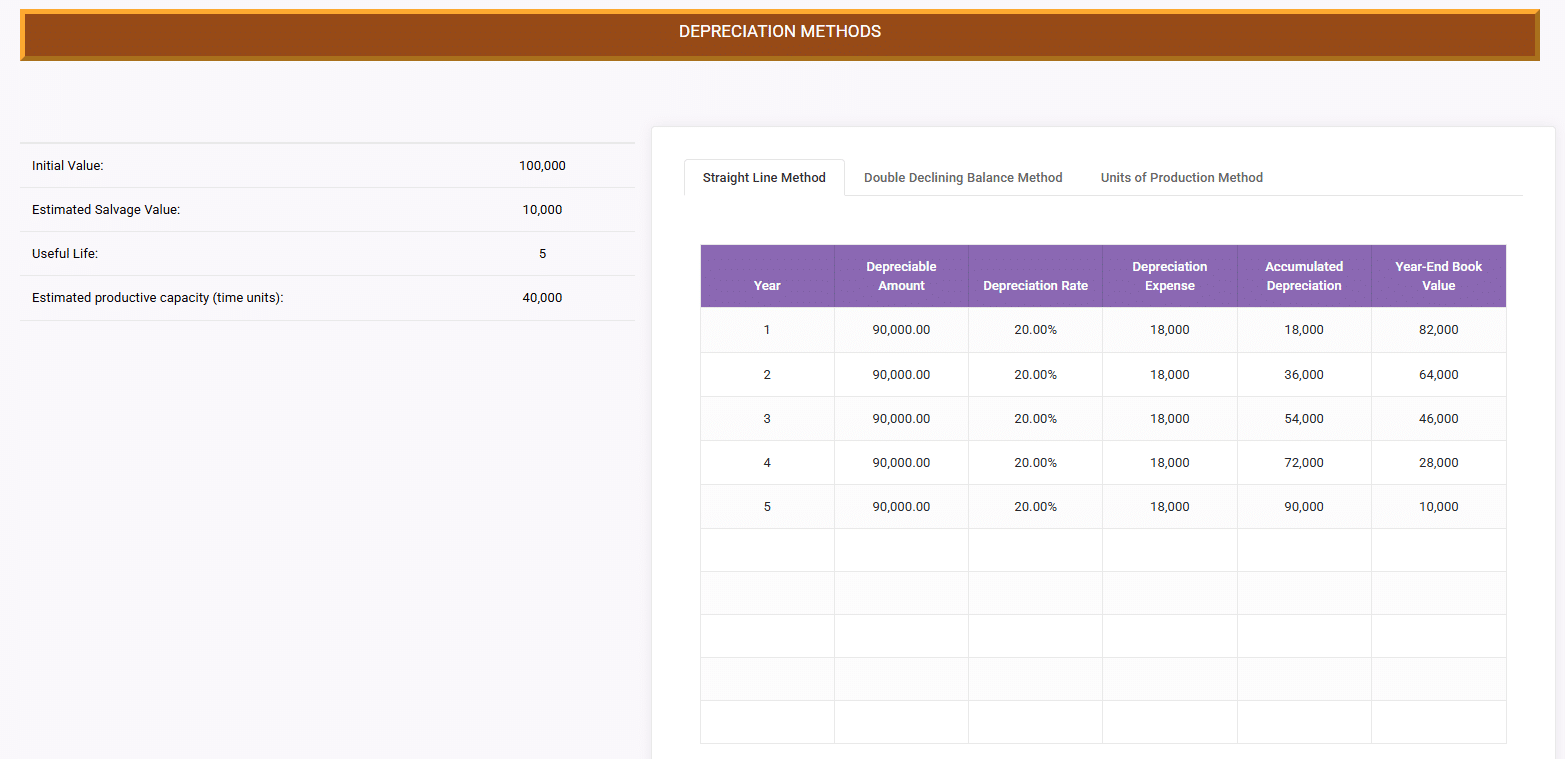
We’ve added support for rendering containers as tabs. Now, when a container’s direct children are all containers, you’ll see a new option to display them as tabs. Each child container can define its Header Text, which becomes the tab label, and the system will handle the tabbed layout automatically. This makes it easier to create organized, multi-section layouts with clean navigation for end users.
Support for Excel DataTables
In Excel, a Data Table is a built-in What-If Analysis tool that allows you to perform multiple recalculations of a model by varying one or two input values. Data Tables are often used for sensitivity testing, simulations, or scenario analysis because they automatically run the same calculation across a large set of input values and display the results in a structured table.
With this release, we’ve added full support for Excel DataTables, including the ability to perform recursive workbook calculations. This means you can bring models that already use Data Tables directly into SpreadsheetWeb without removing or restructuring them. Complex simulations (like Monte Carlo methods or iterative financial forecasts) can now run natively within web applications powered by SpreadsheetWeb.
Consider a life insurance premium model built in Excel. Insurers often need to estimate premiums under different risk scenarios to ensure pricing remains both competitive and sustainable. By using a Data Table, the Policy Amount input can be varied across thousands of simulated values randomly generated from a distribution function. For each Policy Amount, the model recalculates the insurance premium, and the results of these simulations are then aggregated into a histogram, providing a clear view of the distribution of possible premium outcomes. With SpreadsheetWeb’s new Data Table support, this same workbook can now be deployed as a web application, enabling underwriters and business analysts to run simulations with a single click. Users can adjust assumptions, re-run the simulation, and instantly visualize the impact on premiums, all directly in their browser, without requiring desktop Excel. You can explore this capability in our demo application.
By adding Data Table support, we’re closing an important gap between desktop Excel and SpreadsheetWeb applications, ensuring that even the most advanced workbook logic can transition seamlessly to the web.
CSV File Upload to Named Range
We’ve added the ability to bind a CSV upload to a named range. With this feature, uploaded CSV data will flow directly into a target output grid control, updating the model automatically. This makes it much easier to handle structured datasets and feed them into your applications without manual copy-pasting.
Save as New Record
We’ve added a new option to the Save event: Save as New Record. By enabling this property, each save action will create a new record with a unique ID, rather than updating the existing one. This is especially useful for scenarios where versioning, audit trails, or maintaining multiple scenarios of the same dataset are critical.
These updates bring more power and flexibility to both your workbook logic and application design. From advanced Excel features like DataTables to time-saving UI enhancements like control conversion and multi-select, we’re committed to helping you build smarter, faster, and more scalable solutions with SpreadsheetWeb.
Stay tuned — we’ve got even more exciting improvements on the horizon!