

Walk into almost any engineering team, civil, mechanical, chemical, electrical, environmental, biomedical, and you’ll find the same quiet “unofficial standard” sitting next to the CAD/CAE tools and code repos: spreadsheets.
They’re not glamorous. They’re not always “enterprise-grade.” But they’re fast, flexible, and familiar, that combo makes them incredibly persistent in real engineering work.
1) How widespread are spreadsheets in engineering?
If you want referenceable numbers (not vibes), the cleanest evidence comes from employer demand data (job ads) plus workplace-use surveys:
Engineering job ads: Excel shows up in ~4 out of 10 postings (bachelor’s level)
A large study analyzing 26,103 engineering job advertisements found Microsoft Excel to be the most frequently specified technical skill across engineering disciplines. In the paper’s discipline-by-discipline breakdown for bachelor’s-level postings, Excel appears in:
Engineering Fields Distribution (%)
That doesn’t mean engineers only use Excel, but it does show spreadsheets are a widely expected baseline skill across multiple engineering fields.
Broader “tech work” job ads: Excel appears hundreds of thousands of times
A separate analysis referenced by Business Insider (based on 12+ million tech job postings on Indeed) reported Excel appearing in ~531,000 listings, far more than many programming tools in that dataset. (Business Insider)
Again: not “engineering only,” but it reinforces that spreadsheet skills remain heavily requested in technical roles.
Workplace-use survey: frequent Excel use is normal
A survey of 1,000 office workers reported 66% use Excel at least once per hour, and workers spent ~38% of their time in Excel. (Acuity Training - Power BI Training)
Engineering is often office-based knowledge work (even when it supports field work), so these usage patterns are consistent with the day-to-day environment many engineers operate in.
Bottom line: By multiple quantitative lenses, especially engineering job ads, spreadsheets are not “niche tools.” They’re a common, cross-discipline expectation and a persistent part of engineering workflows. (ResearchGate)
2) What engineers use spreadsheets for
Spreadsheets show up in engineering in two big roles:
- “Glue work” — organizing inputs/outputs, cleaning data, tracking assumptions, summarizing results for reports
- “Model work” — running real calculations that influence design choices, costs, safety factors, and compliance documentation
Because spreadsheets are quick to set up and easy to share, they often become the place where engineering work gets “stitched together” across tools (CAD/CAE, lab instruments, ERP/PLM, simulation exports, etc.).
Civil & structural engineering
Spreadsheets are commonly used for:
- Load takedowns and design checks (dead/live/wind/seismic combinations, safety factors)
- Member sizing and basic structural verification calculations
- Quantity takeoffs and cost estimating (materials, rebar schedules, concrete volume, earthworks)
- Survey and field data processing (tabulating measurements, quick sanity checks)
Typical spreadsheet pattern: a set of input cells (geometry, material properties, loads) feeding a chain of calculations and producing a clean “output summary” engineers can paste into calculation packages or design memos.
Mechanical engineering
Spreadsheets are frequently used for:
- Strength, fatigue, stiffness, and deflection calculations
- Tolerance stack-ups and fits/clearances across assemblies
- Thermal calculations (simple heat transfer balances, temperature rise estimates)
- Design trade studies (parametric “what if” comparisons: weight vs cost vs performance)
A common use case is building a reusable calculator that lets engineers quickly iterate through multiple design variants before committing to detailed simulation or prototyping.
Electrical & electronics engineering
Spreadsheets are common for:
- Power budgets and load schedules (currents, voltages, wire sizing checks)
- Component selection tables (ratings, derating, operating margins, cost)
- Test data reduction (importing measured values and generating pass/fail summaries)
- BOM cost rollups and lifecycle tracking (availability, alternates, revisions)
Even teams with strong specialized EDA tools still use spreadsheets as the “human-readable” layer for decisions and reporting.
Chemical & process engineering
Spreadsheets are widely used for:
- Mass and energy balances
- Equipment sizing (pumps, heat exchangers, tanks) using established correlations
- Sensitivity analysis (changing feed conditions, temperatures, pressures, flow rates)
- Process economics (OPEX/CAPEX estimates, utilities, throughput vs cost)
They’re especially popular in early process design because they allow rapid changes and clear visibility into assumptions without needing a full flowsheet model.
Industrial & manufacturing engineering
Spreadsheets often act like an operational cockpit for:
- Capacity planning (cycle times, line balancing, throughput)
- Yield/scrap tracking and root-cause categorization
- Quality metrics and SPC-style summaries
- Work instructions, checklists, and shift handoff tables
- Cost rollups (labor, materials, overhead allocation)
In many plants, spreadsheets become “living systems” that bridge gaps between formal systems and day-to-day execution.
Environmental engineering
Common spreadsheet uses include:
- Sampling and lab data organization
- Trend analysis (seasonality, exceedances, compliance summaries)
- Simple fate/transport approximations (screening-level calculations)
- Permit reporting tables and documentation packages
Spreadsheets are useful here because the work often combines measurement datasets, regulatory thresholds, and recurring reporting formats.
3) Why spreadsheets persist in engineering
This isn’t just inertia. Spreadsheets have structural advantages that fit engineering work:
- Speed-to-first-result: you can sketch a model in minutes.
- Low friction collaboration: almost everyone can open and edit.
- Transparency: formulas are visible; you can trace assumptions (when built well).
- What‑if analysis by default: tweak an input, see outputs immediately.
- They’re “universal adapters”: you can import/export data from almost anywhere.
4) The downside: spreadsheet risk is real
Spreadsheets are widely used for significant numerical processing and modeling, so quality and correctness matter.
A 2024 literature review on spreadsheet quality assurance synthesizes research on how spreadsheets are used and how organizations attempt to mitigate risk, reflecting that spreadsheet correctness and governance remain persistent issues (not “solved problems”). (ERIC)
Common failure modes in engineering contexts include:
- Silent formula errors (wrong cell references, copy/paste drift)
- Unit mistakes (kN vs N, mm vs m, °C vs K)
- Hidden assumptions (hard-coded constants nobody remembers)
- Version chaos (multiple “final_v7_REALfinal.xlsx” copies)
- Overconfidence (a spreadsheet feels precise because it outputs a number)
None of this means “don’t use spreadsheets.” It means treat them like software when the stakes are high.
5) Best practices for engineering spreadsheets that don’t betray you
If the spreadsheet influences a design decision, a quote, a safety margin, or a client deliverable, build it like a lightweight engineering product:
Design and structure
- Separate Inputs, Calculations, and Outputs into distinct areas/sheets.
- Use named ranges for key inputs (more readable, less fragile).
- Keep formulas short and auditable; avoid mega-formulas when possible.
- Include a visible units column beside every input.
Validation and testing
- Create a test sheet with known benchmark cases (hand calcs or trusted software).
- Add sanity checks (e.g., mass balance closes, monotonic relationships hold).
- Use data validation for inputs (bounds, dropdowns, required fields).
Change control
- Put version + date + owner in the workbook.
- Track changes with a simple changelog tab.
- If you can, store in a system with history (SharePoint/OneDrive versioning, or export logic into code when appropriate).
Documentation
- Add a “Read Me” sheet: purpose, scope, assumptions, limitations, references.
- Cite standards, textbooks, or equations used.
If you do only one thing: make it easy for a second engineer to review.
6) When to turn a spreadsheet into a web app
Spreadsheets start breaking down when you need:
- Many users (especially non-Excel users)
- Controlled inputs (no accidental edits)
- Audit trails and consistent versioning
- Security (file sharing is messy)
- A stable interface (forms, workflows, approvals)
- Integration (APIs, databases, embedding in portals)
SpreadsheetWeb: “publish the model” without rewriting everything
SpreadsheetWeb is a no-code platform to turn Excel spreadsheets into web applications and APIs, letting teams keep the spreadsheet logic while changing the delivery mechanism. (SpreadsheetWeb)
For engineering use cases specifically, SpreadsheetWeb is commonly used by engineering professionals to convert engineering spreadsheet models into applications (aimed at sharing, controlling access, and reducing the friction of distributing spreadsheet tools). (SpreadsheetWeb)
Here are a few engineering-oriented demos show what this looks like when you take a familiar Excel model and publish it as a browser-based tool:
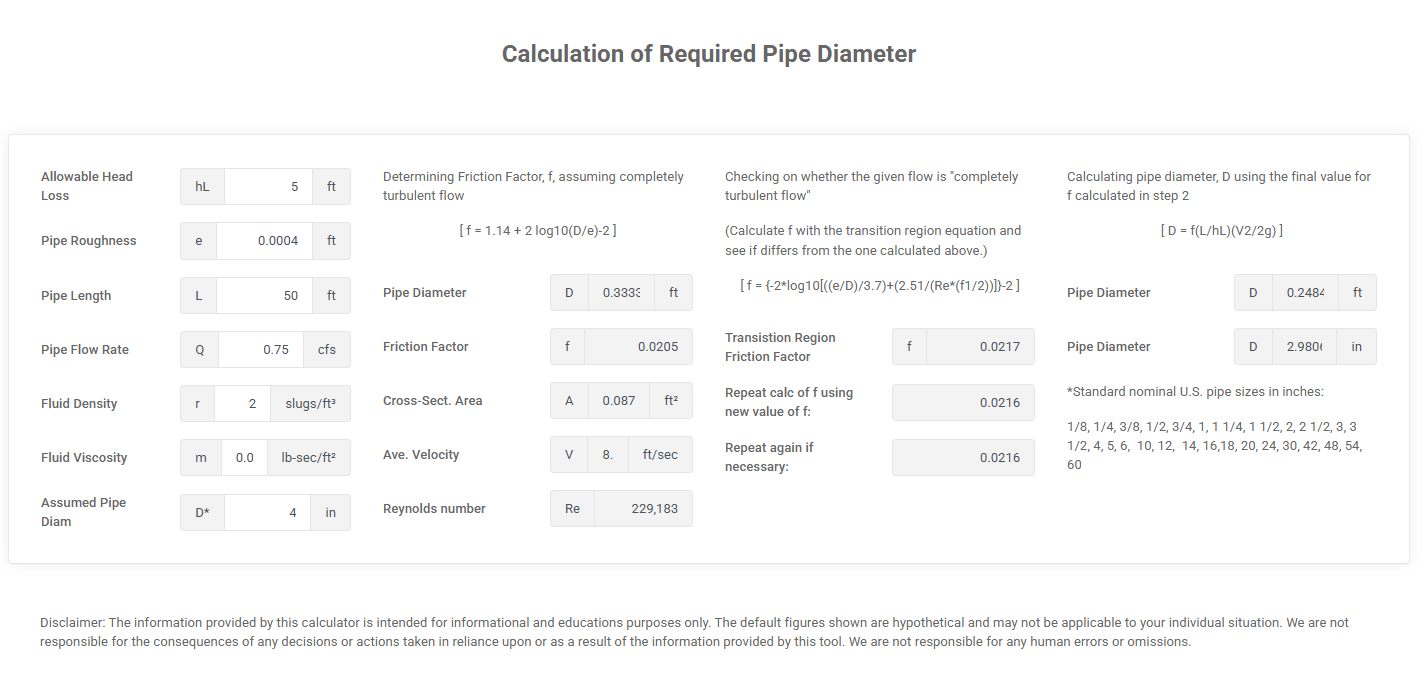
- Pipe sizing (fluid systems / piping / HVAC): a Pipe Diameter Calculator Demo that helps determine an appropriate pipe size based on flow rate, velocity, and fluid properties—explicitly described as a spreadsheet-based sizing model converted into a responsive web app so users can test scenarios without needing the spreadsheet file.

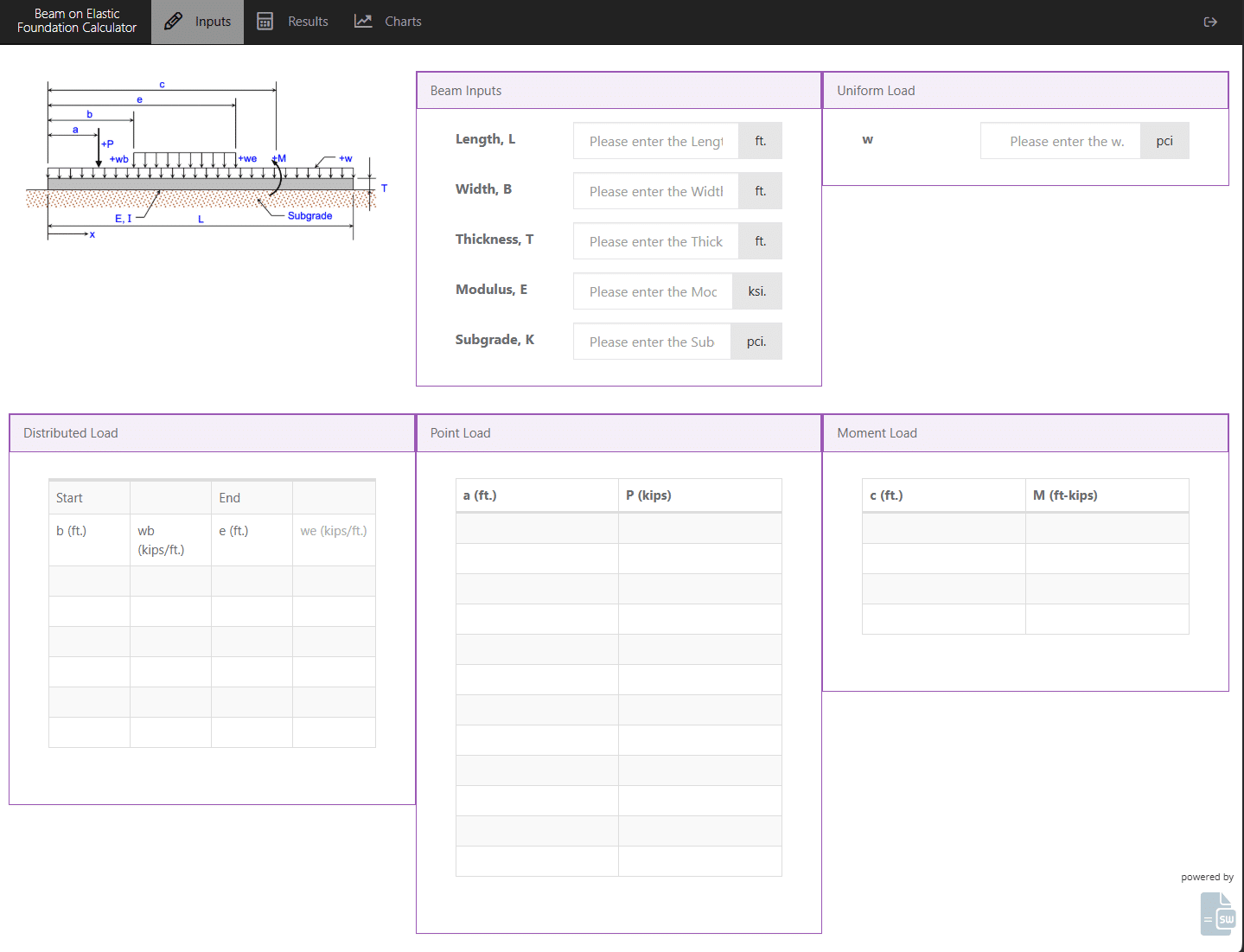
- Structural / geotechnical analysis: a Beam on Elastic Foundation Calculator Demo that computes beam deflections, shear forces, and bending moments for beams supported by a continuous elastic medium (e.g., soil/subgrade). The page frames it as an Excel-based engineering model transformed into an interactive web application while preserving the underlying formulas.

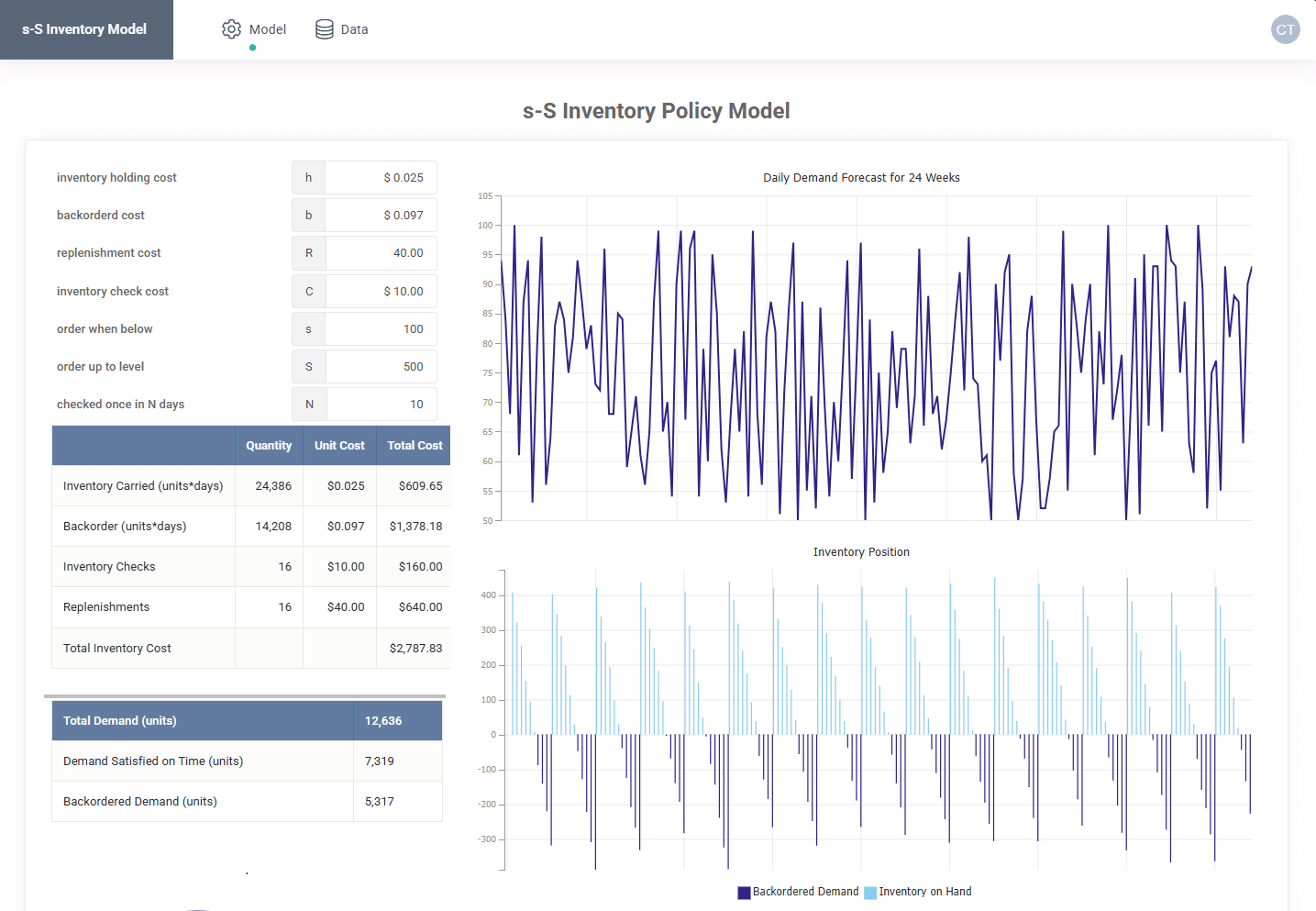
- Industrial engineering / operations research (inventory policy): an s‑S Inventory Model Demo that implements a classic two-threshold policy (reorder point s, order-up-to S) with interactive inputs for demand parameters, lead time, and costs, providing real-time calculations and scenario analysis. It’s also described as an Excel-based model converted into a web app with the Excel logic preserved.

A practical decision rule
Convert a spreadsheet into an app when:
- The spreadsheet is used repeatedly (weekly/monthly) by multiple people, and
- A wrong edit or wrong version creates real cost/risk, or
- You’re spending too much time supporting the spreadsheet (“how do I run this?” “which version is current?”)
Think of it as graduating the spreadsheet from a personal tool → a shared engineering product.
Summary
Spreadsheets are prevalent in engineering for a simple reason: they sit at the intersection of math, data, communication, and speed.
The trick isn’t to pretend engineers will stop using spreadsheets. The trick is to:
- Use them deliberately (with testing and structure), and
- Promote them to more controlled delivery (like web apps) when scale and risk demand it.
References
- Fleming et al., analysis of 26,103 engineering job advertisements and frequency of Excel across disciplines. (ResearchGate)
- Business Insider (via Course Report/Indeed postings analysis) reporting Excel appearing in ~531,000 of 12M+ tech job listings. (Business Insider)
- Acuity Training survey of 1,000 office workers reporting Excel usage frequency (e.g., 66% at least hourly). (Acuity Training - Power BI Training)
- Rebman et al. (2023) job-posting analysis showing Excel mentions far exceed Google Sheets.
- Gomes Jr. et al. (2024) Excel tool for water distribution network modeling/optimization; includes reported 9.8% cost reduction example. (arXiv)
- Darnal et al. (2022) MS Excel-based approach for driveshaft design for stiffness and fatigue strength. (NSF Public Access Repository)
- Gómez‑Siurana & Font‑Escamilla (2022) using Excel spreadsheets to teach rigorous methods for multicomponent separations. (Florida Virtual Campus Journals)
- SpreadsheetWeb platform pages + documentation on converting Excel models into web applications/APIs (including engineering-focused discussion). (SpreadsheetWeb)
- Spreadsheet quality assurance literature review (2024) highlighting ongoing QA/governance concerns. (ERIC)
