
Managing online payments is essential for businesses aiming to streamline transactions, and automate financial workflows. A seamless payment process not only improves the customer experience but also reduces administrative burdens, allowing businesses to focus on growth. By integrating PayPal with SpreadsheetWeb, companies can facilitate direct product purchases without requiring backend development. One of the most effective ways for this integration is by leveraging PayPal Payment Links and QR Codes. These tools allow businesses to create direct, shareable payment links and scannable QR codes that customers can use to complete transactions seamlessly.
This article provides a comprehensive, step-by-step guide on setting up PayPal Payment Links and QR Codes, integrating them with SpreadsheetWeb. We will focus on this method as a no-code approach, ideal for businesses looking for simplicity and ease of use.
Why Choose PayPal Payment Links & QR Codes?
PayPal Payment Links & QR Codes offer a seamless solution for businesses that don’t have a dedicated e-commerce website or backend system. With this method, companies can:
- Quickly set up payment options without coding knowledge.
- Accept payments from anywhere by sharing a simple link or QR code.
- Track transactions easily via the PayPal Dashboard.
- Ensure secure transactions with PayPal’s trusted payment platform.
Whether you run a small business, manage online services, or sell digital products, PayPal Payment Links & QR Codes provide a convenient way to collect payments.
Step 1: Creating Payment Links & QR Codes
Before integrating payments with SpreadsheetWeb, you need to generate payment links through PayPal. Here’s how you can create them:
- Log in to your PayPal Business Dashboard.
- Navigate to Pay & Get Paid > Pay Links and Button
- Under "Choose a link or button," select Payment link & QR code.
- Create your product or service:
- Item Name: (e.g., Basic Product, Premium Product, Gold Product)
- Price: Set a one-time price.
- Currency: Select your preferred currency.
- Customize the thank you page (optional).
- Click Create Link.

- Copy the generated Payment Link and QR code.
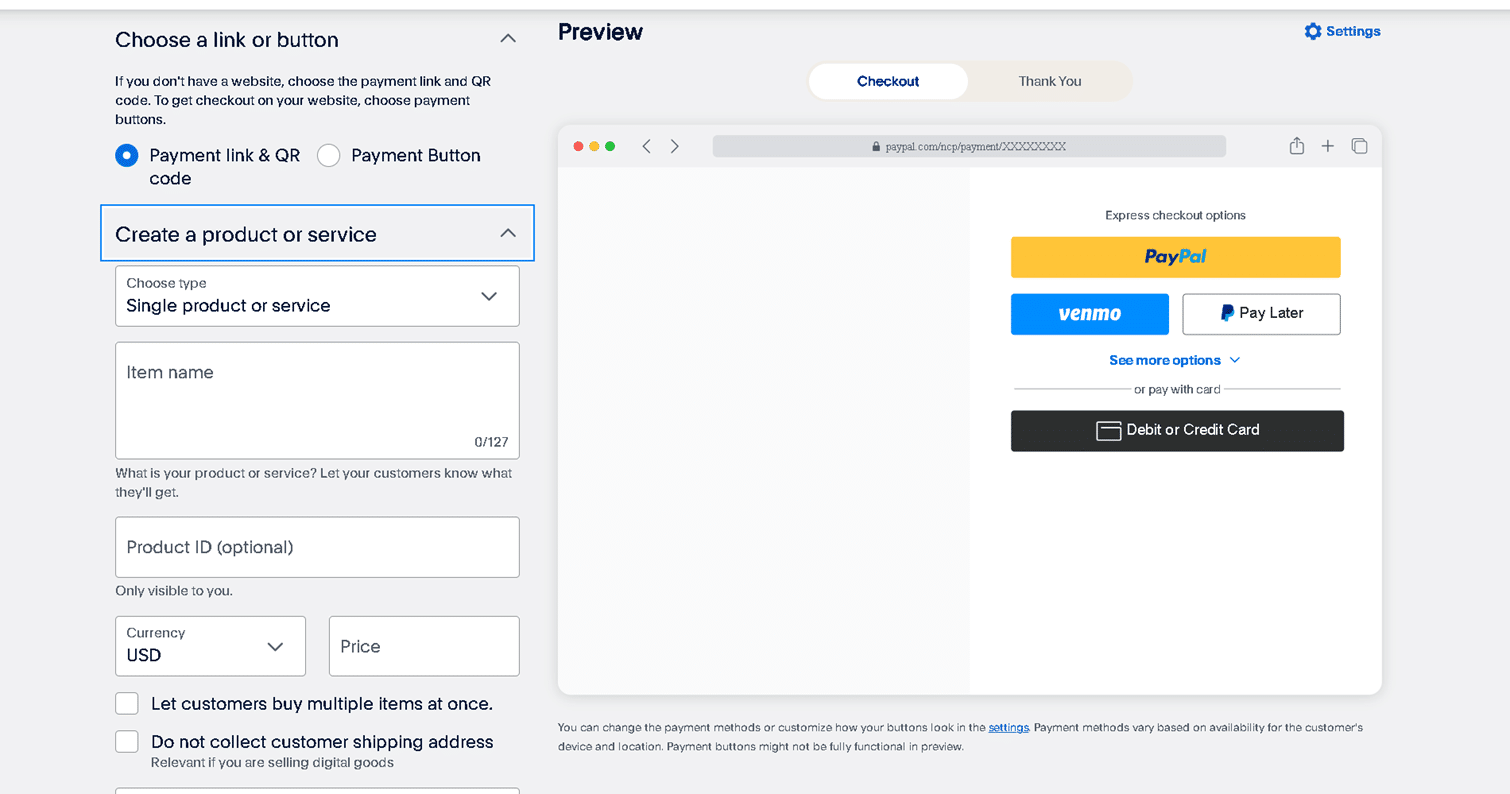
Repeat this process for each product or service you want to offer.
Step 2: Storing Links in SpreadsheetWeb
Once your payment links are ready, you’ll need to organize them within an Excel file to use dynamically in SpreadsheetWeb. First create a table structured like this:
| Product Name | Payment Link | |
| Basic Product | https://www.paypal.com/paypalme/link1 | |
| Premium Product | https://www.paypal.com/paypalme/link2 | |
| Gold Product | https://www.paypal.com/paypalme/link3 |
We then use a lookup formula to retrieve the payment link of the selected product and assign it to a named range (e.g., SelectedPaymentLink).
Step 3: Configuring the Payment System in SpreadsheetWeb
Dynamic Integration
The payment link is fetched dynamically from the Excel table using the formula from Step 2. This allows the payment link to update automatically based on the selected product.
Adding a Pay Button in SpreadsheetWeb
- Go to the UI Designer in SpreadsheetWeb.
- Add a Button and name it "Pay".

- Go to Navigation Settings.
- Choose External Page and enable the Dynamic Option.
- Select the named range (SelectedPaymentLink) as the URL source.


Now, when the user clicks the "Pay" button, they are redirected to PayPal’s payment page for the selected product.
Benefits of Using PayPal Payment Links & QR Codes with SpreadsheetWeb
- No Coding Required: Entirely managed through SpreadsheetWeb and Excel without backend development.
- Instant Payments: Customers can pay directly through PayPal links.
- Scalability: New products can be added by simply updating the Excel file.
- Secure Transactions: All payments are protected by PayPal’s secure platform.
While this approach is easy to configure and implement, it has a key limitation: the payment status is not automatically linked to the SpreadsheetWeb database. This means that administrators must manually review successful payments within their PayPal account and cross-check them against the relevant data in SpreadsheetWeb to ensure accuracy. This manual verification process can be time-consuming, particularly for businesses processing a high volume of transactions. For those seeking a fully integrated solution, where payment status updates are automatically reflected in SpreadsheetWeb, alternative integration methods provide more advanced automation. These approaches, discussed in the following section, enable businesses to establish a seamless connection between PayPal and SpreadsheetWeb, ensuring real-time payment tracking and reducing administrative effort.
Comparing PayPal Payment Integration Methods
| Feature | PayPal Payment Links & QR Codes | PayPal Checkout | PayPal REST API |
| Backend Required | ❌ No | ✅ Yes | ✅ Yes |
| Customer Tracking | ❌ No | ✅ Yes | ✅ Yes |
| Metadata Storage | ❌ Limited | ✅ Full | ✅ Full |
| Recurring Payments | ❌ No | ✅ Yes | ✅ Yes |
| Customizable Checkout | ❌ Basic | ✅ Advanced | ✅ Fully Customizable |
| Security & Compliance | ✅ PayPal-hosted | ✅ Enhanced | ✅ PCI-DSS compliance |
Which Integration Is Best for You?
- PayPal Payment Links & QR Codes: Best for businesses looking for a simple, no-code solution that requires minimal setup.
- PayPal Checkout: Ideal for businesses that need advanced features like recurring payments and improved customer tracking but require backend development.
- PayPal REST API: Provides complete customization and flexibility but requires technical expertise and backend development.
Conclusion
Integrating PayPal Payment Links & QR Codes with SpreadsheetWeb offers businesses a hassle-free way to collect payments securely and efficiently without the need for backend development. This no-code approach allows for quick setup, seamless integration, and scalability.
For businesses that require advanced tracking, recurring payments, or detailed metadata storage, PayPal Checkout or REST APIs are better suited, though they require backend development.
Regardless of your business size, combining SpreadsheetWeb with PayPal creates a versatile, powerful, and adaptable payment solution that meets various operational needs while providing a user-friendly experience for customers.