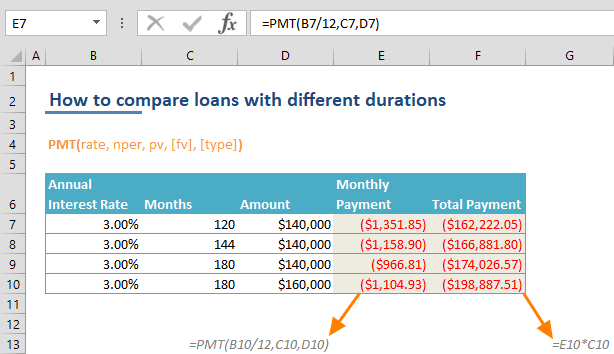
If you're in the process of considering loan options for a home or vehicle but find it challenging to determine the most favorable choice, Microsoft Excel can be a valuable tool for comparison and decision-making. Leveraging Excel's PMT function proves particularly effective for such analyses. This guide will walk you through the process of how to calculate and compare loans with different durations in Excel.
Calculating Payments of a Loan
Before steeping into showing how to compare loans, we will show how to calculate payments of a loan. The PMT function is a powerful tool in financial calculations, specifically designed to determine loan payments based on a fixed interest rate. This function is particularly useful when you need to ascertain the regular payments a borrower must make over a specific period to fully repay a loan.
This function requires five arguments, with three being mandatory and the other two optional. Essential inputs include the interest rate (rate), the number of payment periods (nper), and the loan amount (pv). Optionally, you can include a residual value (fv) if applicable. Additionally, the type argument specifies the timing of repayments, with the default being at the end of each period.
PMT(rate, nper, pv, [fv], [type])
Here is how you can calculate a payment amount for a $140,000 loan with constant payments over 120 months, with a 3.00% annual interest rate.

In the provided example, the annual interest rate is divided by 12 to align with the monthly period used in the formula. If the timeframe were 10 years instead of 120 months, the 3.00% annual rate could be used without monthly division.
How to Compare Loans with Different Durations
After calculating the payment amount using a simple formula, the process of to compare loans becomes significantly more efficient by organizing them into a comprehensive table. The first step is to incorporate each distinct loan option as a new row in the table, establishing a visual representation that streamlines a side-by-side assessment of their respective terms and conditions.
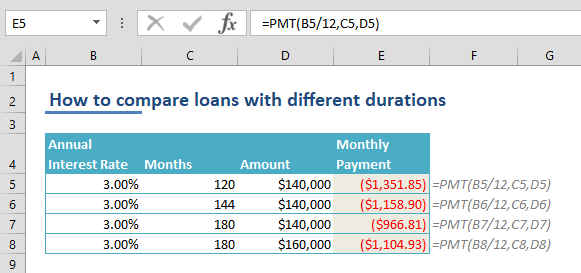
This structured format simplifies to compare loans, allowing for easy analysis and modification of variables. For example, you can adjust the loan amount for the alternative presented in the fourth row, which currently stands at $160,000.
To improve the clarity of this table, we can introduce a column displaying the total payment amount at the conclusion of all payment periods. This can be achieved by incorporating a formula calculating months multiplied by the monthly payment.

That concludes the process! Now, you can compare loans side by side effortlessly!