

As businesses rely more on automation and digital tools, the need for robust calculation engines has grown significantly. Whether it's financial modeling, logistics optimization, or advanced analytics, the tools we use need to handle high-concurrency workloads with speed and accuracy. SpreadsheetWeb, Google Sheets, and Microsoft Office 365 Excel APIs are widely used for such tasks, each catering to different needs.
In this article, we take a closer look at the performance and accuracy of these platforms in 2024. Building on earlier tests in 2017 and 2019, we re-evaluated them using a modern testing environment designed for large-scale, concurrent scenarios.
Updated Test Setup
For these tests, we wanted to ensure the environment could handle the high demands of modern applications. The virtual machine (VM) setup was specifically chosen to minimize hardware-related limitations. Here’s a summary of the testing environment:
- CPU: 8 vCPUs
- RAM: 16 GB
- Disk: 200 GB SSD
- Network: 10 Gbps internet connection (optimized for the test region)
- Cloud Platform: Azure
- VM Type: D8s_v5 (8 vCPUs, 32 GB RAM)
This environment allowed us to stress-test the APIs under realistic workloads without bottlenecks caused by insufficient resources.
APIs Testing Methodology
We used a shared spreadsheet model across all platforms, designed to calculate shipping costs based on three inputs:
- Package weight
- Origin ZIP code
- Destination ZIP code
Three user scenarios were tested:
- Single user
- Five concurrent users
- Twenty-five concurrent users
Each user sent 20 sequential requests to measure two key metrics:
- Response Time: How long it takes for the API to process inputs and return outputs.
- Accuracy: Whether the API consistently delivers the correct results, especially under high load.
Performance Results
Response Time
- SpreadsheetWeb: Maintained response times under one second for all scenarios, including 25 concurrent users. Its single-call structure, which handles both input and output processing in one request, is a significant advantage.
- Google Sheets API: Showed improvements compared to earlier tests, with faster response times overall. However, performance degraded noticeably as user concurrency increased.
- Microsoft Office 365 Excel API: While faster than in past tests, it struggled with concurrency. Its two-step process (separate calls for writing inputs and retrieving outputs) led to increased response times as load grew.
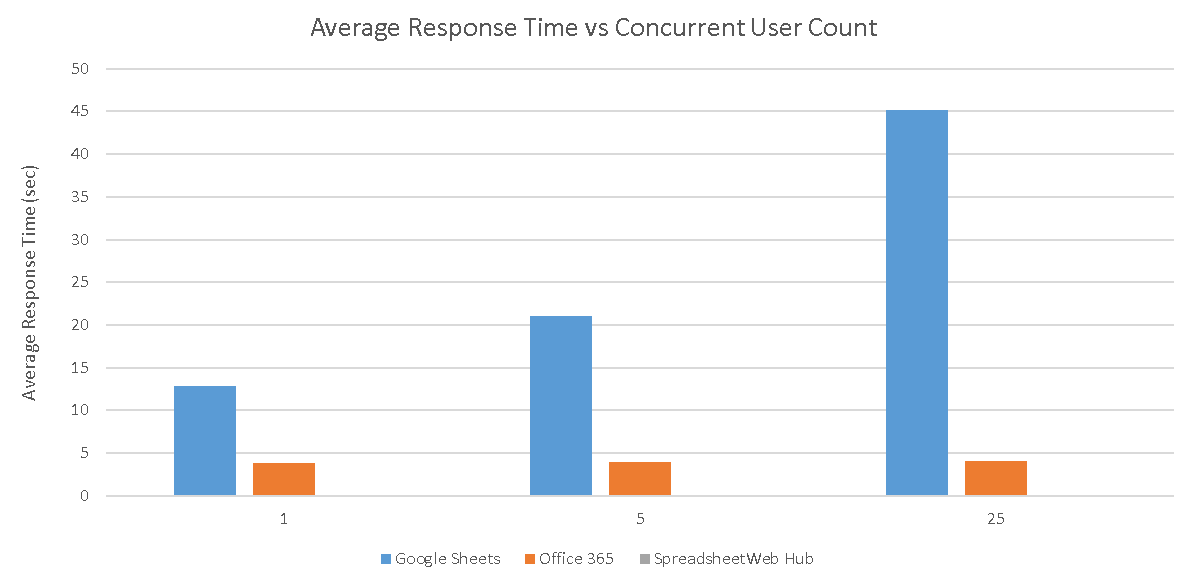
| Concurrent User Count | Google Sheets (sec) | Office 365 (sec) | SpreadsheetWeb Hub (sec) |
| 1 | 12.901600 | 3.853400 | 0.112842 |
| 5 | 21.106700 | 3.925250 | 0.2429184 |
| 25 | 45.201000 | 4.071190 | 0.254332 |
Accuracy of Results
SpreadsheetWeb API
SpreadsheetWeb delivered 100% accuracy in all scenarios. Its internal locking mechanism ensures that inputs and outputs are properly synchronized, even under heavy concurrent loads. This design prevents errors or mismatches that can occur when multiple users send simultaneous requests. Compared to previous versions, SpreadsheetWeb’s calculation engine has improved by 20%, further solidifying its position as a reliable calculation tool for enterprise-level applications.
Google Sheets and Office 365 APIs
The accuracy of both Google Sheets and Office 365 APIs diminishes significantly when concurrency increases.
- Single User Scenario: Both platforms performed well in single-user tests, consistently returning accurate results. This is expected, as there are no overlapping sessions to handle.
- Five and Twenty-Five Concurrent Users: Accuracy drops sharply in concurrent scenarios. Without session locks, these APIs often return incorrect outputs or mix up data between requests. For instance, the output of one user’s inputs may reflect another user’s request due to the lack of proper locking mechanisms.
To mitigate these issues, session locking can be applied to ensure calculations are processed sequentially. However, this approach introduces significant delays. Even with locking, the performance of Google Sheets and Office 365 APIs becomes so poor that it is not practical for real-time or high-load applications.
Key Differences
Design Philosophy
The biggest distinction lies in the design focus of each platform:
- SpreadsheetWeb: Built specifically as a calculation engine, optimized for high-speed and high-accuracy computations. Its single-call design eliminates many of the issues that arise with concurrent user scenarios.
- Google Sheets and Office 365 APIs: Designed for collaboration and ubiquitous access. While great for editing and sharing spreadsheets, they are not tailored for handling heavy computation loads or high-concurrency demands.
APIs Concurrency Handling
SpreadsheetWeb’s ability to handle concurrency without sacrificing speed or accuracy makes it an ideal choice for enterprise applications. By contrast, Google Sheets and Office 365 APIs require additional measures, such as locking workbooks or adding delays, to maintain accuracy under load. These workarounds further degrade performance, making them impractical for high-demand environments.
Lessons from Past Tests
Compared to earlier tests, all three platforms have shown improvements in speed. However, SpreadsheetWeb remains significantly faster and more accurate due to its dedicated architecture. Its calculation engine has improved by 20% over previous versions, allowing it to handle larger workloads with greater efficiency.
For Google Sheets and Office 365 APIs, while they have improved in response times, their design limitations still cause issues in scenarios with high user concurrency. Without session locking, these platforms fail to deliver accurate results, and even with locking, performance becomes unacceptably slow for practical use.
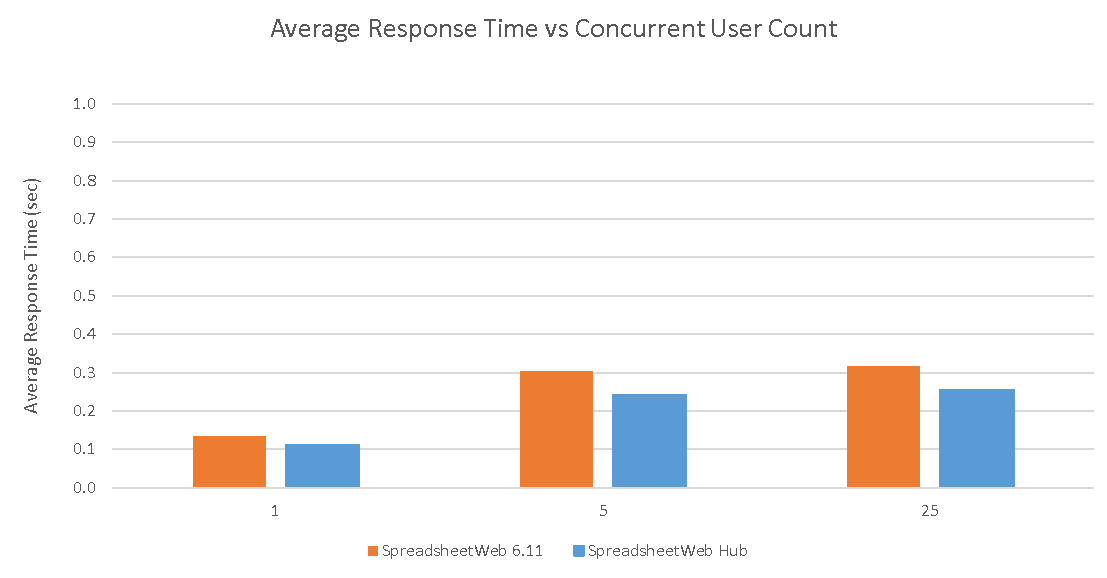
| Concurrent User Count | SpreadsheetWeb 6.11 (sec) | SpreadsheetWeb Hub (sec) |
| 1 | 0.135431 | 0.112842 |
| 5 | 0.303648 | 0.242918 |
| 25 | 0.317915 | 0.254332 |
Use Cases
- SpreadsheetWeb: Best suited for applications requiring high-performance calculations under heavy load, such as financial modeling, logistics, or real-time analytics.
- Google Sheets and Office 365 APIs: Ideal for collaborative projects where multiple users need to edit and view spreadsheets simultaneously but not for handling large-scale computations or high-concurrency workloads.
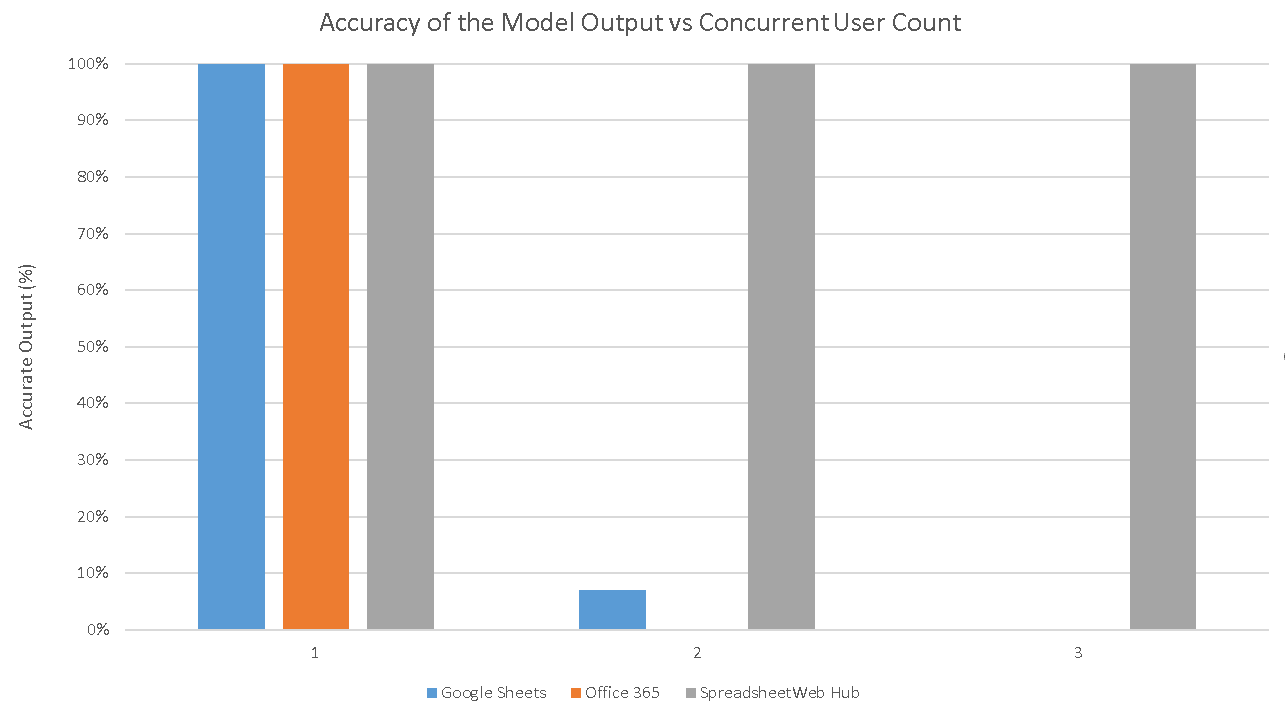
To improve accuracy under high-concurrency scenarios, Google Sheets and Office 365 APIs require additional measures, such as implementing session locks or introducing delays between write and read operations. While these workarounds can reduce errors, they come at a significant cost to performance, making them unsuitable for time-sensitive or high-demand environments.
For example, in the 25 concurrent user test, Google Sheets’ average response time increased from approximately 45 seconds to 180 seconds when session locking and delays were applied. Similarly, Office 365's response times, which typically range from 15 to 20 seconds, saw a sharp rise when these accuracy-enhancing measures were introduced. These results highlight the trade-off between achieving accuracy and maintaining acceptable performance in such scenarios.
Final Thoughts
In 2024, SpreadsheetWeb remains a standout choice for businesses needing a reliable, fast, and accurate calculation engine. Its ability to handle large-scale, concurrent workloads without sacrificing performance makes it an excellent option for enterprise applications.
While Google Sheets and Microsoft Office 365 APIs have made strides in speed, their collaborative focus limits their use in scenarios that demand high-speed calculations with flawless accuracy. Without proper session management, these platforms struggle with concurrent workloads, and even with locking mechanisms, the resulting performance issues make them less viable for high-demand use cases.
For developers and organizations seeking a robust backend calculation engine, SpreadsheetWeb is a solution worth considering. Its consistent performance, improved accuracy, and scalability make it a reliable partner for modern business challenges.

