
Excel resources
Excel Tips & Tricks
Articles, examples, and practical guidance from the SpreadsheetWeb team.
Page 59 of 60 · 540 articles

How to find the power of a number
Learn how to find the power of a number. This practical guide covers the formula syntax, setup steps, and how the result is calculated in Excel.

How to get the column index of a cell using the COLUMN function
Learn how to get the column index of a cell using the COLUMN function. This practical guide covers the formula syntax, setup steps, and how the result is calculated in Excel.

How to get the row index of a cell using the ROW function
Learn how to get the row index of a cell using the ROW function. This practical guide covers the formula syntax, setup steps, and how the result is calculated in Excel.

How to calculate payments for a loan
Learn how to calculate payments for a loan. This practical guide covers the formula syntax, setup steps, and how the result is calculated in Excel.

How to Get The Worksheet Name, File Name, and Its Path
This simple trick in this article will help you to organize your data, and label workbook details like filename in Excel.

How to shorten a number and get the integer value
Learn how to shorten a number and get the integer value. This practical guide covers the formula syntax, setup steps, and how the result is calculated in Excel.
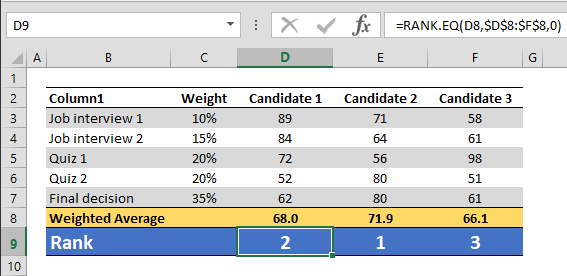
How to rank data in Excel tables
Learn how to rank data in Excel tables. This practical guide covers the formula syntax, setup steps, and how the result is calculated in Excel.
Number Formatting in Excel - All You Need to Know
The main advantage of custom number formatting is that you can alter the look of your data without changing the actual values. This means that you do not need to use additional spaces or formulas to create the layout you want and preserve the raw data.

How to calculate weighted average with SUMPRODUCT
Learn how to calculate weighted average with SUMPRODUCT. This practical guide covers the formula syntax, setup steps, and how the result is calculated in Excel.