How to find the power of a number

How to find the power of a number

You can always use caret symbol (^) to find a certain power of a number. However, doing this with a formula can be easier to read and identify in nested formula sets. Syntax =POWER(base number, how many times that base number will be multiplied by itself) Steps Begin...
How to get the column index of a cell using the COLUMN function

How to get the column index of a cell using the COLUMN function

Working with Excel’s coordinate system makes building data models extremely easy. You can retrieve the column index information of a cell using the COLUMN function and implement in other formulas. Syntax =COLUMN(cell or range reference you want get its column...
How to get the row index of a cell using the ROW function

How to get the row index of a cell using the ROW function

Working with Excel’s coordinate system makes building data models extremely easy. You can retrieve the row index information of a cell using the ROW function and implement in other formulas. Syntax =ROW(cell or range reference you want get its row number) Steps...
How to calculate payments for a loan

How to calculate payments for a loan

In need of quick money? Well, we can’t tell you how to get that, but we can show you how to use Excel to find out what you’re getting into. Use this easy method to calculate what you would be paying for that shiny new loan. Syntax =PMT(interest rate for...
How to Get The Worksheet Name, File Name, and Its Path

How to Get The Worksheet Name, File Name, and Its Path

Managing multiple workbooks with various sheets in Excel can be a challenging task, especially when dealing with dynamic file names that can be altered by users. However, there's a simple trick you can use to efficiently organize your data and label workbook details....
How to shorten a number and get the integer value

How to shorten a number and get the integer value

Do you need to shorten number, but not round them? Need to find the nearest INTeger or TRUNCate numbers in Excel? Yep, Excel has two functions that do exactly that! You can shorten numbers using the TRUNC and INT functions while preserving the original value, without...
How to rank data in Excel tables

How to rank data in Excel tables

Sure, it’s easy to find the highest or smallest values in a data set. But what if you’re looking for the 3rd, 10th, 20th rank in a large table, or need to do this in ascending and descending order? Luckily, Excel features a formula that does just that....
Number Formatting in Excel - All You Need to Know

Number Formatting in Excel - All You Need to Know

If you used Excel in any shape or form, there is a pretty good chance that you’ve used the formatting and number formatting features. Formatting options like number, currency, percentage, date and time values are easily accessible to users. However, that’s not all...
How to calculate weighted average with SUMPRODUCT

How to calculate weighted average with SUMPRODUCT

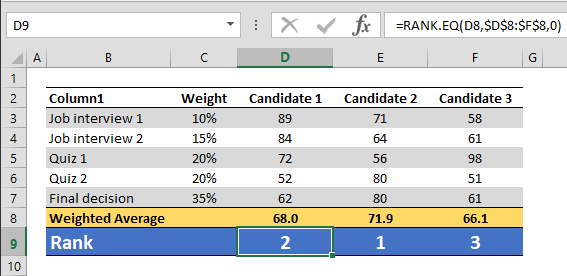
A final exam is worth more in terms of graduation score and the term weighed average becomes relevant. In such cases, SUMPRODUCT formula can help calculate the weighed totals of a data set. In our example, test scores of 3 candidates are being compared. Although...