
Excel resources
Excel Tips & Tricks
Articles, examples, and practical guidance from the SpreadsheetWeb team.
Page 52 of 60 · 540 articles

How to get last match
Learn how to get last match. This practical guide covers the formula syntax, setup steps, and how the result is calculated in Excel.

How to find closest match
Learn how to find closest match. This practical guide covers the formula syntax, setup steps, and how the result is calculated in Excel.

How to sum every N rows
Adding certain cells in a table can be challenging. This article shows how to sum every n rows by using the SUM and the OFFSET functions.

How to calculate average by week number
This article focuses on to calculate average by week number with exact week number by using WEEKNUM and AVERAGEIFS functions.
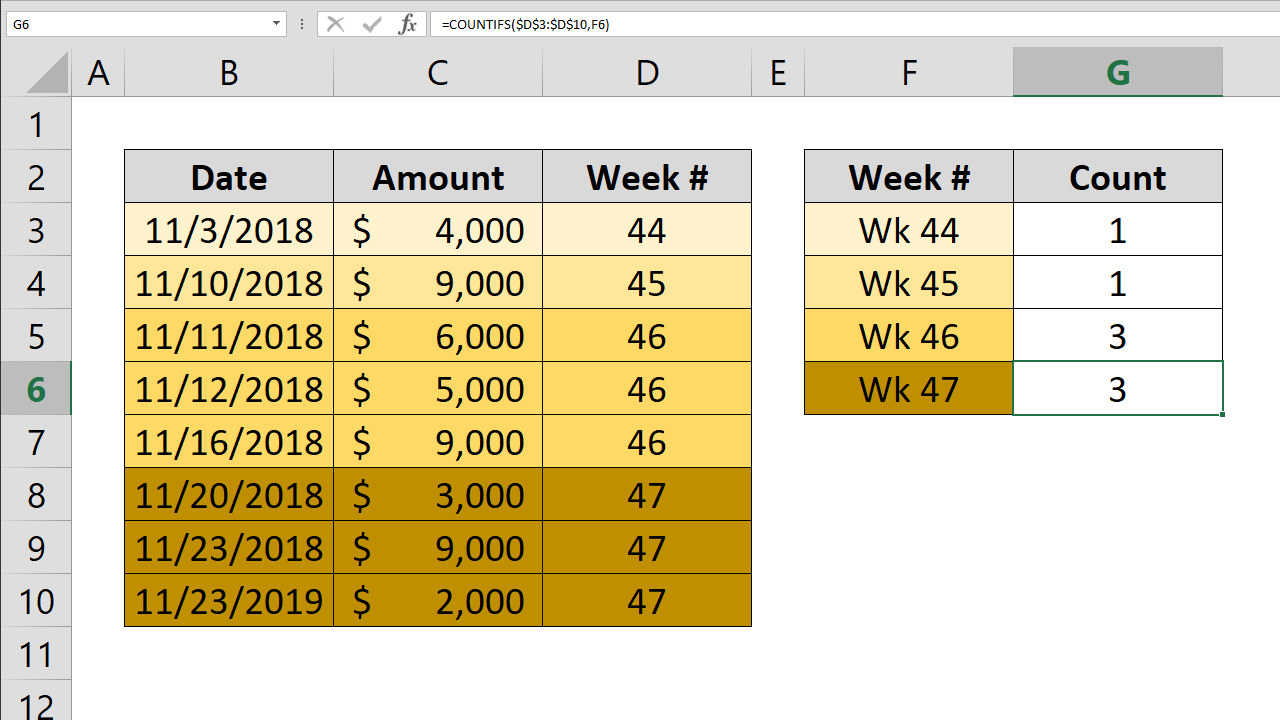
How to count by week number
This article focuses on to count by week number with exact week number by using COUNTIFS and WEEKNUM functions.

How to create conditional Excel drop down lists
Learn how to create conditional Excel drop down lists. This practical guide covers the required setup, step-by-step process, and useful Excel options.

How to highlight values based on item lists
You can highlight the duplicate values in a data set to help identify the outliers. Let's see how to highlight values based on item lists.

How to replace character in Excel by position
This article shows how to replace character in Excel by position using REPLACE function. If you are looking to replace a specific character please refer to article How to replace a character.
Excel Case Statements: SWITCH Function Versus Nested IF
Excel case statements can be handled via the SWITCH function which can essentially do what nested IF functions can, using only one function.