
Excel resources
Excel Tips & Tricks
Articles, examples, and practical guidance from the SpreadsheetWeb team.
Page 4 of 60 · 540 articles

Unique Values in Excel and How to Find Them?
With unique values in Excel, you can automate tasks such as finding the outliers in your data. Here, we will show you how to find them.
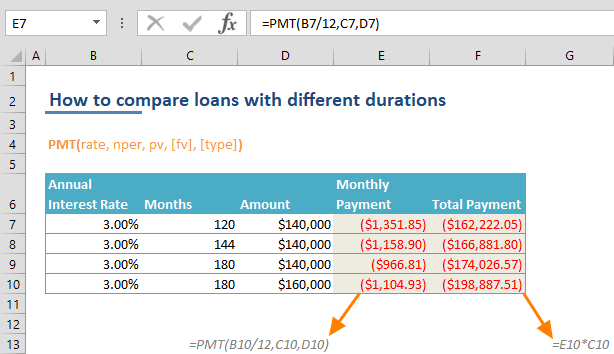
How to Compare Loans with Different Durations in Excel
In this article, we're going to show you how to compare loans with different durations in Excel with PMT function.

How to Convert Excel Columns to Rows - Unpivoting
This article explains how to convert Excel columns to rows, also knows us unpivoting, using VLOOKUP formula.

How to Print Headings in Excel
In this article, we are going to show you how to print headings in Excel 2016, Excel 2013, Excel 2010 and Excel 2007.

Dynamic Arrays Functions in Excel
SpreadsheetWeb • Learn the dynamic array functions in Excel of populating a range of cells with values of an array.
Protect Excel Files: How to Password Protect Spreasdsheets?
Protecting your Excel files is important, there are several reasons why you might want to password protect Excel workbooks.

How to strikethrough in Excel
Learn how to strikethrough in Excel. This practical guide covers the formula syntax, setup steps, and how the result is calculated in Excel.

How to find largest value in array using a criteria
This article shows how to find the largest value in an excel array formula using LARGE and IF functions and array formulas.

How to Extract First and Last Names in Excel?
In this blog, we'll explore a simple yet effective method to automatically extract first and last names using Excel functions.