
Welcome to SpreadsheetWEB Blog

Populating SpreadsheetWeb Applications with Publicly Available Data Using AI Prompts
Building data-driven applications in SpreadsheetWeb has traditionally required one of two things: either a developer writes a custom API integration to pull external data into cells, or a user manually copies and pastes values from external sources on a regular basis....

Turn Your Excel Models into AI Tools: Making a SpreadsheetWeb App AI-Consumable
Most teams start their AI journey by letting a chatbot answer questions. The real leap happens when AI can do work—run your pricing model, validate a configuration, evaluate eligibility, or generate an output that used to require a specialist. SpreadsheetWeb...
What’s New in SpreadsheetWeb – February 2026
We’re excited to share the latest improvements in the February 2026 SpreadsheetWeb Hub release (26.2.0). Building on the new release versioning format introduced in January, this update brings a major runtime upgrade, stronger validation for Excel-driven apps, and a...

AI Didn’t Kill the Spreadsheet — It Supercharged It
When generative AI went mainstream after ChatGPT’s public release in November 2022, a popular storyline took hold: AI would replace spreadsheets. If you can ask a chatbot for insights, formulas, and charts, why keep working in a grid? But the reality playing out...
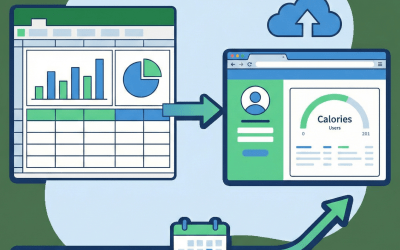
Turning Excel Files Into Web Applications with Stateful, Persistent Data Storage
Many Excel-based applications are not transactional in nature, they are stateful, evolving tools where each user works with the same model over time. A daily calorie tracking app is a perfect example: the underlying Excel logic stays the same, but new rows of data are...

Spreadsheets in Engineering: Still Everywhere, Still Useful, Still Risky
Walk into almost any engineering team, civil, mechanical, chemical, electrical, environmental, biomedical, and you’ll find the same quiet “unofficial standard” sitting next to the CAD/CAE tools and code repos: spreadsheets. They’re not glamorous. They’re not always...
What’s New in SpreadsheetWeb – January 2026
As we kick off 2026, we’re excited to share the latest updates in the January 2026 SpreadsheetWeb release. This release introduces an important change to our release versioning scheme, major improvements to automated app creation, and several usability enhancements...
SpreadsheetWeb 2025 Year in Review: More Power, Better UX, and Smarter Excel Integration
2025 was a big year for SpreadsheetWeb. We shipped a new runtime, crossed the 500‑formula mark, deepened our support for advanced Excel features, and made it much easier to build polished web applications without ever leaving your spreadsheet comfort zone. Across...

A Practical Guide to Application Migration on SpreadsheetWeb
Application migration is a critical part of building and maintaining solutions on the SpreadsheetWeb platform. As organizations expand their models, update calculation logic, and refine user interfaces, the ability to safely promote applications across Development,...