
SpreadsheetWeb blog
A Calculator That Updates Itself
The dangerous problem is the quiet one: a calculator that runs cleanly, throws no error, and returns an answer built on a number that stopped being true three months ago.
Most problems with an online calculator are easy to catch. If a formula breaks, you get an error, somebody complains, and you go fix it. The dangerous problem is the quiet one: a calculator that runs cleanly, throws no error, and returns an answer built on a number that stopped being true three months ago.
That is how calculators usually go wrong. The math behind a loan payment has not changed in a very long time. The interest rate changed last Thursday. A calculator is a formula plus a handful of reference numbers, and it is only ever as current as the last time someone remembered to update those numbers.
Someone usually does remember, for a while. Then the person who owned the spreadsheet moves to another team, or the update slips a week, then a month, and the calculator keeps answering with complete confidence. Your users cannot tell the difference between a fresh number and a stale one, which is exactly why it goes unnoticed.
This article explains how to automate that maintenance. If your calculator’s reference data lives in a Google Sheet, SpreadsheetWeb can now check the sheet on a schedule and republish the application whenever the data changes. Below is the kind of calculator this matters for, one worked example you can try, and how the pieces fit together.
Calculators that depend on fresh data
Once you start looking, most useful calculators have at least one number in them that somebody else publishes on a schedule. The table below lists a few common ones. These are illustrations, not a complete list.
| Calculator | The number that goes stale | How often it changes |
|---|---|---|
| Mortgage payment | Average mortgage rates | Weekly |
| Currency converter or travel budget | Exchange rates | Daily |
| Savings or investment growth | Treasury yields and deposit rates | Daily |
| Trip or delivery cost | Fuel prices | Weekly |
| Salary and cost of living | Inflation (CPI) | Monthly |
| Loan or lease pricing | Benchmark rates such as prime or SOFR | When the benchmark moves |
| Payroll or tax estimator | Brackets, thresholds and contribution limits | Yearly |
| Mileage reimbursement | Standard mileage rate | Yearly |
| Sales quote or price estimator | Your own price list, discounts and surcharges | Whenever you change them |
The last row is worth a second look. The data does not have to come from a public source. A price list your own team maintains in a Google Sheet is the same problem: the quoting tool is right only until the next price change.
In every one of these, the update itself is trivial. It is one cell, or one small table. What makes it a problem is that it has to happen again and again, on someone else’s calendar, with nothing to remind you when you miss it.
A real-world version of this problem
Take the first row. Imagine a lender, a broker, or a real estate site that puts a mortgage calculator on its home page. A buyer types in a home price and a down payment, and the calculator needs an interest rate to do anything useful with them.
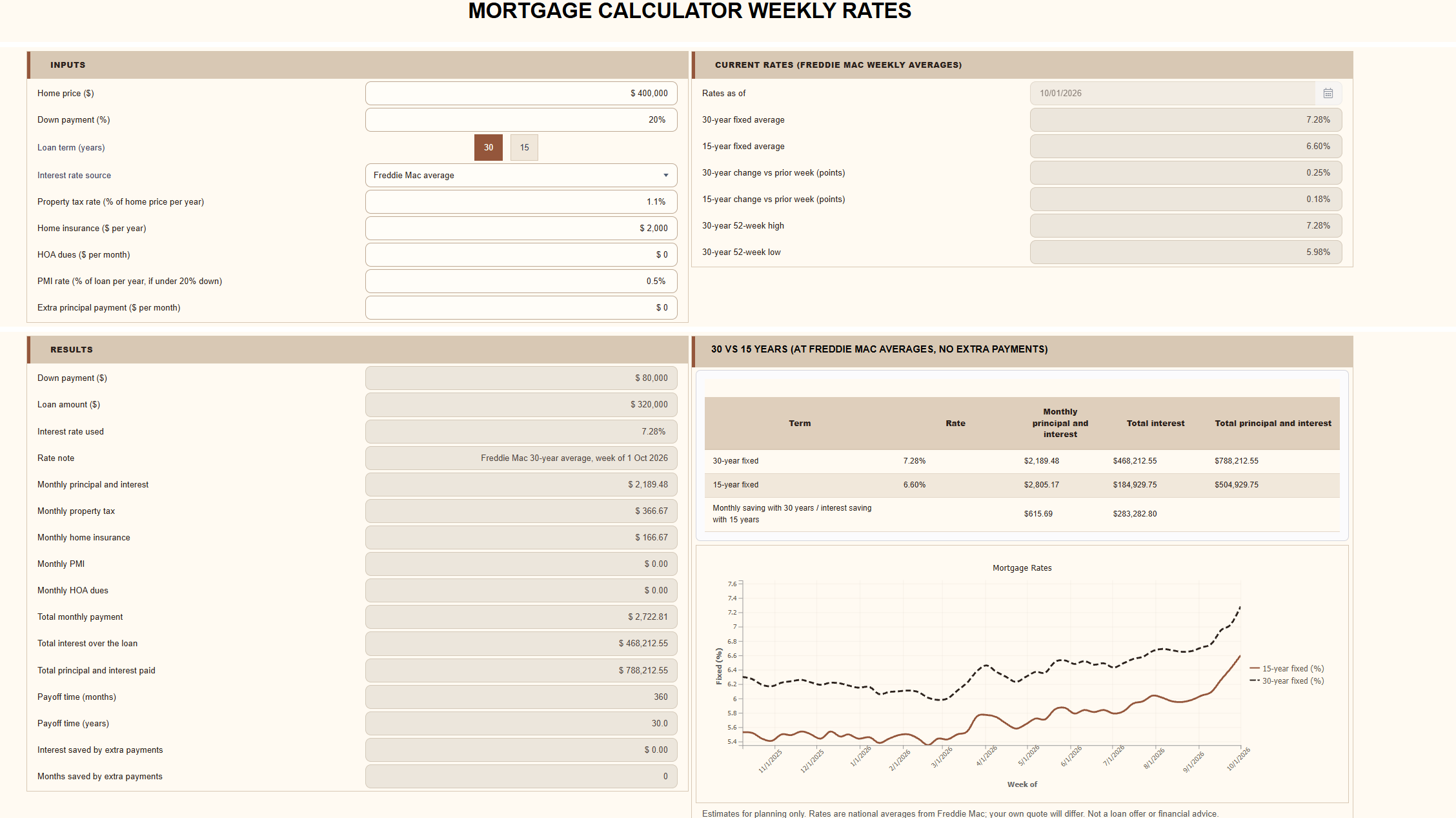
There are two common ways to handle that, and both have a flaw. The calculator can ask the buyer to type in a rate, which most first-time buyers do not know. Or it can show a default rate, which was correct on the day the page was built. Average US mortgage rates are published every week, and they move: the 30-year average rose from 6.66% to 7.28% in the five weeks to October 1, 2026. On a $320,000 loan, that is roughly $130 a month. A calculator still showing the August rate would be wrong by that much, with no error anywhere on the page.
So we built the version that does not need looking after. The demo below opens with the current week’s average rate, and no one updates it.
Try the mortgage calculator demo
The application itself is an ordinary spreadsheet model published with SpreadsheetWeb. It works out the full monthly payment at this week’s average rate, compares a 30-year loan with a 15-year one, shows what happens if rates move, and lays out the amortization schedule.
A buyer who already has a quote from a lender can enter that rate in place of the average.
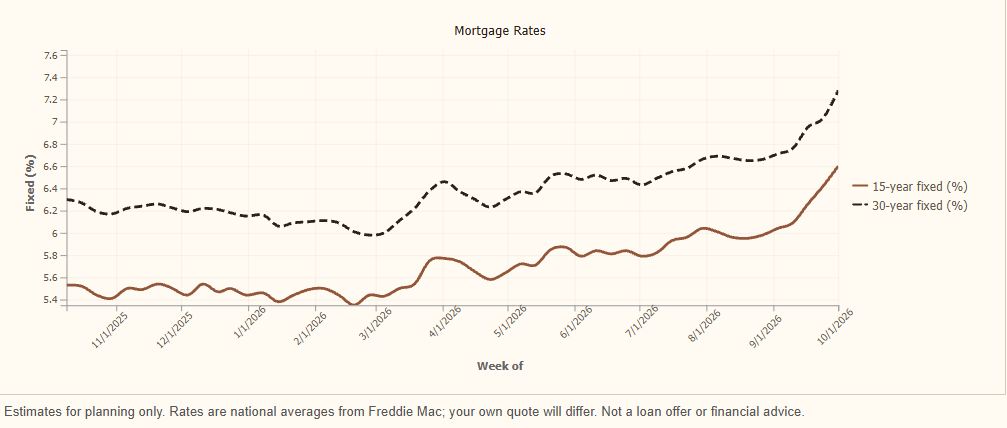
The interesting part is not the calculation. It is the “as of” date in the corner, which moves forward every week by itself.
How the update works
Three things happen each week, in order, and none of them involves a person.
1. Google Sheets fetches the data
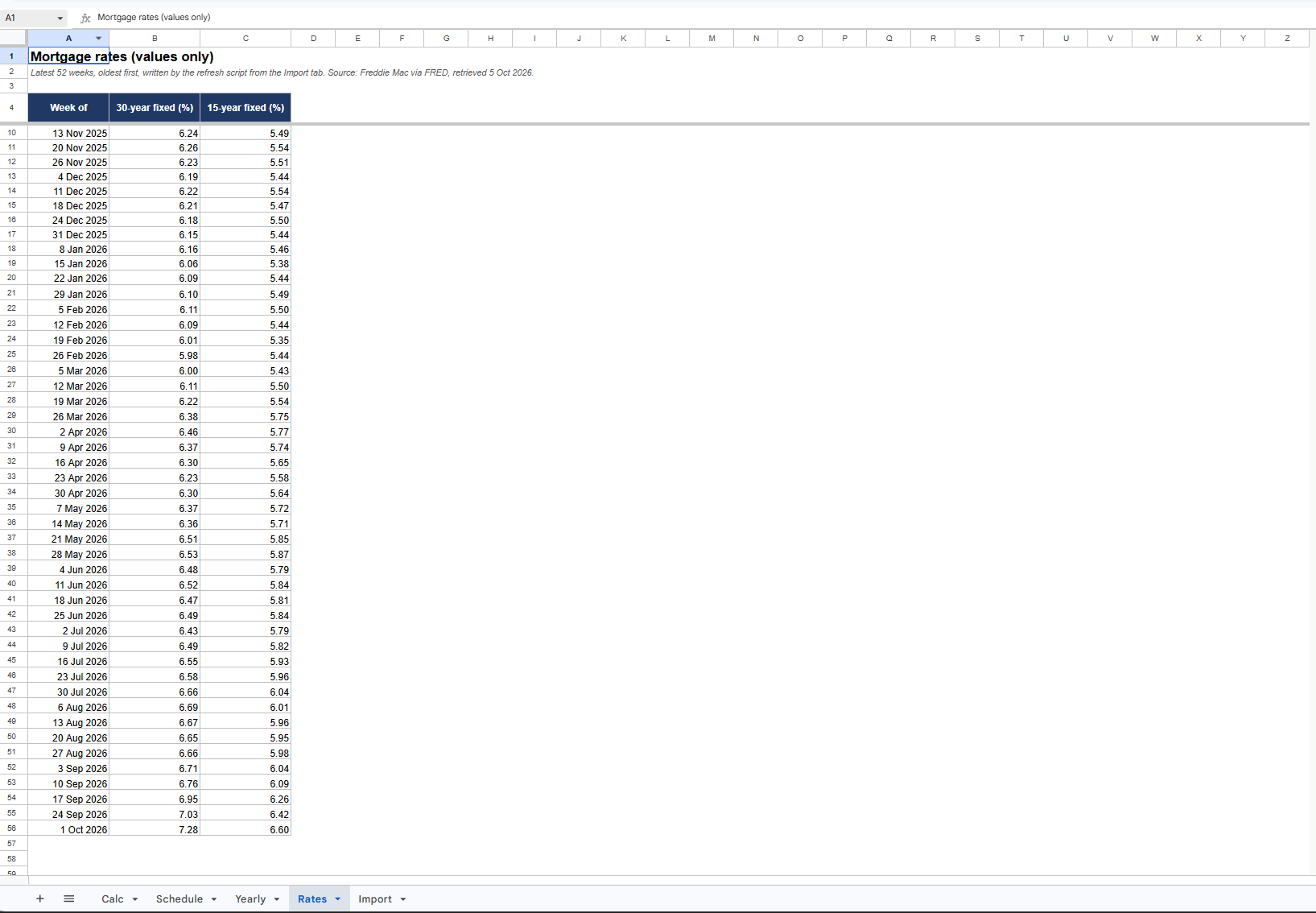
The workbook behind the calculator is a Google Sheet. One tab holds a single formula that reads Freddie Mac’s weekly averages from FRED, the St. Louis Fed’s public data service, and keeps the latest 52 weeks:
=SORT(QUERY(IMPORTDATA("https://fred.stlouisfed.org/graph/fredgraph.csv?id=MORTGAGE30US,MORTGAGE15US"),"select Col1, Col2, Col3 where Col2 is not null and Col3 is not null order by Col1 desc limit 52 label Col1 '', Col2 '', Col3 ''",1),1,TRUE)This is the part Google Sheets is good at. Functions such as IMPORTDATA, IMPORTHTML and GOOGLEFINANCE pull published data straight into cells, with no API key and no code.
2. A short script takes a snapshot
Every Friday morning, a few lines of Apps Script copy those 52 rows into a second tab as plain values. If Freddie Mac has not published a new week, or the import returned something that does not look like 52 dated rates, the script changes nothing and last week’s data stays in place.
3. SpreadsheetWeb publishes the change
On its own weekly check, SpreadsheetWeb looks at the linked sheet. If the sheet has been modified and the workbook is still compatible with the application, it publishes a new version. The next visitor sees the new rate.
Why the snapshot step exists
It is fair to ask why step 2 is there at all. Why not point the calculator at the import formula and be done?
There are two reasons. The first is that IMPORTDATA and its relatives are Google-only functions. They work because Google’s servers go and fetch the data, and they have no meaning outside Google Sheets. SpreadsheetWeb runs your workbook’s calculations in its own engine, so the calculator reads only the plain-values tab and leaves the fetching to Google.
The second reason is the trigger. SpreadsheetWeb publishes a new version only when the sheet’s modification date has changed. The snapshot is the edit that changes it. It also means the sheet is edited only when there is something new, so a week with no new data produces no new version.
Turning it on
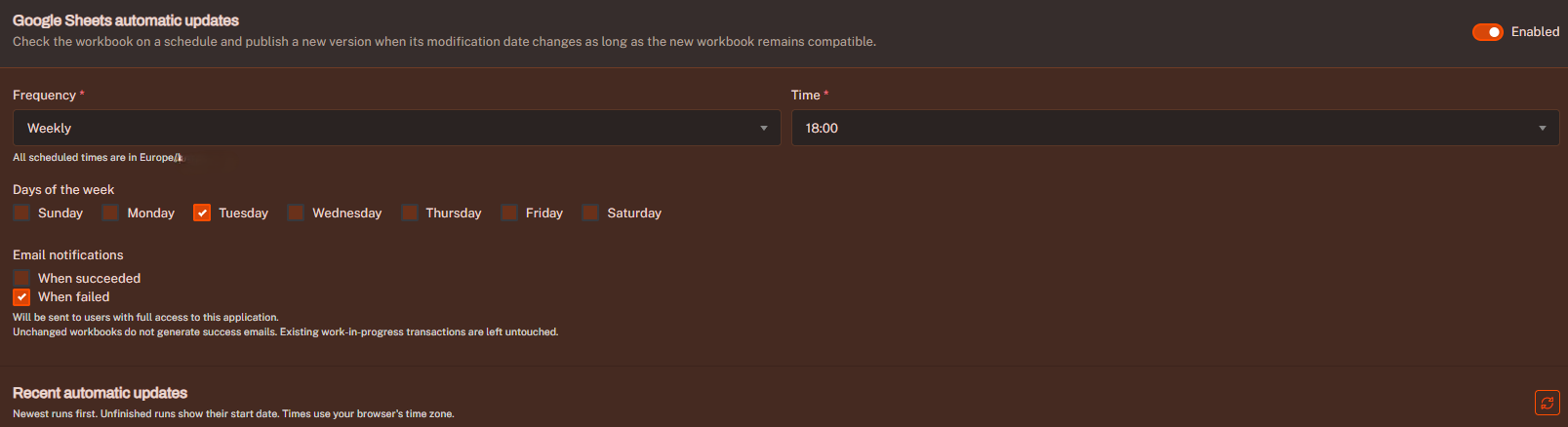
Scheduled updates for Google Sheets applications arrived in the September 2026 release. In the application’s settings, expand More options and configure Google Sheets automatic updates. Checks can run daily, weekly or monthly. Pick the one that matches how often your data is published: weekly for mortgage rates, daily for exchange rates, monthly for inflation.
What happens when something goes wrong
An unattended update is only useful if you can trust it not to publish something broken, and a few behaviors are there for that. An untouched sheet does nothing: if its modification date has not changed, no new application version is created. A breaking change is not published either. If the workbook changes in a way that no longer fits the application, the update is held back and the application keeps serving the last good version.
Your own work is protected as well, so edits you have underway in the Designer are not overwritten by a scheduled run. Failures do not loop: repeated failures pause the schedule, so the same unsuccessful update is not attempted forever. And you can always see what happened. Email notifications can be sent for successful runs, failed runs or both, and the update history records each check, its outcome and when the next one is due.
The takeaway
The practical point is not about mortgage rates. It is that a calculator has two parts with very different lifespans: logic that stays right for years, and data that goes wrong on a schedule. Most of the effort goes into the first part, and most of the quiet failures come from the second.
If the data already lives in a Google Sheet, keeping it current no longer has to be anyone’s job. Update the sheet, or let a script do it, and the application follows.
Stop publishing last month’s numbers. Try the mortgage calculator demo, then turn on automatic updates for one of your own Google Sheets applications. New to SpreadsheetWeb? You can sign up for free.
Rate data in the demo: Freddie Mac Primary Mortgage Market Survey, retrieved from FRED, Federal Reserve Bank of St. Louis (30-year, 15-year). Rates are national averages and an individual quote will differ. Results are estimates for illustration, not a loan offer or financial advice.