
The wrong prediction
In late 2023, the conventional wisdom was that natural language would replace the spreadsheet. AI labs were going to give business users a chat interface, and the grid would join the fax machine in the museum of office tools. Two and a half years later, the opposite has happened. Anthropic ships Claude for Excel. Microsoft built Copilot Agent Mode directly into Excel. OpenAI's ChatGPT Agent treats spreadsheets as a first-class output target. PwC has built a frontier agent specifically designed to read multi-sheet workbooks. The most-watched agent reliability benchmark in the field, SpreadsheetBench, is composed of 912 questions pulled from Excel help forums.
This is an unexpected outcome. If you had asked any frontier AI lab in 2022 to design the optimal interface for human-AI collaboration, none would have invented the spreadsheet. The format is forty-seven years old. It has no enforced schema. The academic literature on spreadsheet errors consistently finds that the vast majority of production spreadsheets contain material defects, and the most famous business catastrophes of the last twenty years (the London Whale, Reinhart-Rogoff, the UK government's COVID contact tracing failure) all involve Excel files nobody caught an error in until after the damage was done. By any reasonable engineering criterion, the grid is not how you would build a substrate for AI collaboration.
And yet here are the AI labs, all of them, building Excel agents. The question worth asking is not whether they are right. They clearly are. The question is why.
The answer is not in the format. It is in the population. For business users (finance, operations, marketing, sales, HR, strategy, audit, consulting) the spreadsheet is the working surface they already inhabit. They open Excel in the morning and close it at the end of the day. Whatever the AI labs build, the work that needs to be done is happening in the spreadsheet. This is the substrate question for AI agents in 2026, and it has a counter-intuitive answer. Substrates are not chosen by the design properties of the medium. They are chosen by the population that already inhabits the medium.
Populations decide substrates
Substrates are determined by populations, not by formats. The format that wins is the one the relevant population already inhabits, regardless of how well it was designed for the work that arrives later. Email is a terrible interface for collaboration and it is the substrate for nearly all professional communication. SQL is an awkward query language and it is the substrate for almost all enterprise data work. PDF is a notoriously difficult format to work with, and it is the substrate for almost all formal business correspondence. The substrate is not best; it is occupied.
For AI agents working with business users, the occupied medium is the spreadsheet. Finance teams build models in Excel. Operations teams track work in Excel. Marketing teams plan budgets in Excel. Sales teams forecast pipelines in Excel. Procurement, HR, strategy, audit, consulting, project management, and much of legal: they all spend a large fraction of their hours inside a spreadsheet, and any AI agent that wants to be useful has to meet them there.
This explains the convergent commercial behavior. Anthropic, Microsoft, and OpenAI did not independently conclude that the grid is optimal. They independently concluded that the grid is where their users live, and built accordingly. The same logic applies to specialists like Shortcut, Decide, Rows, Bricks. The substrate is not a design choice the labs are making. It is a discovery they are reporting.
The argument is scoped to business users. Developers got their human-AI substrate first (the IDE, with code), and the same population-based logic applies. Code is where the developers were. This is a parallel case, not a counter-example.
So if substrates are decided by populations, the question becomes: what makes a medium habitable enough that a population settles into it? Why did business workers end up in spreadsheets and not in dedicated financial software, vertical SaaS tools, or custom databases? The answer has two parts. The grid is a schema-flexible canvas that accepts any data shape. And Excel formulas are the only formal computational language with mass non-technical literacy. The combination is rare to the point of uniqueness.
The structural properties that make the grid habitable
The spreadsheet was designed in 1979 by Dan Bricklin and Bob Frankston as a tool for accountants who wanted to recompute ledgers without redoing the arithmetic. Forty-seven years later, the structural choices they made turn out to be load-bearing for human-AI collaboration in business. Four properties make the format habitable. Each comes with a real cost. The substrate is strong because the combination is rare.
The grid is a schema-flexible canvas. The spreadsheet lets you start typing without defining a schema. Multiple tables of different shapes can coexist on one sheet. Data types can be mixed within a column. The format accepts whatever the user has and lets them figure out the shape as they go. This is what makes the grid the universal container for business data, which arrives in unpredictable shapes: CSV exports from a dozen tools, query results, manual entries, copy-paste from emails. The flexibility creates ambiguity that agents have to resolve through inference, and the high error rate in production spreadsheets is partly a consequence of this same flexibility.
Cells are addressable, and the 2D layout carries meaning. Every cell has a deterministic identifier. A1 means exactly one thing. This is what makes spreadsheet agents technically feasible: an agent can target a cell, modify it, and verify the operation. Tool calls become deterministic. For collaboration, the address space gives both parties a shared vocabulary. An analyst can say "the value in D17 looks too high" and the agent knows exactly what they mean. Business users encode an enormous amount of structure spatially. Microsoft Research's SpreadsheetLLM paper notes that spreadsheets pose unique challenges for LLMs due to their two-dimensional layouts, which are poorly suited to linear input. The team had to invent a compression framework called SheetCompressor specifically to teach LLMs to read 2D layouts. The fact that this work was necessary is the point: the structure is information-rich. The cost is brittleness: addresses are fragile to insertion and deletion, and the spatial richness that humans find natural is what makes the format hardest for agents.
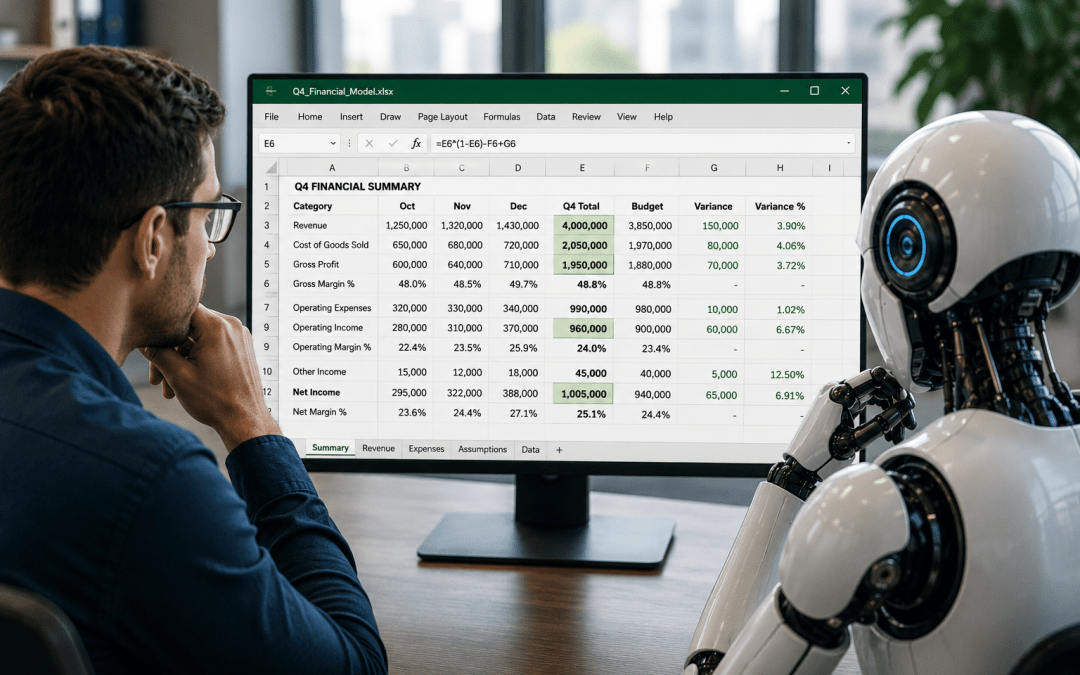
The formula language is a shared notation and an inspectable program. This is the deepest property. A formal computational language has typed values, composable operations, and deterministic execution. SQL qualifies. Python qualifies. Excel formulas qualify. Now ask which of these has crossed into mass non-technical literacy. SQL has not. Python has not. Excel formulas are the exception. Hundreds of millions of people who never learned to program can write =SUMIFS(...), =VLOOKUP(...), =IF(...). They can read formulas others wrote. The collaboration consequence is enormous: humans and agents write in the same notation. There is no translation layer. When an agent writes =VLOOKUP(A2, Pricing!A:C, 3, FALSE), a human can read it directly. Formulas are also inspectable programs: a cell stores both a value and the recipe. The cell shows 47, the formula bar shows =B5*C5-D5. This is structurally stronger than any other verification model for AI output. The alternative is intermediated verification, where the AI explains its output and the human trusts the explanation. With a formula, the human reads the recipe directly.
The dependency graph and the deliverable identity. Spreadsheets are internally a network of dependencies. Change an input, watch downstream cells recompute. Both parties can manipulate inputs and observe consequences in real time. A human can change an assumption and see the agent's entire model re-run. This is how business users think about quantitative work: scenario modeling, sensitivity analysis, what-if exercises. A revenue model on Sheet1 feeds into a P&L on Sheet2 which feeds into a valuation on Sheet3. And the spreadsheet is both the working surface and the shippable artifact. Same file, no translation step. The CFO opens the same file the analyst and the agent worked in. This is rare. Chat transcripts are not deliverables. Code is not consumable by non-developers. The spreadsheet is the unique format that is both the working medium and the artifact that ships.
Each property would be valuable on its own. The combination is what makes the spreadsheet structurally privileged. None of it was designed for AI collaboration. It was designed for accountants. The agents are arriving because the population is already there.
The evidence
Two independent kinds of evidence point at the same conclusion: commercial convergence, and benchmark consensus.
Commercial convergence. Every frontier AI lab has shipped a dedicated Excel agent. Anthropic launched Claude for Excel and expanded access to Pro-tier subscribers in January 2026. Microsoft built Copilot Agent Mode. OpenAI's ChatGPT Agent treats spreadsheets as a primary target. Behind the frontier labs, specialists have emerged: Shortcut, Decide, Rows, Bricks. None is building an agent for Notion or Word as the centerpiece of their company. They are all building for Excel. Even non-AI companies have noticed: PwC announced its own frontier spreadsheet agent in early 2026. Consulting firms do not typically build frontier models. PwC built one because their clients' work product lives in workbooks.
Benchmark consensus. A benchmark is a kind of declaration. When teams choose to report scores against it, they are agreeing it matters. For AI agents on business tasks, the benchmark that has stabilized is SpreadsheetBench, introduced by researchers from Renmin University, Tsinghua, and Zhipu AI, and accepted as a spotlight at NeurIPS 2024. The 912 questions are sourced from real Excel help forums, not synthesized. All three frontier labs use it: Microsoft Copilot scored 57.2%, OpenAI's ChatGPT Agent 45.5%, Claude 42.9%. The numbers are mediocre. A human analyst with similar accuracy would not survive a performance review. But the fact that three competing labs all decided this was the right test tells you that the substrate is taken seriously and that the work is genuinely hard. Specialists do better: Decide reported 82.5% on SpreadsheetBench Verified, a curated subset of 400 human-validated tasks. The SOTA on SpreadsheetBench has improved from 20% to 68.9% over the past year. SpreadsheetBench 2 raises the bar to workflow-level outcomes: structured models, repaired spreadsheets, accurate visualizations. The deliverable property is now the metric the field is competing on.
Three independent kinds of evidence. The convergence is not accidental.
Stress tests
The case made so far is the strongest version of the argument. It deserves an honest counter-case. The thesis has three places where it can break down.
The static-output problem. The collaboration property depends on agents writing formulas, not values. The Rows benchmark found most current agents default to static outputs. If this does not change, a spreadsheet full of agent-written values is functionally a PDF with a different file extension. The human cannot interrogate the computation, cannot change an input and watch the model re-run. There are reasons to think the field will solve this (audit workflows demand formula outputs; specialists are differentiating on dynamic outputs), but it is genuinely unsolved at the population level, and it is the single biggest threat to the substrate thesis.
The accuracy ceiling. Current SpreadsheetBench numbers suggest frontier agents get roughly half the right answer roughly half the time. A substrate without reliable collaboration is not actually a substrate. If the capability curve flattens at 70 to 80 percent on Verified, as the remaining hard cases involve the ambiguity that defines real spreadsheets, the collaboration thesis degrades to an assistance thesis, which is a smaller claim.
The data-gravity migration. Business data is increasingly moving out of spreadsheets and into warehouses, application databases, and SaaS systems of record. The spreadsheet may end up being the last mile of work but not the substantial middle. The code parallel suggests how this might resolve. Developers settled on the IDE as their substrate, and that substrate held even as data systems underneath them became dramatically richer. The same pattern is plausible for business users: the spreadsheet holds as the working surface even as the warehouse layer grows under it. Agents would meet humans at the spreadsheet, do the warehouse access in the background, and present results in the cells.
The thesis after the stress tests is more conditional, not weaker. Three things have to go right: agents writing formulas reliably, accuracy continuing to improve, and the substrate remaining where the work happens. None is guaranteed. All are tractable.
The accidental substrate
If the conditions described in the previous section hold and the substrate thesis plays out, three consequences follow. They are downstream of the structural argument but reach beyond it, into questions of who gets disrupted, what they need to learn, and where the unsolved product opportunities sit.
The population most affected by AI agents in the next five years is not engineers and not content creators. It is the much larger population of business analysts, finance professionals, operations managers, consultants, and accountants who have been quietly running organizations from inside spreadsheets for four decades. Tens of millions of people globally. The disruption is happening in the back-office finance team at a manufacturing company in Indianapolis, the operations analyst at a logistics firm in Singapore, the strategy consultant building a model on a hotel-room laptop in Frankfurt.
The skill shift for these workers is not "learn to prompt." It is the shift from production to verification. A finance analyst's job in 2020 was substantially about building models. In 2027 it will be substantially about reviewing models. The agent produces the first draft of the cash-flow forecast, the budget variance analysis, the scenario model. The analyst catches errors, sanity-checks assumptions, and signs off before the result goes to the CFO. The structural properties of the spreadsheet are unusually well-suited to this. Business schools are still teaching modeling as a production skill. The relevant skill, increasingly, is critical reading.
The interesting product problem is not the substrate but the seam. Most current spreadsheet agent products bolt a chat interface onto Excel. The interesting design problem is the formula bar itself, which was designed for a world where humans write all formulas. It does not know whether a formula was written by a human or an agent. It does not show the agent's reasoning. What does formula authoring look like when half the formulas are written by agents? What does verification look like when the agent can explain its work at any cell? Incumbents are adding AI as a layer on top of legacy surfaces. AI-native challengers have the opportunity to redesign the seam from scratch.
The spreadsheet was not designed for AI collaboration. It was designed by Dan Bricklin and Bob Frankston in 1979 as a tool for accountants. The structural properties that turned out to matter for AI were design choices in service of that specific use, never intended for a future where agents would write formulas alongside humans. And yet here we are. The substrate is not the people. But for business users, the substrate is wherever the people happen to be standing. Business users have been standing in the spreadsheet since 1979, and the agents are coming to meet them. What VisiCalc shipped that year became a human-AI collaboration medium because the properties it needed were already there. The AI labs did not pick this substrate. They discovered it. The spreadsheet was a forty-seven-year setup for a punchline none of its designers could have known they were writing.
