

Spreadsheets have long been the backbone of business operations, powering everything from financial models to planning tools. Yet, in today’s fast-paced business landscape, speed, flexibility, and user experience define competitive advantage. Organizations can no longer afford months of development cycles or siloed tools that demand constant upkeep. What they need are solutions that unlock the knowledge already embedded in spreadsheets and transform it into robust, scalable, and user-friendly web applications.
This is exactly where SpreadsheetWeb comes into play. By turning Excel files into secure, interactive web applications, SpreadsheetWeb enables companies to get the most out of their models and calculations without rebuilding them from scratch.
To illustrate the breadth of what’s possible, let’s take a single Excel file: a Retirement Calculator. This is a common model that projects savings, investment growth, and expected income for retirement planning. Normally, you might expect this to become one basic application. But SpreadsheetWeb proves that a single spreadsheet can wear many faces. From simple no-code interfaces to fully customized, visually rich tools, the same calculator can be deployed in multiple formats, each tailored to different business needs, user expectations, or branding requirements.
Let’s walk through four examples.
A No-Code, Single-Page Application
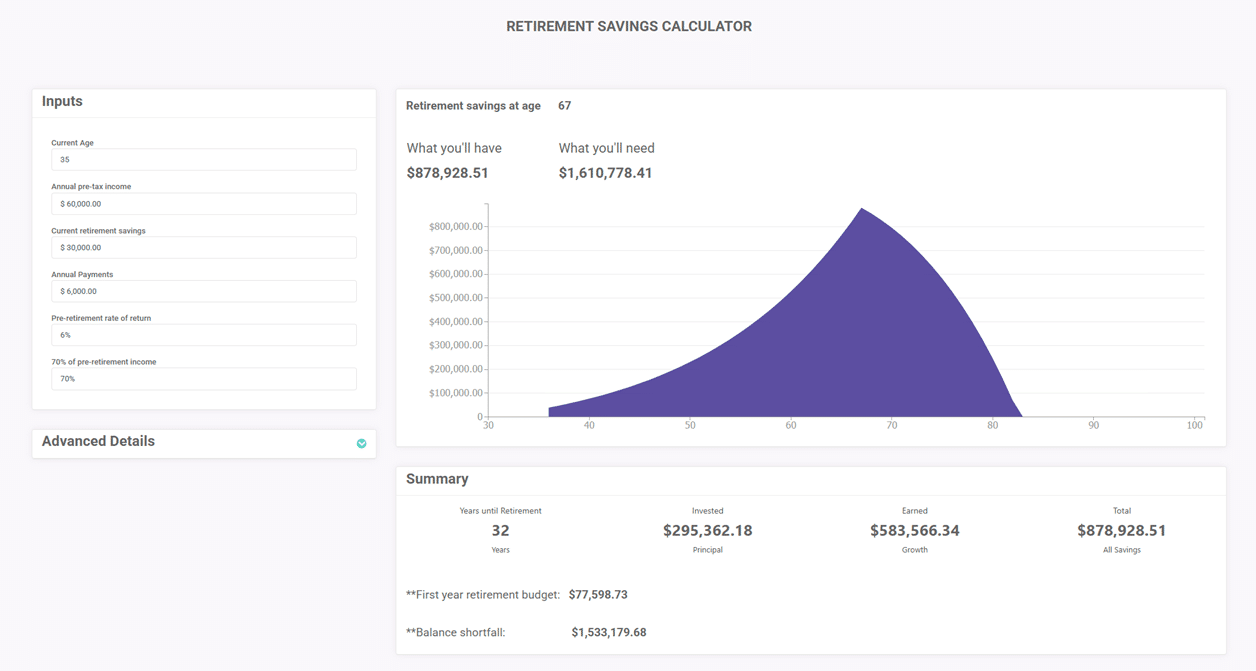
The simplest transformation is a single-page application created entirely without code. Using SpreadsheetWeb’s native building blocks, panel containers, charts, and content labels, the Retirement Calculator instantly becomes an interactive tool that is both functional and professional.
- Dynamic Inputs: Users can adjust values such as current age, annual savings, and retirement age through fields connected directly to the spreadsheet logic.
- Real-Time Charts: Projection charts update instantly, providing visual clarity on long-term outcomes.
- Ease of Deployment: No developer is required. A financial advisory firm could upload the spreadsheet in the morning and have a functioning client-facing calculator by the afternoon.
For businesses, this approach dramatically reduces time-to-market. It’s perfect for pilot programs, proof-of-concepts, or quick rollouts where speed is critical but design complexity is secondary.
Demo link: https://designer.spreadsheetweb.com/a/retirement-savings-calculator-1
Multi-Page Navigation with Structured Data Collection

While the single-page layout is fast, some use cases benefit from a step-by-step, multi-page experience. In this second variation, the same Retirement Calculator is reorganized into pages that guide users through the planning process.
- Structured Flow: Instead of overwhelming users with all inputs at once, the journey is broken down. Page one collects personal demographics, page two gathers income and savings details, and subsequent pages address lifestyle expectations and retirement age.
- Intuitive Controls: Sliders and textboxes give users flexibility in how they enter information. Someone might prefer typing in exact numbers, while others may enjoy dragging a slider to test scenarios.
- Contextual Transitions: Each page builds on the previous one, creating a narrative experience rather than a static form.
This style is well-suited for businesses that want to guide clients carefully through decision-making, such as insurance providers or HR departments rolling out retirement benefit tools. It improves engagement, reduces drop-off rates, and makes complex data collection less intimidating.
Demo link: https://designer.spreadsheetweb.com/a/retirement-savings-calculator-2
Interactivity through Scripts and Styles
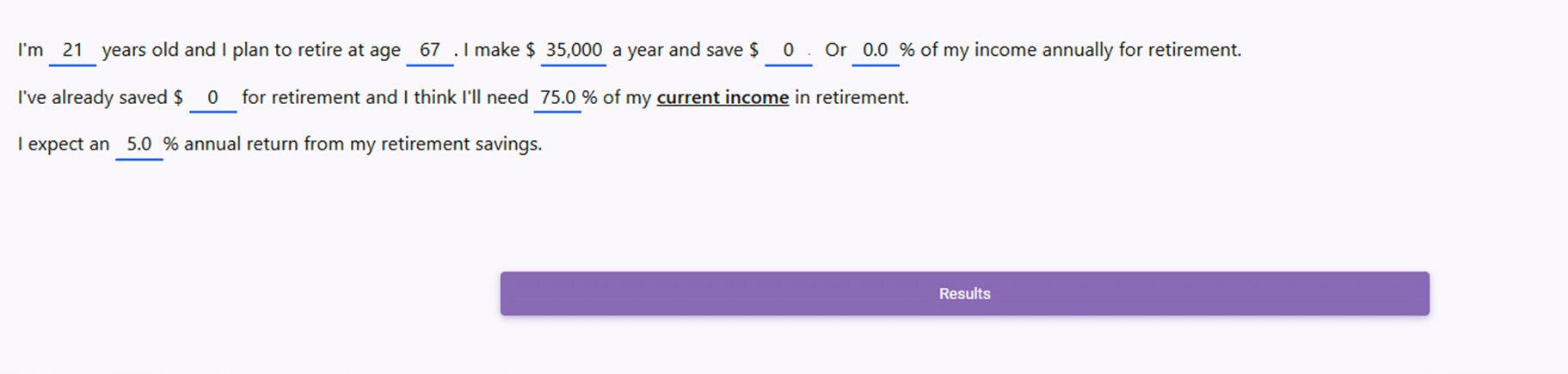
For companies that want a more immersive, conversational experience, SpreadsheetWeb supports Scripts and Styles. This means developers can inject HTML, CSS, and JavaScript into applications, blending design creativity with the power of the underlying spreadsheet.
In this third version, the Retirement Calculator takes on a completely new feel. Instead of filling boxes, users interact with the tool directly inside sentences.
Example:
“I am [__ years old] and I plan to retire at [__ years old]. I currently earn [$] per year and save [%] of my income.”
Inputs are embedded seamlessly into the text, making the process intuitive and almost story-like. The design can be styled to match corporate branding, with fonts, colors, and layouts tailored for a unique look.
- Advantages:
- Creates a natural, human-centered interaction.
- Differentiates the company’s digital tools from competitors.
- Bridges the gap between static forms and engaging digital experiences.
For organizations aiming to impress users with a modern interface—think fintech startups, banks, or employee engagement platforms—this approach builds trust and communicates innovation.
Demo link: https://designer.spreadsheetweb.com/a/retirement-savings-calculator-3
Fully Customized, Branded Experience

Finally, SpreadsheetWeb allows the same spreadsheet to be transformed into a deeply customized application that goes beyond standard calculators.
Here, design flexibility is maximized:
- Background Images: Companies can brand the tool with images aligned to their campaigns, whether that’s serene landscapes for retirement or corporate motifs for employee portals.
- Toggle-Style Checkboxes: Users can show or hide specific containers at will, creating personalized views of the data. For example, someone may choose to see only income projections while hiding investment details.
- Custom Sliders with Plus/Minus Buttons: Standard controls can be redesigned entirely. Instead of dragging a slider, users can click + or – buttons for precise adjustments.
This version demonstrates SpreadsheetWeb’s ability to move far beyond “spreadsheets online.” It becomes a full-fledged digital product, indistinguishable from a custom-coded web application—but still powered by the same Retirement Calculator at its core.
Demo link: https://designer.spreadsheetweb.com/a/retirement-savings-calculator-4
Beyond Retirement Calculators
Although our example focuses on retirement planning, the same principle applies across industries:
- Insurance: Premium estimators, claim calculators, and policy comparison tools.
- Healthcare: Patient intake forms, risk assessments, and treatment cost estimators.
- Manufacturing: Quotation engines, production planning tools, and quality control checklists.
- Finance: Loan calculators, portfolio projections, and compliance checklists.
In every case, businesses can start with one spreadsheet and expand outward, creating multiple digital tools that adapt to different contexts and audiences.
Conclusion: One Spreadsheet, Infinite Possibilities
The story of the Retirement Calculator illustrates just how transformative SpreadsheetWeb can be. A single Excel file can evolve into four very different web applications, ranging from no-code single-page calculators to fully customized, branded experiences.
This flexibility empowers businesses to deliver value faster, serve diverse user groups, and innovate without reinventing the wheel. In short: SpreadsheetWeb turns spreadsheets into living, breathing digital products.
And with one spreadsheet capable of producing many faces, the possibilities are limited only by imagination.

