As SaaS products and data-driven business models continue to evolve, the need for automated, tiered access to applications based on customer subscriptions is more crucial than ever. This guide demonstrates how you can create an entirely hands-off system where users can subscribe to a plan on Shopify, pay via Stripe, and—thanks to SpreadsheetWeb and Zapier—instantly receive personalized application access, all without manual intervention.
This integration brings together the strengths of four leading platforms:
- Shopify as your storefront and subscription management hub,
- Shopify Subscriptions app for recurring plans,
- Stripe as a robust payment gateway,
- SpreadsheetWeb to host and secure your business logic or Excel-powered applications,
- Zapier as the automation bridge tying it all together.
Let’s dive into each piece of this solution, showing how they connect to create a seamless experience for both you and your end users.
Setting Up Subscription Plans in Shopify
The process begins with Shopify, one of the world’s most trusted e-commerce platforms. Shopify supports subscription products via third-party apps. To start, you’ll want to install a subscription app—such as the free “Shopify Subscriptions” app—directly from the Shopify App Store. Once installed, this app enables you to define and manage recurring billing cycles for any product you choose.

In the Shopify admin panel, head to the Products section. Here, you can create a new product or edit an existing one, attaching a subscription plan to it. The Shopify Subscriptions app will let you define the frequency (monthly, yearly, etc.), the trial period if any, and the pricing for each subscription tier—such as Basic, Pro, or Enterprise. Each plan can be tied to specific products, allowing for a highly flexible pricing and access structure.

It’s important to design your subscription plans to map directly to access levels in your application—for example, a “Basic” plan for entry-level features, and “Enterprise” for full data access.

This clear segmentation is what later enables precise, automated control over what each user can see or do within your SpreadsheetWeb applications.

Enabling Stripe for Subscription Payment Processing
Shopify natively supports multiple payment providers, but Stripe stands out for its flexibility, global coverage, and developer-friendly features. To integrate Stripe, navigate to Settings > Payments in your Shopify dashboard. From there, add Stripe as your payment provider. This process will require you to connect an existing Stripe account (or create a new one) and grant Shopify access.
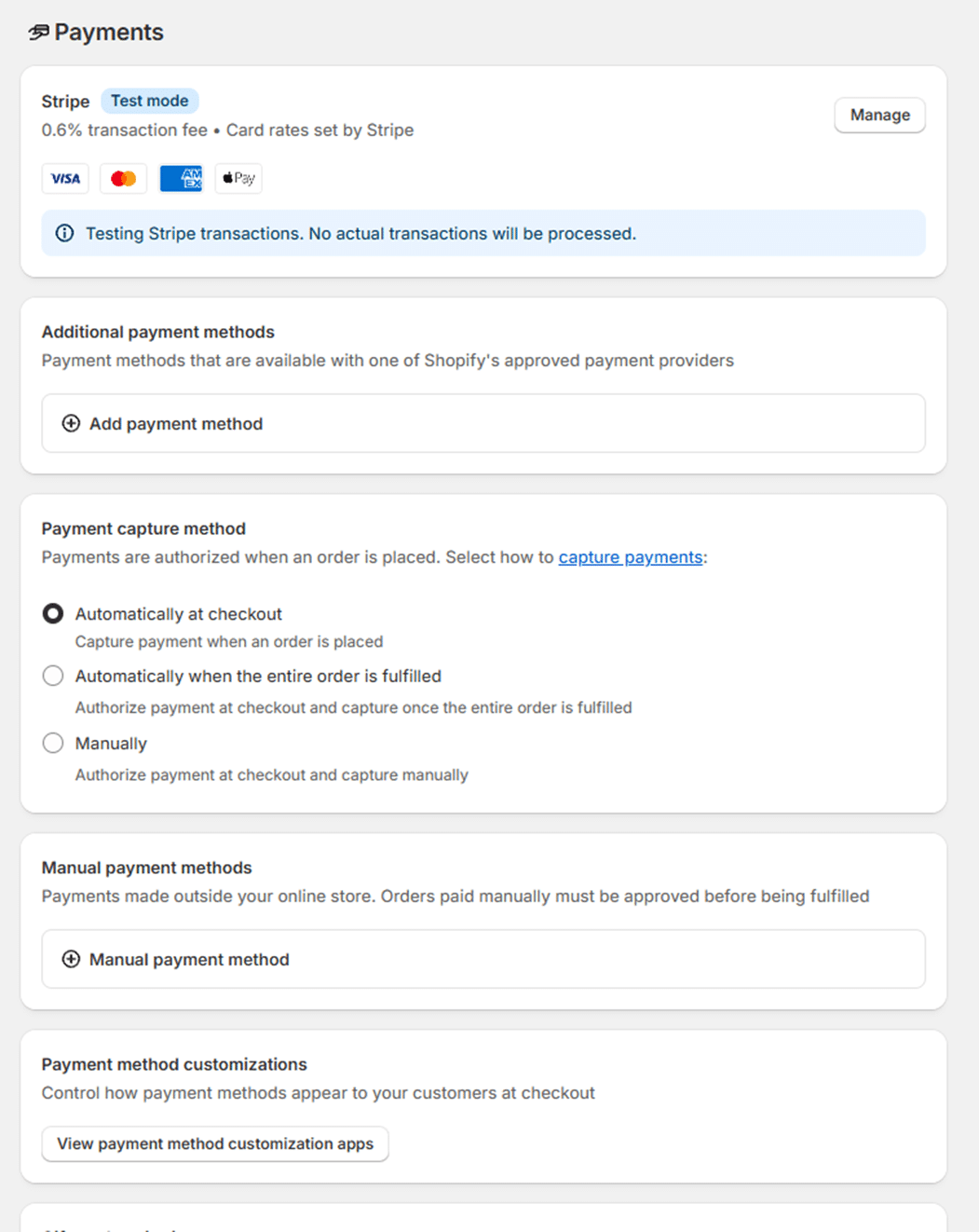
If you plan to test your payment flows before launching, activate “Test Mode” from within the Stripe configuration in Shopify’s Payments settings. Test mode allows you to simulate purchases, subscriptions, and refunds without processing real transactions—essential for verifying the integration end-to-end before going live.
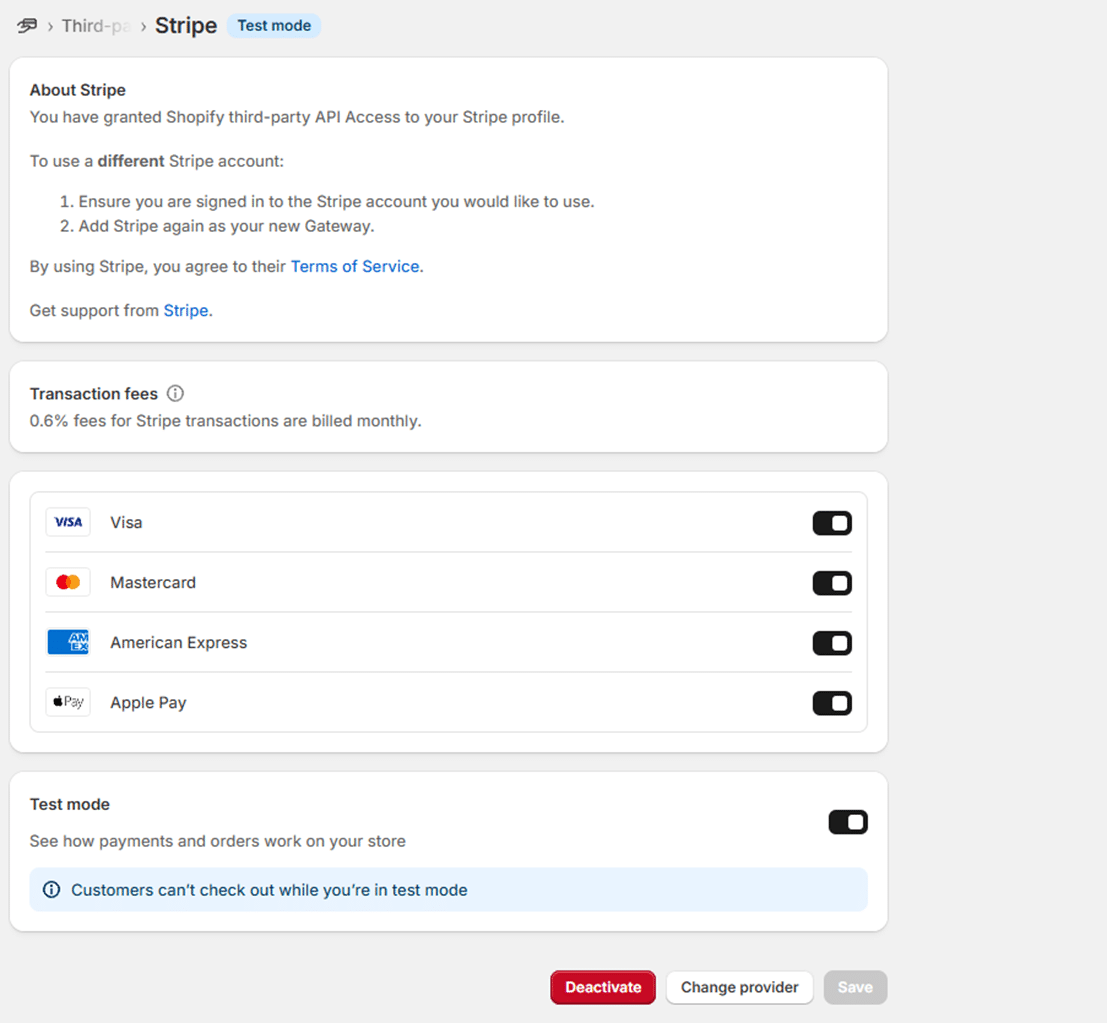
Once configured, all subscription payments—whether new, recurring, or upgrades—will be handled securely by Stripe, with full support for invoicing, receipts, and compliance.
Creating Access Tiers with Identity Templates in SpreadsheetWeb
While Shopify manages products and Stripe handles the money, SpreadsheetWeb is where the magic happens—delivering the actual application or content your subscribers are paying for. To automate which users get access to which features, SpreadsheetWeb employs the concept of Identity Templates.
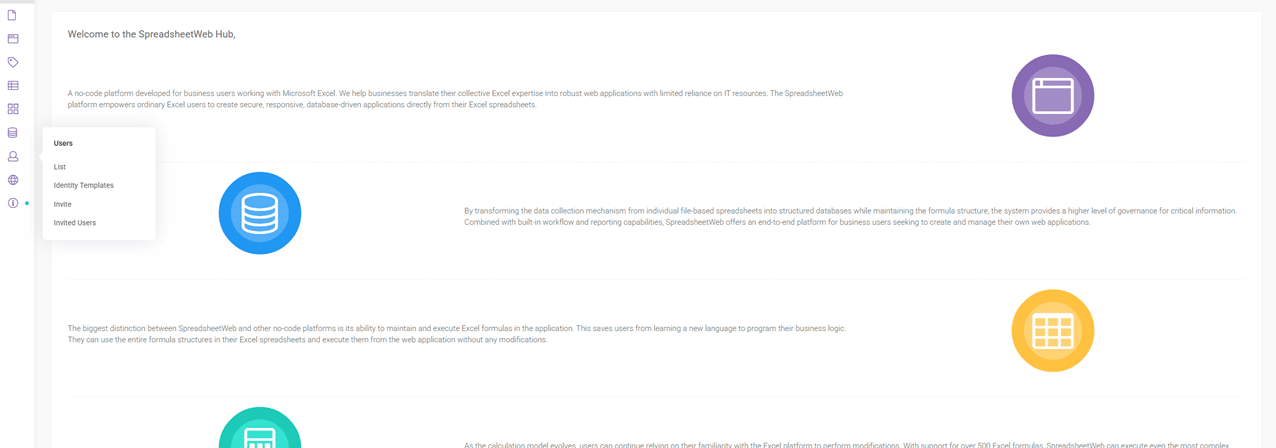
After logging into your SpreadsheetWeb Hub account, find the Users section in the sidebar and select Identity Templates. Here, you’ll set up access templates that align with each of your subscription tiers—Basic, Pro, Enterprise, and so on. These templates define the scope of access, specifying which applications or workspaces a user can see and what actions they’re permitted to perform.
For example, the “Basic” template might allow only a single application, while “Enterprise” unlocks a suite of dashboards and collaboration tools. This fine-grained control is what makes SpreadsheetWeb ideal for commercial SaaS offerings built from Excel models.
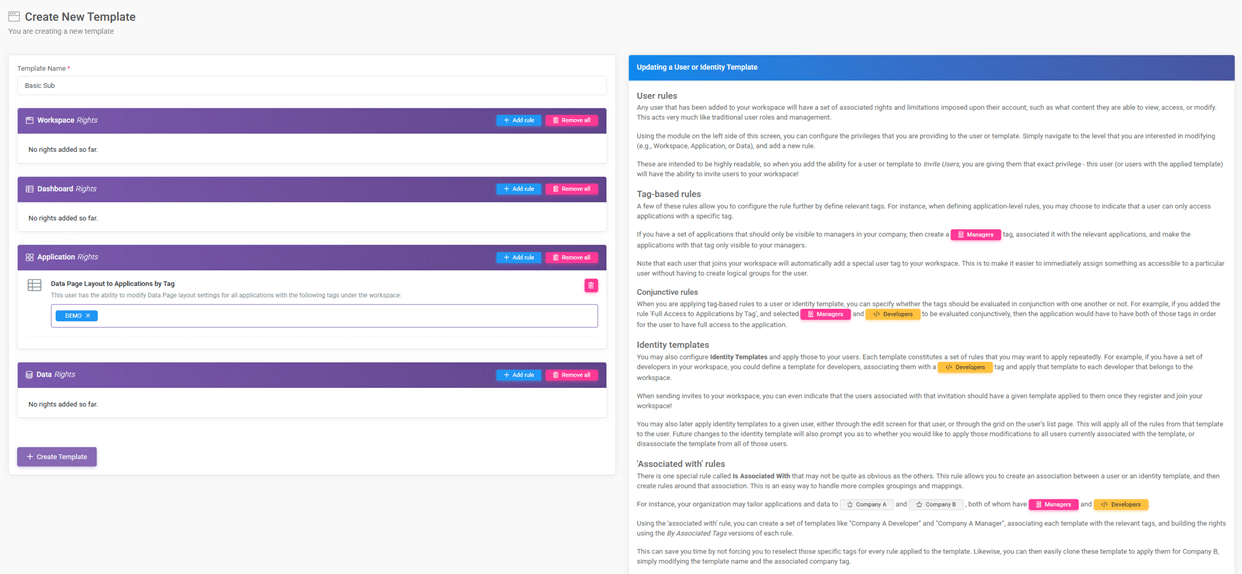
When you later automate user invitations, you’ll specify which Identity Template is assigned, instantly determining the user’s capabilities within the system.
Automating the Subscription-to-Access Workflow with Zapier

The heart of this system is Zapier, which connects Shopify and SpreadsheetWeb, making sure that every new subscription triggers an access invitation—completely automatically.
In Zapier, you’ll create a new workflow (Zap) with Shopify as the trigger. The event you want is typically “New Order”—firing whenever a customer completes a subscription purchase on your Shopify store. This trigger event will surface details about the purchased product, the customer’s email, and—crucially—which plan was chosen.

The next step in your Zap is to select SpreadsheetWeb’s “Invite User” action. After connecting your SpreadsheetWeb account, you’ll configure this action to send an invitation to the email collected from Shopify, assigning the Identity Template that matches the purchased subscription plan.
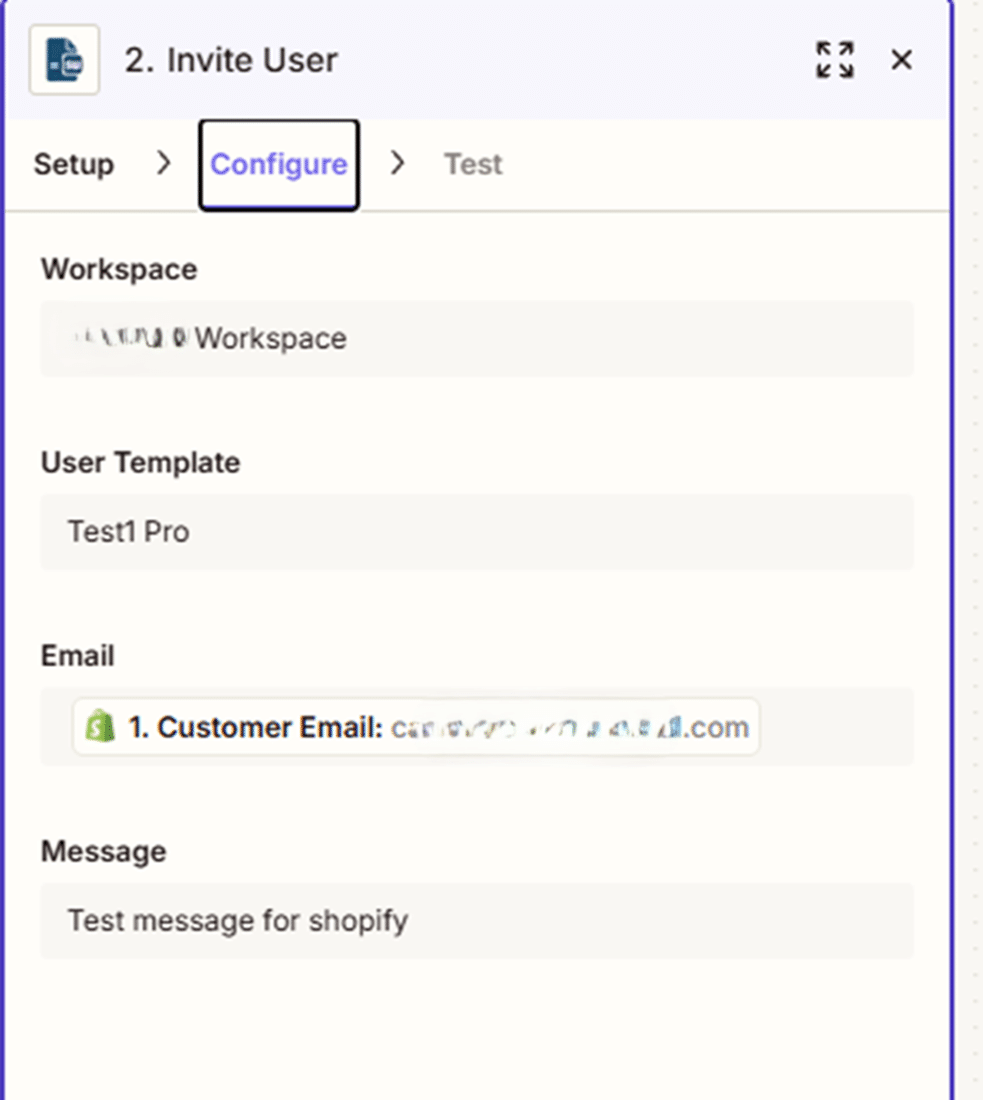
This mapping can be handled dynamically: by using Zapier’s built-in Filter or Paths tools, you can check which Shopify plan was bought and automatically select the corresponding Identity Template. For example, if the “Enterprise” plan was purchased, Zapier ensures the user is invited with the “Enterprise” template.
The end result: every time someone subscribes on Shopify, they’ll receive an email invitation (from SpreadsheetWeb) to register and gain instant access to your application, with permissions exactly matching what they paid for.
The Customer Experience: From Purchase to Access
From the customer’s point of view, this system is seamless. They:
- Choose a subscription plan and check out via Shopify (with Stripe handling the payment).

- Receive an invitation email from SpreadsheetWeb within seconds.

- Register their account via the link provided.
- Instantly gain access to the precise applications, workspaces, or data their subscription tier allows.


No waiting for manual approvals, no chance for human error, and no support tickets about “why can’t I see my content?”—because everything is fully automated.
Additional Notes: Managing Plans, Testing, and Scaling
- Testing: Before launching, always use Shopify’s and Stripe’s test modes to validate your entire flow end-to-end. Test purchasing each subscription level and ensure users receive the correct SpreadsheetWeb access.
- Plan Changes and Cancellations: For advanced automations, you can add Zapier workflows to handle subscription renewals, upgrades, downgrades, or cancellations, adjusting access levels in SpreadsheetWeb accordingly.
- Custom Emails: Consider customizing the invitation emails in SpreadsheetWeb for branding and a better onboarding experience.
- Seat Management: SpreadsheetWeb offers user-based pricing. Monitor your seat allocation to ensure you never run out during high-volume periods.
- Security and Compliance: Both Shopify and Stripe are fully PCI-compliant, and SpreadsheetWeb offers enterprise-grade security for your business data.
Conclusion
This architecture lets you run a modern, scalable, and efficient SaaS product built on the power of Excel—no coding required, no manual user management, and complete flexibility to grow. Customers get immediate access to your tools, and your team is freed from repetitive admin work. With Shopify handling subscriptions, Stripe taking payments, SpreadsheetWeb enforcing access rights, and Zapier gluing everything together, you have a world-class system for commercializing spreadsheet-driven applications.
If you’re aiming to launch, scale, or modernize your subscription-based SaaS, this integration blueprint is your foundation for success.