Merry Christmas to you all! Before we get into a new year, we would like to present you with a whole bunch of updates that give you much more flexibility, faster load times, and robust functionality when building applications. From new formulas to more efficient ways of user management, let's see what we have this month!
Tab-Based Loading As Default
Tab-based loading is the new default for all newly created applications. This feature is particularly beneficial for applications with multiple pages, each containing numerous controls. It enhances loading times by loading only the controls on the active page. This is especially advantageous for applications with large grid controls distributed across several pages. This feature is not enabled by default in existing applications, so you will need to enable it manually if it is applicable to your application.
Support for GROUPBY Formula
The GROUPBY function is one of Excel's latest additions, designed to enhance data analysis and aggregation capabilities. It is particularly useful for analyzing data and can serve as an alternative to pivot tables when single-column aggregation is sufficient.
With this update, by supporting the GROUPBY formula, our platform enables users to create advanced reporting applications directly within Excel, eliminating the need for pivot tables. This provides greater flexibility and efficiency in handling dynamic datasets, making it an excellent tool for modern data analysis and reporting requirements.
In the current release, we support the first three parameters of the GROUPBY function. However, in the upcoming release, we plan to expand functionality by supporting all parameters, allowing for even more sophisticated use cases and broader application possibilities.
Bind Increment to Value for Sliders
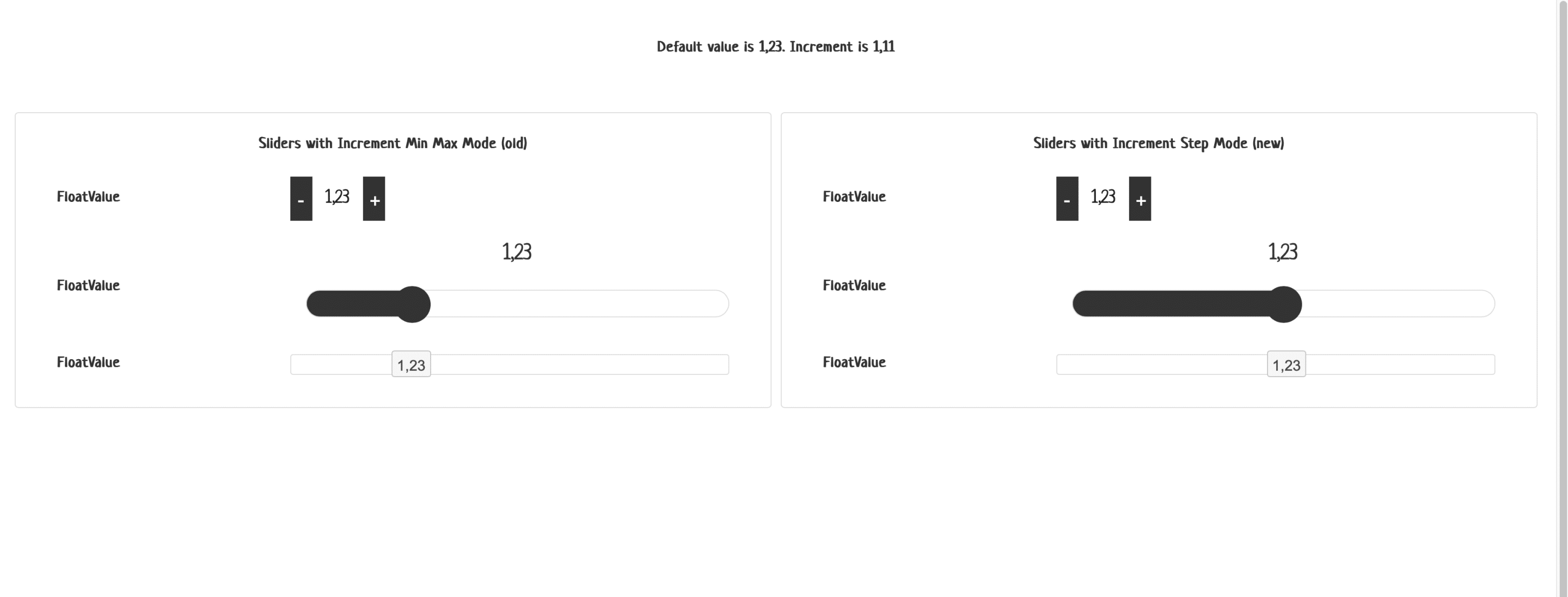
The slider is now greatly enhanced from the previously established minimum and maximum values to enabling a default midpoint value, step specification, and an increment for each step. You can configure it even further dynamically, thus suiting your visualization data needs.
Manage Users by Tags
In previous versions, user management features could only be assigned to a user in their entirety. In this version, we have introduced greater granularity by enabling administrators to manage users based on tags. This enhancement supports use cases such as allowing department heads to manage users exclusively within their respective departments, providing a more precise and flexible approach to user management.
New Regex Formulas
Microsoft has recently introduced three new functions in beta: REGEXTEST, REGEXEXTRACT, and REGEXREPLACE. These functions leverage regular expressions (regex), a powerful tool for identifying, extracting, and manipulating text patterns within data. The inclusion of regex in Excel marks a significant milestone, enabling users to work more efficiently with complex text-based data.
With these new functions, users can perform tasks such as extracting phone numbers or email addresses, validating data formats, and replacing text elements based on defined patterns—all using straightforward formulas. For instance:
- REGEXTEST checks if a text matches a specific pattern.
- REGEXEXTRACT pulls text that fits a given pattern.
- REGEXREPLACE replaces text elements that match a pattern with specified alternatives.
We are excited to announce that SpreadsheetWeb now fully supports these three regex-based formulas. This integration allows our users to bring advanced text processing capabilities into their applications seamlessly, opening the door to more dynamic and flexible data handling. Whether it's cleaning up datasets, automating text processing, or building validation systems, these tools provide the precision and efficiency needed for modern data operations.
IMAGE Formula Support
And here it is: the star of this month's updates! The IMAGE formula works directly in the core calculation engine, allowing you to produce HTML-valid image references- wherein users can insert graphical elements such as icons, product images, or visual indicators into their applications for a much more enriched, interactive user interface.
Here is a demo application that displays property details alongside corresponding images sourced from image URLs. Applications like this can be created to render images within grid controls, replicating the way they are displayed in Excel.


Click here to see the demo application.
Monthly, December highlights ongoing work toward making SpreadsheetWeb a powerful and flexible environment for feature-rich, data-driven applications. Some new improvements will be on the lookout for updates, and the world's just opened further up for exploring this month!