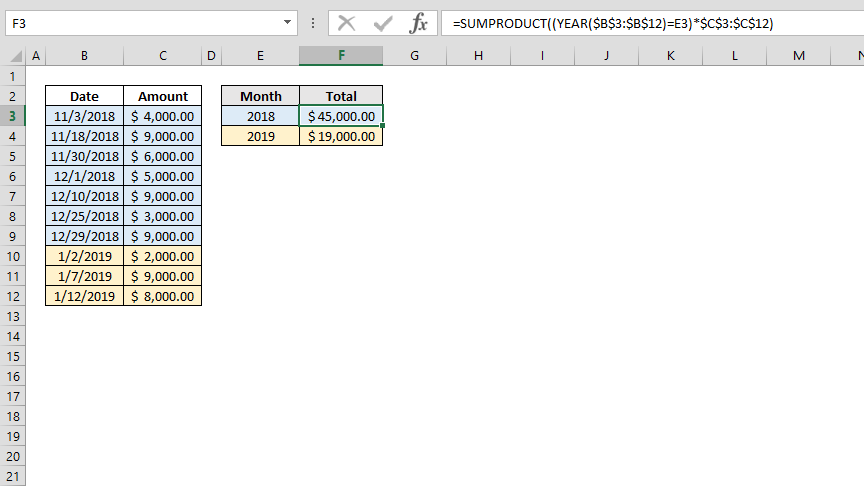
Although the SUMIF and SUMIFS function can sum data by date using given condition, they won't work if you want to use the output in other functions. We also don't want to use a pivot table due to its limitations. In this article, we're going to show you how to sum data by date with the help of SUMPRODUCT function.
Syntax
=SUMPRODUCT( ( YEAR( date values ) = year value ) * sum values )
Steps to Write SUMPRODUCT Function
- Start with the =SUMPRODUCT( function
- Open a parenthesis to wrap the criteria range – criteria pair (
- Enter the criteria range – criteria condition by date and year numbers YEAR($B$3:$B$12)=E3
- Close the parenthesis and add an asterisk to multiple condition and value arrays )*
- Select the values to add $C$3:$C$12
- Type in ) to close the SUMPRODUCT function and finish the formula
How Does SUMPRODUCT Work?
The ability of the SUMPRODUCT function to process arrays directly, bypassing the need for traditional array formulas, offers a distinct advantage over the constraints associated with the SUMIF and SUMIFS functions. SUMPRODUCT can assess and generate array outcomes based on range-value conditions. This feature is utilized to apply the YEAR function to an array of date values and to manage pairs of criteria range and criteria effectively.
YEAR($B$3:$B$12)=E3 returns {TRUE;TRUE;TRUE;TRUE;TRUE;TRUE;TRUE;FALSE;FALSE;FALSE}
When using the SUMPRODUCT function with a single argument array, it's capable of summing up the values within that array. However, the initial step involves identifying the specific values to be summed. This is achieved by filtering out the values that satisfy our specified conditions through multiplication with a Boolean array. In the resultant array, the dates that fulfill the condition are represented by their actual values, while all other entries are replaced with zeros.
{TRUE;TRUE;TRUE;TRUE;TRUE;TRUE;TRUE;FALSE;FALSE;FALSE}* {4000;9000;6000;5000;9000;3000;9000;2000;9000;8000} returns {4000;9000;6000;5000;9000;3000;9000;0;0;0}
The last step is to add the values in the result array to sum data by date.
=SUMPRODUCT((YEAR($B$3:$B$12)=E3)*$C$3:$C$12)