

How often have you come across marketing slogans that say, “Don’t use Excel for [X], use our product instead”—with [X] being just about any business process?
This type of marketing highlights a broader trend: countless software platforms have emerged precisely because companies sought specialized alternatives to Excel for managing distinct business tasks. The widely shared "Spreadsheet Unbundling" diagram by Foundation Inc., inspired by the term "the unbundling of Excel" introduced by Tom Tunguz, visually demonstrates how Excel’s broad usage has paved the way for many successful businesses, including Salesforce, Tableau, Asana, Workday, QuickBooks, and others.
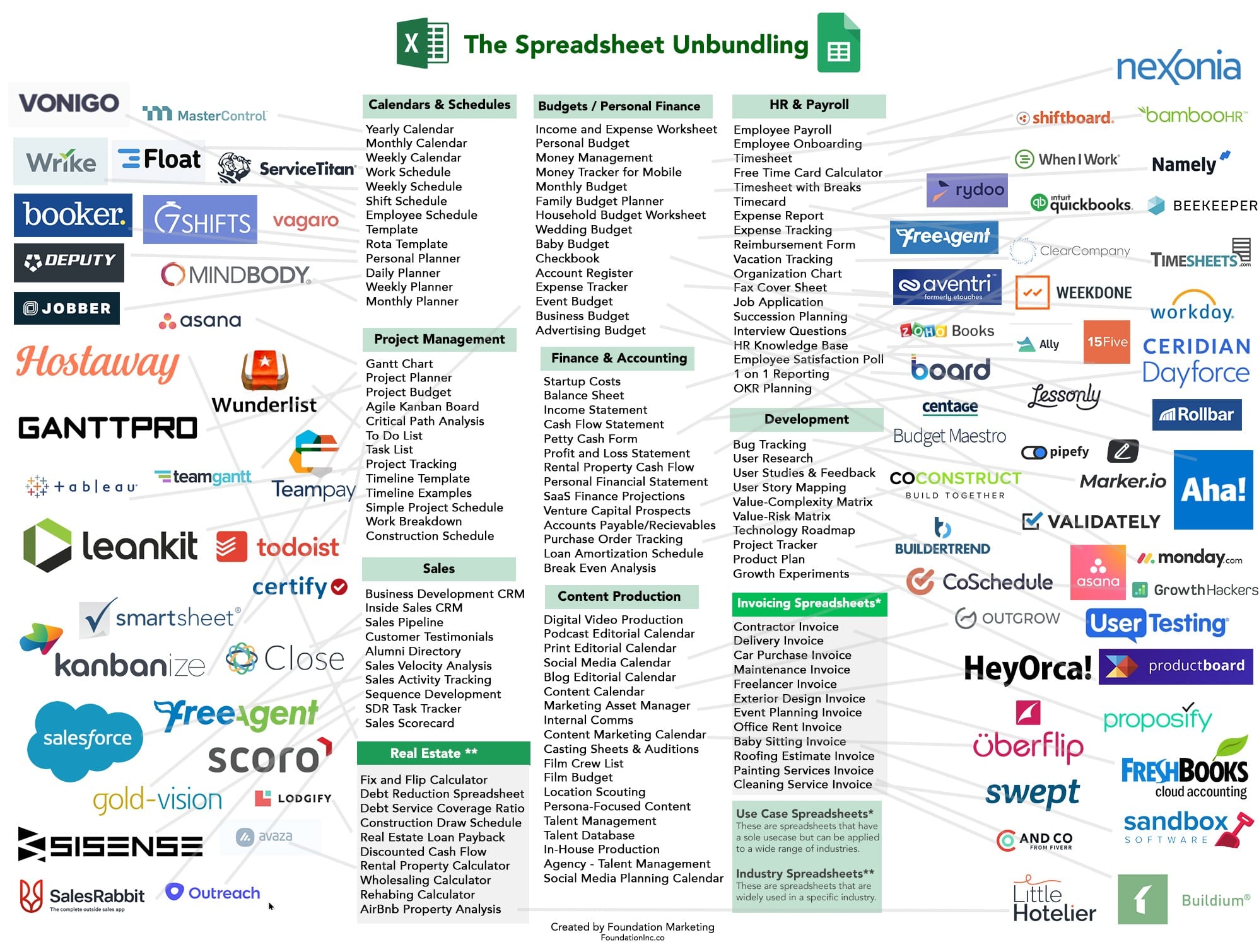
In many scenarios, these specialized software platforms effectively address the limitations of Excel and deliver significant improvements in efficiency and capability. However, despite these advancements, businesses frequently revert to spreadsheets for certain processes, driven by factors such as flexibility, simplicity, familiarity, and cost-effectiveness.
This article explores the reasons behind such reversions, examining how organizations can refine their approaches and better align user needs with available technology—ultimately striving to leverage a single, effective platform for each business requirement.
Why Do Businesses Move Away from Spreadsheets
Businesses often transition away from Excel to specialized software platforms because, despite Excel's flexibility and accessibility, it frequently becomes inefficient when managing complex or collaborative business processes at scale. As companies grow and processes become increasingly intricate, Excel's limitations—such as version control difficulties, manual data consolidation, susceptibility to human error, and challenges with real-time collaboration—can hinder productivity and compromise data integrity. Specialized software platforms, designed explicitly to handle particular workflows such as project management, customer relationship management, budgeting, or data visualization, provide targeted functionality that addresses these shortcomings.
Moreover, specialized platforms offer advanced features and capabilities beyond Excel's intended scope, including robust security measures, audit trails, detailed role-based access control, and seamless integrations with other enterprise applications. These tools also support cloud-based collaboration, mobile accessibility, automation of routine tasks, and advanced analytics capabilities that would otherwise require extensive customization and ongoing manual management within Excel. As regulatory compliance becomes increasingly critical, businesses also recognize the value of software solutions designed with compliance requirements in mind, significantly reducing the risks associated with data breaches or regulatory audits.
Ultimately, organizations move toward specialized software platforms to better manage operational complexity, enhance efficiency, ensure compliance, and support sustainable growth—outcomes that a spreadsheet-driven process alone often struggles to deliver.
Why and How Often Businesses Revert Back to Spreadsheets
Businesses often revert to spreadsheets after trying specialized software due to the unmatched flexibility and familiarity Excel offers. Specialized platforms, although powerful, frequently require users to adapt their workflows to predefined processes, which can limit customization. Employees accustomed to the dynamic and easily customizable nature of spreadsheets may find specialized solutions rigid or overly complex, leading them to return to Excel. Additionally, the learning curve associated with new software can result in user frustration or resistance, especially when tasks previously completed quickly in Excel become cumbersome in the new environment.
Another reason businesses revert to spreadsheets is cost and practicality. Specialized software platforms often come with significant licensing fees, ongoing maintenance costs, and additional expenses related to training or integration. For smaller teams or organizations operating under budget constraints, these costs may outweigh the perceived benefits. Furthermore, Excel's ubiquity means employees across roles and departments are already proficient, reducing the need for training and minimizing disruption.
But how frequently do businesses revert back to using spreadsheets, even after adopting specialized software solutions? Let's examine some revealing data:
- An article by Vena Solutions cites a survey of finance professionals, which found that over 80% continue to rely on spreadsheets even after their organizations implemented dedicated business performance management platforms.
- Manufacturing.net highlights a study involving 281 manufacturing executives. The study reveals that 75% of managers under the age of 35 default to spreadsheets instead of their company's ERP, CRM, or SCM systems when these enterprise solutions are perceived as overly cumbersome or challenging to use. Notably, even among managers aged 36–45, a substantial 58% shared the same preference.
There are also numerous specific examples where organizations have returned to spreadsheets after trying specialized software platforms:
- The Public Works Department in Alpharetta, GA, attempted to adopt two separate government budgeting software solutions. However, both solutions fell short of the city's expectations due to missing promised features and inadequate customer support. Ultimately, they reverted to using Excel to manage their capital budgeting processes.
- Another organization invested millions in customizing a widely used CRM system to handle stakeholder relationships—a task for which the CRM was not initially designed. After an extended implementation period, the system saw minimal adoption among team members, leading the organization to abandon it altogether and return to managing stakeholder engagement through spreadsheets.
- A finance company specializing in alternative lending experimented with several CRM platforms, including Salesforce and Zoho. The company found that none of these platforms offered sufficient flexibility to accommodate their unique workflow requirements. Despite repeated attempts to adopt these CRM solutions, they consistently found themselves returning to spreadsheets to manage their processes effectively.
It's important to note that the examples mentioned above primarily come from vendor-provided case studies, where the organizations eventually selected the vendor’s solution after moving away from previous platforms. Nevertheless, it's entirely plausible that companies might later revert back to Excel for the exact same reasons they initially moved away.
Both the survey data and specific cases strongly suggest that many business users either completely abandon specialized software solutions in favor of Excel or attempt to manage processes simultaneously in both systems. Either scenario leads to inefficiencies and increased costs. Business leaders face a dilemma: enforcing the use of specialized software can result in dissatisfied employees and reduced productivity, whereas allowing teams to use both Excel and specialized software introduces risks such as data duplication, inconsistencies, and potential errors. Is there a more effective alternative that balances user satisfaction, operational efficiency, and data accuracy?
Convert Spreadsheets to Web Applications
Most challenges associated with spreadsheets stem from businesses treating and distributing them as if they were standalone applications. Spreadsheets are great for building logic, performing complex calculations, and analyzing data. However, the moment they are shared broadly across teams or departments as fully-fledged applications, various issues inevitably emerge, including version control problems, data integrity concerns, and security vulnerabilities.
A practical solution is transforming spreadsheets into web-based applications and distributing them accordingly. Web applications inherently provide a centralized database, controlled workflows, audit trails, enhanced security measures, and role-based access controls—essential features that spreadsheets inherently lack. Crucially, business users can still leverage the flexibility of Excel to fully customize their spreadsheets prior to conversion, preserving the agility and ease-of-use they value.
No-code platforms like SpreadsheetWeb specifically address this need by enabling organizations to convert their existing Excel spreadsheets into fully-featured web applications. These applications incorporate robust infrastructure and management capabilities while empowering business units to maintain and easily update the original spreadsheet logic. Thus, users can continuously modify and enhance their applications without sacrificing centralization, security, or governance.
