The March 2026 release introduces two major enhancements designed to make building and managing applications faster, more intuitive, and more scalable. This update focuses on improving both the way applications are created from Excel models and how users interact with the design environment.
The release includes the introduction of the new Elements Module and a redesigned Layout & Controls interface (V2). Together, these improvements streamline the application development process and provide a more modern and efficient user experience.
Introducing the Elements Module
One of the most significant additions in this release is the Elements Module, which introduces a new approach to defining user interface components directly from Excel models.
The module includes an auto-detection algorithm that scans spreadsheets and identifies potential user interface elements such as inputs, outputs, and grouped ranges. These suggestions are visually presented to the user, making it easy to review and include them in the application. Instead of manually recreating interface components, users can simply enable detected elements, significantly reducing setup time.

In addition to automated detection, users retain full control and can manually select any cells or ranges that are not identified by the system. This ensures flexibility while still benefiting from automation.
The Elements Module also improves workflows for multi-sheet models. Users can navigate across worksheets, select which sheets should be included, and define how they are represented within the application. Each selected worksheet can be turned into a separate page, helping structure complex applications more efficiently.
Overall, this feature reduces manual effort and accelerates the transition from Excel to a fully functional web application.
New Layout & Controls (V2) Interface
The second major enhancement is the redesigned Layout & Controls module, now available in V2. This update introduces a cleaner and more intuitive interface, making it easier to design and manage application layouts.
In V2, the workspace has been reorganized to improve usability. The Context Menu, which contains structural components and input/output elements, is now positioned at the top of the interface, while the central Staging Area remains the primary space for building layouts. This reorganization creates a more focused and less cluttered design environment.
The Properties panel has also been updated. In the previous Classic View, the Properties Menu was always visible and automatically displayed the settings of the selected control. In V2, this panel is hidden by default and can be accessed through a button in the bottom-right corner. This allows users to maximize their working area while still having quick access to configuration options when needed.
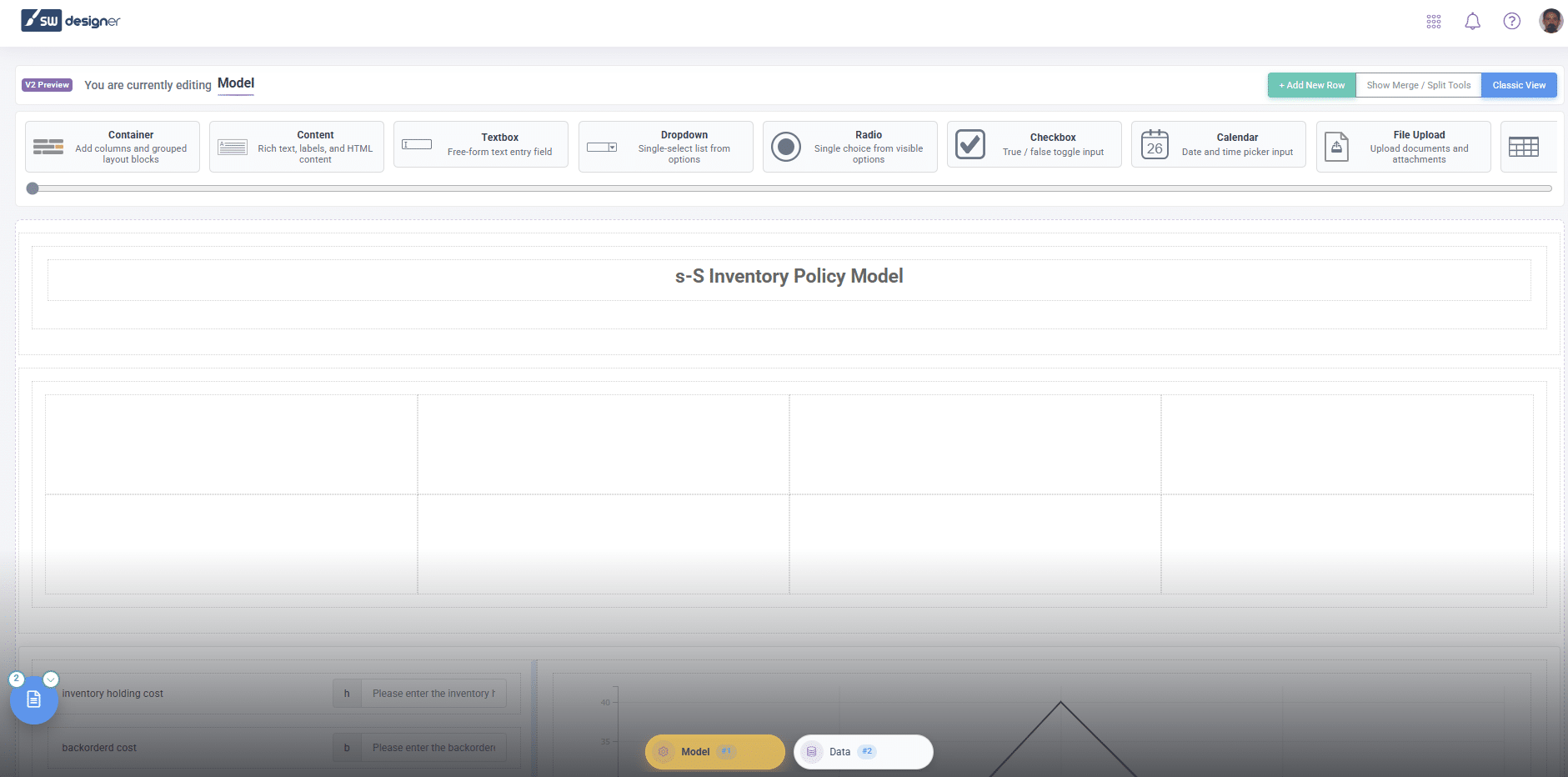
Navigation between pages has also been improved. A new control in the bottom-left corner displays the total number of pages in the application. When activated, it opens a floating menu that allows users to quickly switch between pages without leaving the module. This makes managing multi-page applications more efficient.
For users who prefer the previous interface, Classic View is still available and can be accessed through the button in the top-right corner. However, switching back to V2 requires reloading the module, ensuring compatibility while encouraging adoption of the updated interface.
The March 2026 release represents a significant step forward in both automation and usability within SpreadsheetWeb. By introducing intelligent UI detection and modernizing the design experience, this update makes it easier than ever to transform Excel models into powerful web applications.
For a complete and detailed list of all features, improvements, and fixes included in this release, please refer to the full build notes: