
Spreadsheet Sprawl Is Costing Your Business More Than You Think
Your team built powerful tools in Excel. But the moment you email that file, you lose control of your data, your versions, and your compliance.
When Spreadsheets Spread, Three Things Break Down
Files get emailed. Copies multiply. Nobody knows which version is right or who has access to what. This is spreadsheet sprawl — and it creates serious risk across your organization.
Security
Once a file leaves your hands, anyone with a copy has access to all the data inside it. There is no audit trail and no way to revoke access.
Version Control
v1_FINAL. v1_FINAL_revised. v1_FINAL_revised (2). When multiple copies exist on multiple machines, nobody knows which one is correct.
Compliance
GDPR, HIPAA, and SOX require you to know exactly where your data lives. Emailed spreadsheets make that impossible to answer with confidence.
How One Excel File Becomes Chaos
One trusted spreadsheet. Copied, shared, and modified across your organization. Here is exactly how it spirals out of control.
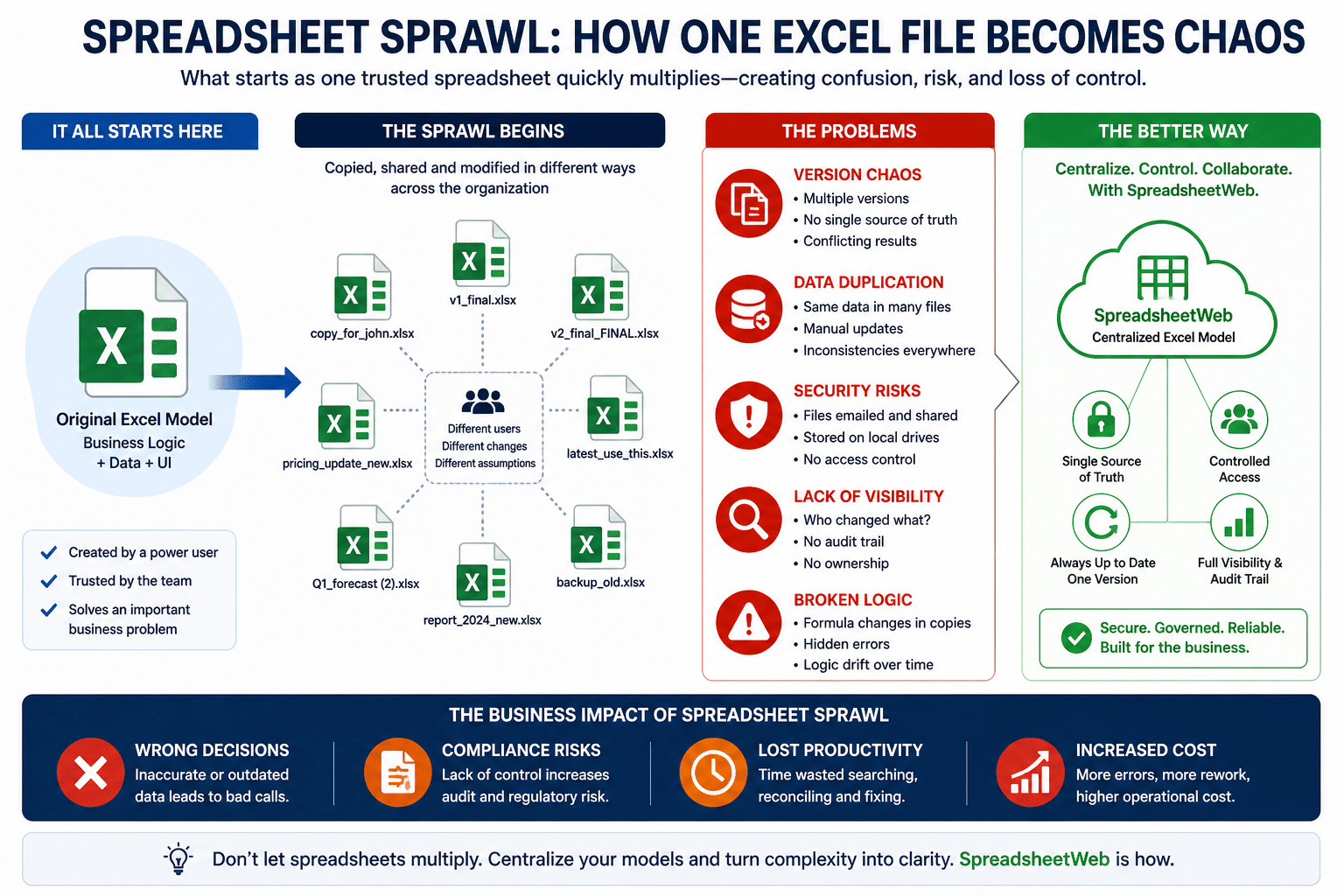
See How It Plays Out — and How to Fix It
These are three of the most common places spreadsheet sprawl creates real operational and compliance risk in enterprises.
Sales Quoting
Your team built a solid quoting tool in Excel. Pricing logic, product configurations, calculated totals. It works perfectly — until you email it to the sales team.
Pricing changes. You send a new version. But half the reps are still working from the old file. Wrong prices go out to customers. Deals are misquoted. Management has no visibility into what's in the pipeline.
Every version update starts the same cycle over again.
A Centralized Quoting Web App
- Every rep works from the same tool, always on the latest pricing
- Each rep saves and manages their own quotes directly in the platform
- All quote data is stored in a central database, not in files on desktops
- Management gets a real-time pipeline view — open deals, close rates, projected revenue
- The full workflow from quote creation through approval and closing runs inside the platform, with no email attachments
- Your pricing formulas stay protected and hidden from users
Project Management
A new spreadsheet gets created for every project. It gets emailed out for input, and everyone saves their own copy on their own machine.
By the time it comes back, someone has to manually merge five different versions to get a complete picture. No one knows who made which change or when. And this happens every single time a new project kicks off.
A Shared Project Workspace
- Every project lives in the system from day one — tasks assigned, deadlines set, owners named
- No new file is created per project. Each is a new submission inside one centralized app
- Team members update their work directly in the app and changes are visible instantly
- Managers get a live view across all active projects — on track, at risk, overdue
- Sign-off and approval workflows notify the right people automatically
- No manual merging. No wondering who has the latest version
HR Reporting
Someone builds a detailed HR dashboard in Excel — headcount, compensation, performance scores by department. It's good, so it gets emailed to leadership.
Leadership forwards it to their teams. Sensitive employee data — salaries, performance ratings, personal details — is now sitting on machines across the company with no way to track it, control it, or pull it back.
A Controlled Reporting Application
- Leadership logs into the app — they never receive a file
- KPIs, compensation breakdowns, and performance data are always current
- Year-over-year comparisons are available with a single selector
- Role-based access means each person sees only what they should see
- Nothing gets forwarded, copied, or saved anywhere it should not be
- Full audit trail of who accessed what and when
From Excel File to Web App in Minutes
You keep building in Excel. SpreadsheetWeb handles the rest — no coding required.
Upload Your Excel File
Log into SpreadsheetWeb Hub and upload your existing spreadsheet. Your formulas, named ranges, and logic are read automatically.
Configure Your App
The system detects your inputs and outputs. Adjust layouts, assign labels, and configure which fields users can see and interact with.
Publish and Share
Hit Publish. Your app gets a unique link you can share directly or embed on your website. No coding. No IT project.
Data Stays Central
Every submission is stored in a secure database. Your formulas stay hidden and protected. Management gets live reporting from day one.
One Source of Truth. No More Sprawl.
Formulas Fully Protected
Users interact with your app without ever seeing the underlying Excel file, formulas, or data model. Your IP stays yours.
Data in a Database
All submissions are stored centrally. No more hunting through email threads for the latest file or manually consolidating inputs.
No Code Required
If you can build it in Excel, you can publish it as a web app. No developers needed. No months-long IT projects.
Built-in Workflows
Route submissions through review and approval stages automatically. Notify the right people at the right time without email chains.
Real-Time Reporting
Every submission feeds a live dashboard. Management gets instant visibility without waiting for someone to consolidate spreadsheets.
Enterprise Deployment
Available on private cloud or on-premise. Role-based access, SSO integration, audit logs, and compliance-ready infrastructure.
The Spreadsheet Stays Yours. The Sprawl Stops.
If your business runs on Excel, this is worth ten minutes of your time. No credit card required to get started.