
Interactive calculator
ROI Calculator Convert Excel ROI Cost Savings Models into Interactive Web Apps
Explore our ROI Calculator Demo. Convert Excel ROI and savings models into interactive web apps with instant results, payback period, and long-term savings.
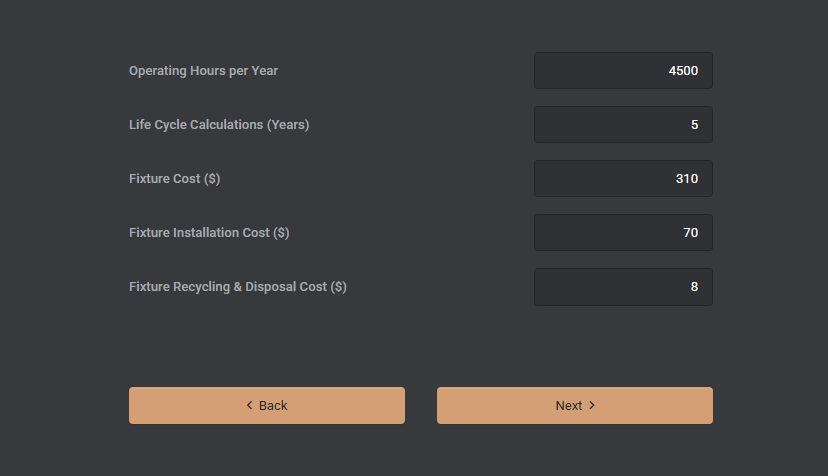
SpreadsheetWeb application example
About this calculator
ROI Calculator: Convert Excel ROI Cost Savings Models into Interactive Web Apps demonstrates how inputs, spreadsheet calculations, and calculated results can move from a spreadsheet into an accessible web interface. The embedded application below is a live example built with SpreadsheetWeb.
Use the application to enter example values and review how the calculated output responds. You can also open the demo in a separate tab for a full-page view.
Live application
Try ROI Calculator Convert Excel ROI Cost Savings Models into Interactive Web Apps
Interact with the application below, or open it in a separate tab for a full-page view.
What Is the ROI Calculator Demo?
The ROI Calculator Demo converts an Excel-based financial model into a clean, guided, and shareable web experience. Users enter assumptions (baseline costs, investment amount, efficiency gains, usage patterns, and time horizon), and the application calculates ROI, payback period, net savings, and lifetime value in real time. All core formulas, lookups, weighted scenarios, annualization, depreciation/discounting if applicable are preserved from Excel.
Key Features
- Instant Results: Outputs update as inputs change, helping stakeholders compare scenarios on the spot.
- Excel Logic Preserved: Keep your VLOOKUP/XLOOKUP, SUMIFS, IF/IFS, and scenario logic without rewriting code.
- Structured Inputs: Sliders, dropdowns, and numeric fields enforce valid ranges and data types.
- Charts & Summaries: Visualize savings by month or year and present a clear executive summary.
- Mobile Friendly: The UI adapts to phones, tablets, and desktops.
- Role-Based Access (optional): Share public demos or restrict internal calculators to authenticated users.
- Export Options (optional): Save results to a database; export reports to Excel or PDF for approvals.
Why Move Your ROI Calculator from Excel to the Web?
- Consistency: Everyone uses the same version, with the same formulas and up-to-date assumptions.
- Speed: No downloads or email attachments. Users calculate and share results in seconds.
- Data Quality: Validations avoid broken links, hidden errors, or overwritten cells.
- Scalability: Roll out to sales teams, partners, or customers without IT overhead.
- Security & Governance: Centralize sensitive assumptions and keep audit trails of usage and results.
Common Use Cases
- LED/Equipment Upgrades: Model energy savings, maintenance reduction, and rebates to show payback.
- SaaS Value Calculators: Quantify FTE savings, process improvements, and cost avoidance.
- CapEx/OpEx Projects: Compare scenarios with different lifespans, discount rates, and utilization.
- Marketing & Sales Enablement: Let prospects self-serve with a branded, embeddable calculator.
- Internal Planning: Standardize ROI evaluations across departments or regions.
How the Demo Works
Enter baseline consumption and costs, then provide the improved scenario (e.g., LED efficiency, reduced runtime, or new unit pricing). The app calculates annualized savings, net cash flows, and cumulative payback, mirroring the structure of the original spreadsheet. Charts translate raw numbers into an easy-to-share story, and summaries highlight the metrics decision-makers care about most.
SpreadsheetWeb Advantages
- No Rewrites: Upload your Excel workbook, map named ranges/inputs/outputs, and publish as a web app.
- UI Controls & Styling: Use sliders, toggles, dropdowns, and formatting to guide users.
- Conditional Logic: Show or hide sections based on user selections to keep the interface focused.
- Database & APIs (optional): Store runs, trigger workflows, and integrate with CRM/BI tools.
- Authentication & SSO (optional): Okta, Azure AD, and role-based permissions.
- Deployment Flexibility: Cloud, private cloud, or on-prem options to match your IT policies.
Who Should Use an Online ROI Calculator?
- Sales Teams: Equip reps to justify proposals with numbers tailored to the customer’s environment.
- Marketing: Turn traffic into qualified leads by letting visitors quantify benefits on their own.
- Finance & Ops: Standardize ROI thresholds and create a single source of truth for approvals.
- Channel Partners: Provide branded tools partners can use without exposing your full spreadsheets.
From Excel to Web: Typical Build Steps
- Prepare the Workbook: Clean inputs/outputs, finalize named ranges, and test formulas.
- Upload & Map: Import into SpreadsheetWeb; bind controls to inputs and outputs.
- Design the UI: Group inputs, add tooltips, and include charts/tables for clarity.
- Validate: Add ranges, formats, and defaults; test key scenarios and edge cases.
- Publish: Share a link, embed in your site, or restrict to authenticated users.
Need More Examples?
Visit the SpreadsheetWeb Gallery to see additional calculators, configurators, and data-driven applications built from real Excel models.
FAQ
Can I keep my existing Excel formulas?
Yes. SpreadsheetWeb preserves your spreadsheet logic, including lookups, SUMIFS, conditional scenarios, and weighted calculations, without rewriting code.
Can the calculator be embedded on my website?
Yes. You can share a link or embed the application within your site. Access can be public or restricted to authenticated users.
Can I export results or save runs?
Yes. You can store runs in a database and export summaries to Excel or PDF for proposals and approvals.
Does SpreadsheetWeb support SSO and integrations?
Yes. Options include Okta and Azure AD. You can also integrate with CRM/BI tools through APIs and custom actions.
What deployment options are available?
Choose cloud, private cloud, or on-premise deployment to meet security and compliance requirements.
Note: This demo was created by converting an Excel ROI model into a web application using SpreadsheetWeb, preserving the original formulas and structure while adding modern UI controls, validation, and optional data storage.