
Interactive calculator
Pricing Analysis
Analyze market trends, evaluate price points, and optimize your pricing strategy effectively with the interactive Pricing Analysis Tool Demo.
SpreadsheetWeb application example
About this calculator
Pricing Analysis Tool Demo: Evaluate and Optimize Your Pricing Strategy demonstrates how inputs, spreadsheet calculations, and calculated results can move from a spreadsheet into an accessible web interface. The embedded application below is a live example built with SpreadsheetWeb.
Use the application to enter example values and review how the calculated output responds. You can also open the demo in a separate tab for a full-page view.
Live application
Try Pricing Analysis
Interact with the application below, or open it in a separate tab for a full-page view.
Overview
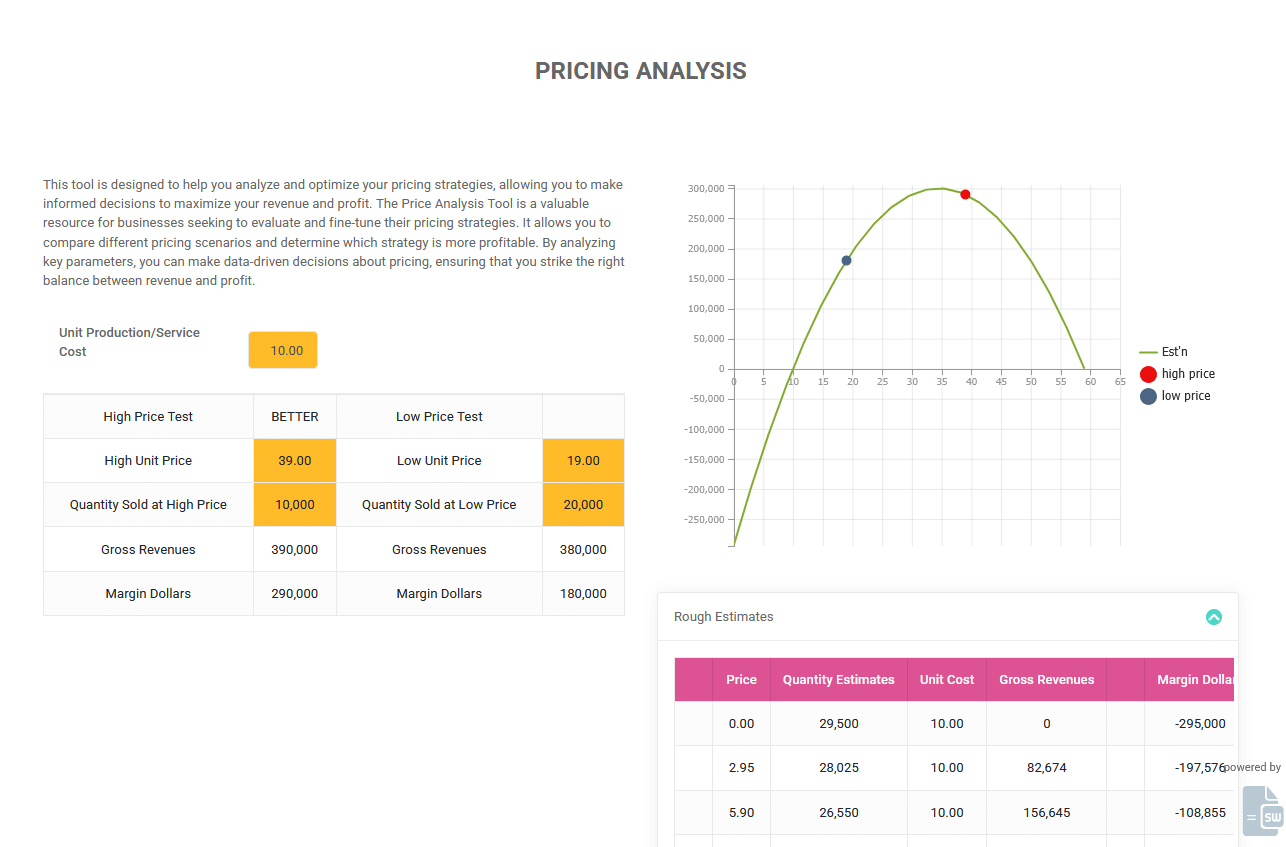
The Pricing Analysis Tool is designed to help you analyze and optimize your pricing strategies, allowing you to make informed decisions to maximize your revenue and profit. This interactive demo, built using SpreadsheetWeb, converts an Excel-based pricing model into a web application that delivers real-time scenario comparisons and visual insights.
What the Pricing Analysis Tool Does
This tool allows you to input key parameters such as product price, cost per unit, sales volume, channel mix, discount levels, and competitive pricing. It then simulates different pricing scenarios side by side and shows you which strategy is more profitable in terms of margin, revenue and total profit. By comparing alternatives, you can identify the optimal sweet spot between price and volume, and ensure your pricing decisions are data-driven.
Because this calculator is powered by SpreadsheetWeb, the original logic and formulas from the Excel model are preserved, and you gain the advantage of a modern web interface, no spreadsheet software required. You can instantly adjust inputs and see how your pricing strategy impacts outcomes.
How It Works
The application leverages basic and advanced pricing-analytics formulas, including break-even analysis, margin calculations, sensitivity to price/volume changes, and scenario comparison. Once you enter your base case, the tool computes profit metrics, displays how changes in price or volume affect your bottom line, and presents visual charts for clearer decision-making.
Applications
The Pricing Analysis Tool is ideal for:
- Product managers deciding on launch pricing or price adjustments.
- Marketing and sales teams assessing discount strategies or channel pricing.
- Business owners and executives aiming to maximize profit while managing volume trade-offs.
- Students and analysts studying pricing strategy, economics, or revenue management.
Whether you’re introducing a new product, adjusting to market pressures, or evaluating bundle offers, this tool helps you explore “what-if” scenarios and pick the most profitable path.
Why Move from Excel to the Web?
Pricing models often begin in Excel, but sharing, versioning and real-time collaboration become challenging as more stakeholders get involved. By converting the model into a web application with SpreadsheetWeb, you benefit from:
- Browser access from any device, no Excel needed.
- A single version of the truth, everyone uses the same core logic.
- Instant recalculation of inputs for rapid scenario testing.
- Easy embedding into websites, dashboards or portals for broader access.
This modern approach streamlines pricing analysis workflows and gives your team faster, more reliable insights.
Interactive Demo
Use the live Pricing Analysis Tool Demo to:
- Enter your cost per unit, desired price points, and expected volume,
- Test discount or promotional pricing,
- Compare base case vs. alternative scenarios side-by-side,
- Instantly see which scenario delivers higher margin, revenue or profit.
Experiment with different strategies and determine the optimal pricing path to boost your bottom line.
FAQ
What does the Pricing Analysis Tool do?
It simulates pricing scenarios by allowing you to adjust price, cost, volume and other parameters and then shows which strategy maximizes profitability.
Who can use this tool?
It’s ideal for product managers, marketing and sales teams, business owners, analysts and students who want to evaluate pricing decisions quantitatively.
What inputs does it require?
You’ll typically need cost per unit, proposed price(s), expected volume, discount or channel mix assumptions, and any competitive pricing factors.
Can I compare multiple scenarios?
Yes. You can run different pricing alternatives side by side and see how changes in price, cost, or volume affect margin, revenue and profit.
Can I embed this tool on my website?
Yes. SpreadsheetWeb allows you to embed this pricing tool directly into your website or share it as a stand-alone web application with secure access and custom branding.
Note: This demo was built by converting an Excel-based Pricing Analysis model into a fully interactive web application using SpreadsheetWeb, preserving the original formulas while enhancing usability, interactivity and adaptability.