
Interactive calculator
Break Even Calculator
Try our Break-Even Calculator. Enter costs, prices, and sales to find your break-even point instantly with data visualization and real-time analysis.
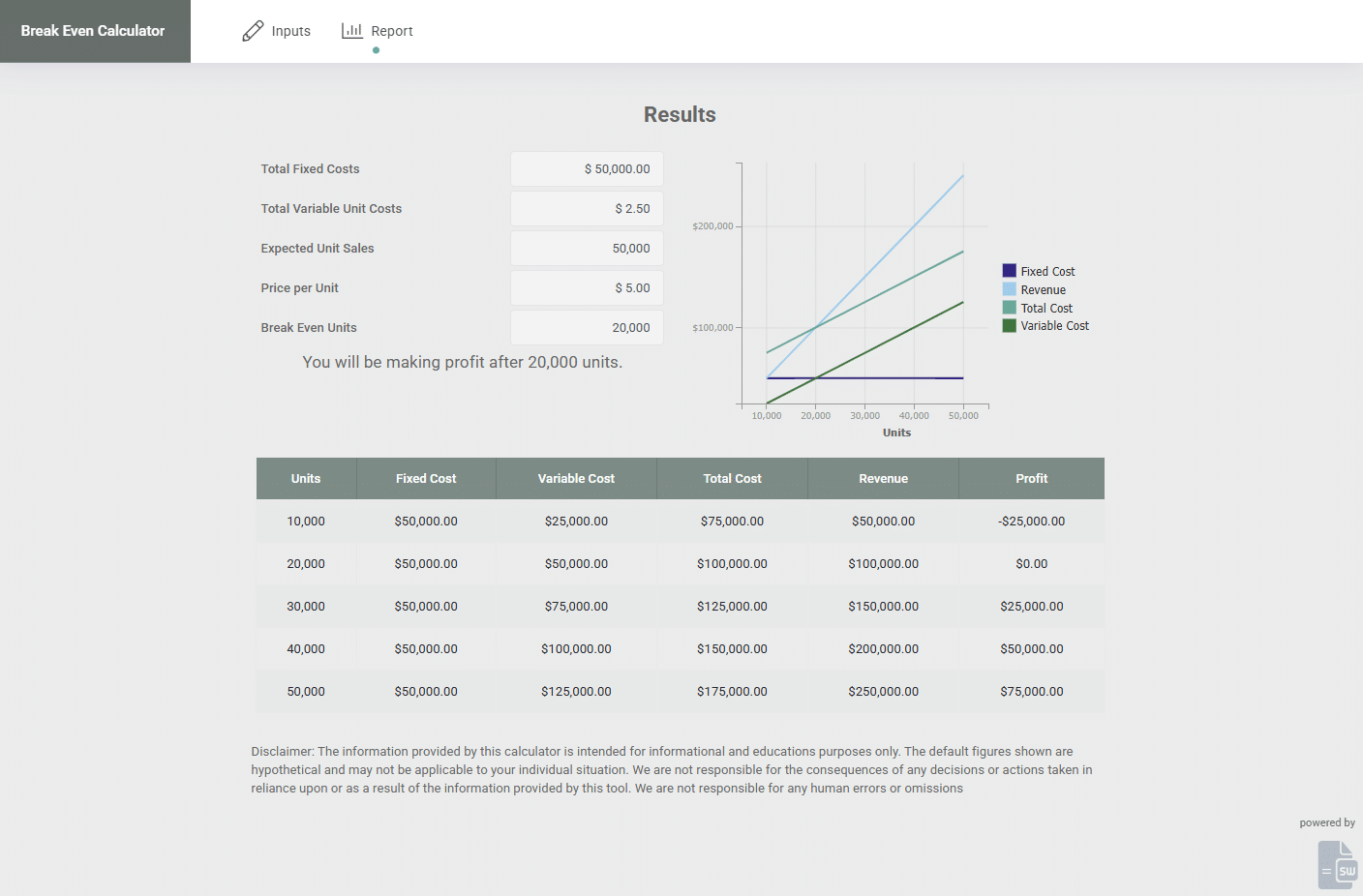
SpreadsheetWeb application example
About this calculator
Break-Even Calculator Demo: Analyze Profitability and Cost Structures demonstrates how inputs, spreadsheet calculations, and calculated results can move from a spreadsheet into an accessible web interface. The embedded application below is a live example built with SpreadsheetWeb.
Use the application to enter example values and review how the calculated output responds. You can also open the demo in a separate tab for a full-page view.
Live application
Try Break Even Calculator
Interact with the application below, or open it in a separate tab for a full-page view.
Overview
Understanding when your business begins to turn a profit is one of the most fundamental elements of financial planning. The Break-Even Calculator is an intuitive web-based tool that helps identify the exact point at which your total revenue equals your total costs. This interactive demo showcases how SpreadsheetWeb can transform an Excel-based financial model into a dynamic, user-friendly web application for real-time analysis and visualization.
What the Break-Even Calculator Does
The Break-Even Calculator allows you to enter key business parameters, fixed costs, variable cost per unit, selling price, and expected unit sales, and determines your break-even point. The tool calculates the number of units or sales revenue needed to cover all costs, helping you understand the level of sales required before your business becomes profitable. It also displays how profit margins evolve as sales increase, offering valuable insights into pricing and production decisions.
Because this calculator is powered by SpreadsheetWeb, all formulas and logic from the original Excel model are preserved, but the tool is now accessible online, without requiring any spreadsheet software. Users can experiment with different input values and see results update immediately, supported by data visualizations that clarify the relationship between cost, price, and revenue.
How It Works
The application uses the classic break-even analysis formula:
Break-even point (in units) = Fixed Costs / (Selling Price per Unit – Variable Cost per Unit)
This formula reveals how many units must be sold to cover both fixed and variable costs. The calculator not only computes this value but also visualizes it through charts and graphs, allowing you to see where total costs and total revenues intersect. You can also analyze sensitivity by changing prices, costs, or expected sales to see how each variable affects profitability.
Applications
The Break-Even Calculator is ideal for entrepreneurs, product managers, financial planners, and students studying business or economics. It’s especially useful during product development and pricing strategy discussions, where knowing the break-even point helps evaluate financial feasibility and risk. Startups can use it to validate business models, while established companies can apply it to forecast performance under new pricing or cost structures.
Why Move from Excel to the Web?
By converting Excel models into web applications with SpreadsheetWeb, organizations can make financial tools accessible across teams and departments instantly. Web-based models eliminate version control issues, reduce dependency on Excel expertise, and allow for modern interfaces with interactive charts and responsive design. Whether you’re sharing with colleagues, embedding the calculator on your website, or using it for client presentations, SpreadsheetWeb ensures secure access and seamless scalability.
Interactive Demo
The live Break-Even Calculator Demo allows you to input your own cost and pricing data, instantly visualizing the point where your total costs and revenues are equal. Explore different pricing scenarios, analyze profitability trends, and use the interactive charts to make data-driven business decisions with confidence.
FAQ
What does the Break-Even Calculator do?
It identifies the number of units or total revenue required to cover all costs. By inputting fixed and variable costs, selling price, and sales volume, the calculator determines your break-even point and profitability levels.
Who can use this calculator?
It’s ideal for entrepreneurs, product managers, analysts, and students who want to assess financial viability, pricing strategies, or investment risk.
Can I test multiple scenarios?
Yes. You can adjust costs, prices, and sales estimates to analyze different business scenarios and instantly view how profitability changes.
Does this calculator include visual charts?
Absolutely. The application displays graphical representations of total cost and revenue lines, making it easy to visualize the break-even point and understand cost structures.
Can I embed this calculator on my website?
Yes. SpreadsheetWeb allows you to embed calculators and models on your website or share them as standalone web applications, with secure access and custom branding options.
Note: This demo was built by converting an Excel-based break-even analysis model into a fully interactive web application using SpreadsheetWeb,
preserving the original formulas while adding real-time interactivity, data visualization, and responsive design.