

Building data-driven applications in SpreadsheetWeb has traditionally required one of two things: either a developer writes a custom API integration to pull external data into cells, or a user manually copies and pastes values from external sources on a regular basis. Both approaches carry well-known costs. The first requires engineering time, ongoing maintenance, and API contracts. The second is slow, error-prone, and does not scale.
There is a third option that has emerged with the maturity of large language models: using AI prompts to fetch, parse, normalize, and deliver structured data directly into SpreadsheetWeb named ranges without custom code, API contracts, or manual entry. This approach treats the entire public web and its document repositories as a loosely structured database, with the AI model acting as a universal adapter that reads any source and returns exactly the values your application needs.
This article explains how this approach works, where it delivers the most value, what data and sources it works best with, and how to evaluate the trade-offs so you can decide whether it is right for your use case.
How It Works
The core pattern is straightforward. Instead of configuring a data connector or writing integration code, you write a natural language prompt that instructs an AI model to complete four tasks:
- Navigate to a specific public URL or search for a specific data source
- Extract the fields you need from whatever format they appear in, whether that is HTML tables, PDFs, CSV files, press releases, or structured data feeds
- Normalize and transform the values as needed, including unit conversion, date formatting, and handling of null values
- Return the results as a table with a defined column order that maps directly to a named range in your SpreadsheetWeb Excel file
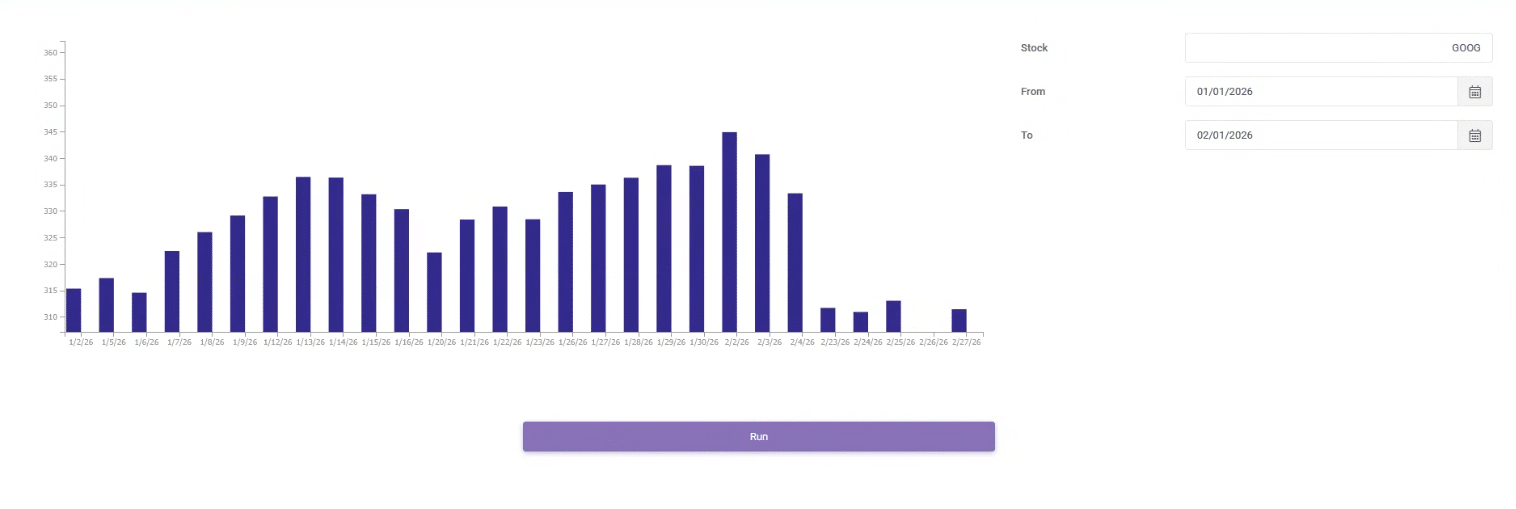
When this prompt is executed on application load, or triggered by a user action in your SpreadsheetWeb application, the output is parsed and written directly to the target named range. The result is a cell population workflow that requires no developer involvement after the initial prompt is written.
The AI model handles all the variability in source format, structure, and layout. Whether the data you need comes from an SEC filing, a government agency page, a news RSS feed, or a financial aggregator, the same prompt-based pattern applies. The model reads, interprets, and structures the data so your application does not have to.
Using a named range as the target has an important practical advantage. Because the named range is defined in the Excel workbook, every formula, and chart that references it automatically reflects the new data as soon as the range is populated. There is no need to update cell references or reformulate downstream calculations.
Typical Data, Sources, and Prompts
The range of publicly available data accessible through this approach is remarkably broad. The table below summarizes the major categories, the types of data available in each, and the primary sources that work well.
| Category | Data Available | Primary Sources |
| Financial / SEC | Revenue, earnings, balance sheet, cash flow | SEC EDGAR, StockAnalysis, MacroTrends |
| Government and Regulatory | Contracts, FDA approvals, federal rules | USASpending.gov, FDA.gov, FederalRegister.gov |
| Economic Indicators | Jobs, inflation, interest rates, GDP | BLS.gov, FRED (St. Louis Fed), World Bank |
| Real Estate | Home values, rent, property records | Zillow Research, HUD, Census ACS |
| Environmental | Air quality, streamflow, climate data | EPA AirNow, NOAA, USGS Water Data |
| Labor and Jobs | Job postings, salaries, occupations | BLS.gov, O*NET, Indeed (public pages) |
| News and Media | Headlines, sentiment, entity extraction | Reuters RSS, AP News RSS, GDELT |
| Academic Research | Study findings, metrics, citations | PubMed, arXiv, SSRN |
| Company Intelligence | Registrations, trademarks, contracts | OpenCorporates, USPTO, SAM.gov |
| Sports and Entertainment | Stats, charts, box office performance | Baseball Reference, Spotify Charts, Box Office Mojo |
The following examples show concrete prompts for several of the most common use cases. Each prompt instructs the model to return a table with a header row, which maps cleanly to a named range in a SpreadsheetWeb Excel workbook.
Financial Data: SEC EDGAR 10-K
Use case: Populate a financial dashboard named range with key income statement, balance sheet, and cash flow metrics for any publicly traded company.
Retrieve the most recent 10-K filing for [TICKER] from SEC EDGAR at
https://www.sec.gov/cgi-bin/browse-edgar?action=getcompany&CIK=[TICKER]&type=10-K.
Extract financial data and return as a table with the following
columns as the first row:
fiscal_year, total_revenue, revenue_yoy_change_pct, gross_profit, gross_margin_pct, operating_income, net_income, earnings_per_share, total_assets, total_debt, cash_and_equivalents, operating_cash_flow, capex, free_cash_flow
Return one data row followed by the header row. Use null for missing values.
Do not include any explanatory text before or after the table.
Government Contracts: USASpending.gov
Use case: Track recent federal contract awards for competitive intelligence, vendor research, or procurement analysis.
Go to https://api.usaspending.gov/api/v2/search/spending_by_award/ and retrieve
the 20 most recent federal contracts over $1M. Return as a table
with the following columns as the first row:
vendor_name, award_date, contract_value, awarding_agency, performance_location, naics_code, description, period_of_performance_start, period_of_performance_end
One data row per contract, with the header row first.
Use ISO 8601 format (YYYY-MM-DD) for all dates.
Use null for any missing values. Do not include any text outside the table.
Economic Indicators: FRED
Use case: Populate a macroeconomic dashboard named range with trend data for key Federal Reserve economic indicators.
Fetch the FRED data series for US unemployment rate at
https://fred.stlouisfed.org/graph/fredgraph.csv?id=UNRATE
and analyze the last 24 months. Return as a table with the
following columns as the first row:
date,value,mom_change, mom_change_pct, yoy_change, yoy_change_pct, rolling_3mo_avg, above_or_below_5yr_avg
One data row per month, with the header row first.
Use YYYY-MM-DD format for all dates. Use null for missing values.
Do not include any text outside the table.
Labor Market: Bureau of Labor Statistics
Use case: Populate a workforce planning named range with current employment data by sector from the most recent BLS jobs report.
Go to https://www.bls.gov/news.release/empsit.nr0.htm and extract all sector
data from the most recent employment situation report.
Return as a table with the following columns as the first row:
sector, jobs_added, prior_month_revised, yoy_change, unemployment_rate, avg_hourly_earnings, avg_hourly_earnings_yoy_change_pct, avg_weekly_hours, labor_force_participation_rate, u6_rate
One data row per sector plus a totals row, with the header row first.
Use null for any values not reported for a given sector.
Do not include any text outside the table.
Real Estate: Zillow Research
Use case: Populate a real estate market named range with home value trends by metro area for market analysis or client reporting.
Go to https://www.zillow.com/research/data/ and retrieve the most recent
Zillow Home Value Index by metro area.
Return as a table with the following columns as the first row:
metro_name, state, current_zhvi, mom_change_pct, yoy_change_pct, 5yr_change_pct, median_days_to_pending, inventory_yoy_change_pct, price_cut_pct
One data row per metro area, with the header row first.
Normalize all monetary values to USD with no currency symbols or commas.
Use null for any missing values. Do not include any text outside the table.
In every case the pattern is consistent: specify the source, define the exact columns, set formatting rules, instruct the model to return only the table, and note that the output will be parsed into a named range. That last instruction is important because it signals to the model that format precision matters and that no surrounding prose should be included in the response.
Advantages, Drawbacks, and Mitigation Strategies
Like any architectural approach, prompt-based data population has genuine strengths and genuine limitations. Understanding both clearly is essential to deploying this pattern reliably and in contexts where it is appropriate.
Summary Comparison
| Advantage | Drawback |
| No API contract or maintenance overhead | Non-deterministic output — format can vary between runs |
| Eliminates manual data entry and copy-paste errors | Latency: LLM calls are slower than direct API calls |
| Dynamic, always-current data on every execution | Token costs accumulate at high volume or frequency |
| Structured output maps directly to named ranges | No guaranteed data freshness or push mechanism |
| Multi-source population in a single pass | Source availability dependency with no SLA or uptime guarantee |
| Accessible to non-developers and business users | Hallucination risk on complex tables or ambiguous content |
| Rapid iteration: prompt edits replace code changes | No native error handling: failures return prose, not codes |
| Built-in normalization and light transformation | Difficult to unit test due to probabilistic output |
| Scales across many tickers/entities via templates | Context window limits on very large documents |
| Audit-friendly, human-readable source attribution | Prompt brittleness when source structure changes |
Advantages in Detail
No API Contract or Maintenance Overhead
Traditional integrations require negotiating data provider contracts, managing API keys, handling version upgrades, and maintaining connection code. A prompt-based approach replaces all of that with a text instruction. When a source changes, you update the prompt rather than rewriting integration code.
Accessible to Non-Developers
SpreadsheetWeb is designed to let business users build applications without deep technical knowledge. Prompt-based data population fits that same philosophy. A finance analyst can write and modify prompts to change what data gets pulled and where it lands, without any developer involvement.
Named Range Integration Is Seamless
Because the prompt returns a structured table that maps column-for-column to a named range defined in the Excel workbook, every downstream formula, chart, and calculation that references that range updates automatically. There is no need to adjust cell references or reconfigure any part of the application when data refreshes.
Multi-Source Population in a Single Pass
A single prompt can pull data from SEC EDGAR, a financial aggregator, and an earnings press release simultaneously, reconcile discrepancies, and populate a named range that spans multiple data points. Achieving the same result through traditional integrations would require multiple API calls and a custom merging layer.
Handles Any Format
APIs assume structured, predictable data. Public data lives in PDFs, HTML tables, CSV files, RSS feeds, and press releases. The AI model handles all that format variability transparently, making sources accessible that would otherwise require a custom parser for each one.
Rapid Iteration
If a stakeholder wants an additional column, a different metric, or data from a new source, the change is a one-line prompt edit rather than a schema change, a new API call, and a redeployment. The iteration cycle collapses from days to minutes.
Drawbacks and How to Mitigate Them
| Drawback | Mitigation Strategy |
| Non-deterministic output | Force strict output schema with explicit column headers. Validate data types, column count, and numeric ranges before writing to the named range. Auto-reject and re-prompt on validation failure. |
| Cost at scale | Batch multiple fields into one prompt. Use lighter models for structured extraction tasks. |
| No guaranteed freshness | Monitor source change signals such as EDGAR RSS feeds. Only re-execute prompts when a new filing or update is detected, not on blind schedules. |
| Source availability | Build fallback source chains. Add retry logic with exponential backoff. Surface live, cached, or unavailable status clearly in the SpreadsheetWeb UI. |
| Hallucination risk | Cross-reference extracted values against a secondary source. Flag deviations above a defined threshold for human review. Display source URL attribution alongside cell values. |
| No native error handling | Instruct the model to always return a status field (success, partial, or error). Read the status field before writing any data to the named range. Log all failures with full context. |
| Context window limits | Use targeted retrieval by navigating to the specific section first, then extracting. Use XBRL or machine-readable endpoints where available rather than HTML pages. |
| Prompt brittleness | Write semantic prompts that describe what you are looking for rather than where it appears on the page. Monitor output quality on a schedule and alert on degradation. Version-control all prompts. |
The Most Critical Mitigation: Validate Before Writing to the Named Range
Of all the mitigations listed, the single most important is this: never write a prompt-sourced value directly to a named range without a validation step. Every prompt output should pass through a lightweight validation layer that checks the column count, data types, numeric ranges, and for financial data, deviation from prior cached values.
This single practice eliminates the vast majority of risk from hallucination, format variation, and source errors. It also creates a natural audit trail, since every validation event can be logged with its input, result, and outcome. If a validation failure occurs, the named range retains its prior values and the user receives a clear notification rather than silently receiving bad data.
When to Use This Approach
Prompt-based data population is the right choice when one or more of the following conditions apply:
- Your data source does not have a developer-friendly API, or acquiring access to one is cost-prohibitive
- Your data requirements are evolving and you need to iterate quickly without engineering cycles
- The data lives in unstructured or semi-structured formats such as PDFs, press releases, or HTML tables
- Your users are business users who can write and maintain prompts without developer support
- Data volume is low to moderate and real-time latency is not a hard requirement
- You need to aggregate data from multiple sources that would otherwise each require a separate integration
It is not the right choice when your application requires sub-second data freshness, processes very high transaction volumes, operates in a regulated reporting context without a human review step, or where the cost of a wrong cell value is high and could go undetected.
Conclusion
The combination of SpreadsheetWeb's no-code application platform and AI-driven prompt-based data retrieval opens up a genuinely new way to build data-driven business applications. For the first time, a business analyst can connect a spreadsheet application to virtually any publicly available data source, including SEC filings, government databases, economic indicators, real estate data, and job market statistics, without writing a single line of integration code.
Returning results as tables that map directly to named ranges makes the integration particularly clean. Because named ranges are already part of the workbook structure, formulas, and charts, that depend on the data update automatically the moment the range is populated, with no additional configuration required.
The approach is not without limitations. Non-determinism, latency, and hallucination risk are real concerns that require thoughtful mitigation. With a validation layer, and source change detection, these risks are manageable and the trade-off is often strongly favorable compared to the cost and complexity of traditional custom integrations.
For organizations looking to put publicly available data to work in their SpreadsheetWeb applications quickly and without engineering overhead, this approach represents one of the most practical and immediately actionable options available today.
About SpreadsheetWeb
SpreadsheetWeb is a no-code platform that transforms Excel spreadsheets into secure, scalable web applications. Organizations use SpreadsheetWeb to build calculators, configurators, data entry tools, and reporting dashboards without writing application code. Learn more at spreadsheetweb.com.
