
Google Sheets to Web App. No Code Required.
Turn a Google Sheet Into a Web App in One Click.
Open your Sheet with SpreadsheetWeb, review the inputs and outputs it detects, and publish. Your formulas run live and calculate exactly the way Google Sheets calculates.
1 Click
FROM GOOGLE DRIVE
0
LINES OF CODE
Free
PLAN INCLUDED
20
YEARS IN MARKET
The Source-Aware Engine
Excel and Google Sheets Don’t Always Agree.
The same formula can return different answers on the two platforms. The differences are real and documented, and they are quiet: no error message, just a number that is subtly wrong. Most conversion tools run your file through one generic engine anyway, usually one that mimics Excel.
SpreadsheetWeb’s engine is source-aware. A Google Sheets file is calculated the way Google Sheets calculates it. Your logic, your dependencies, and your results carry over exactly.
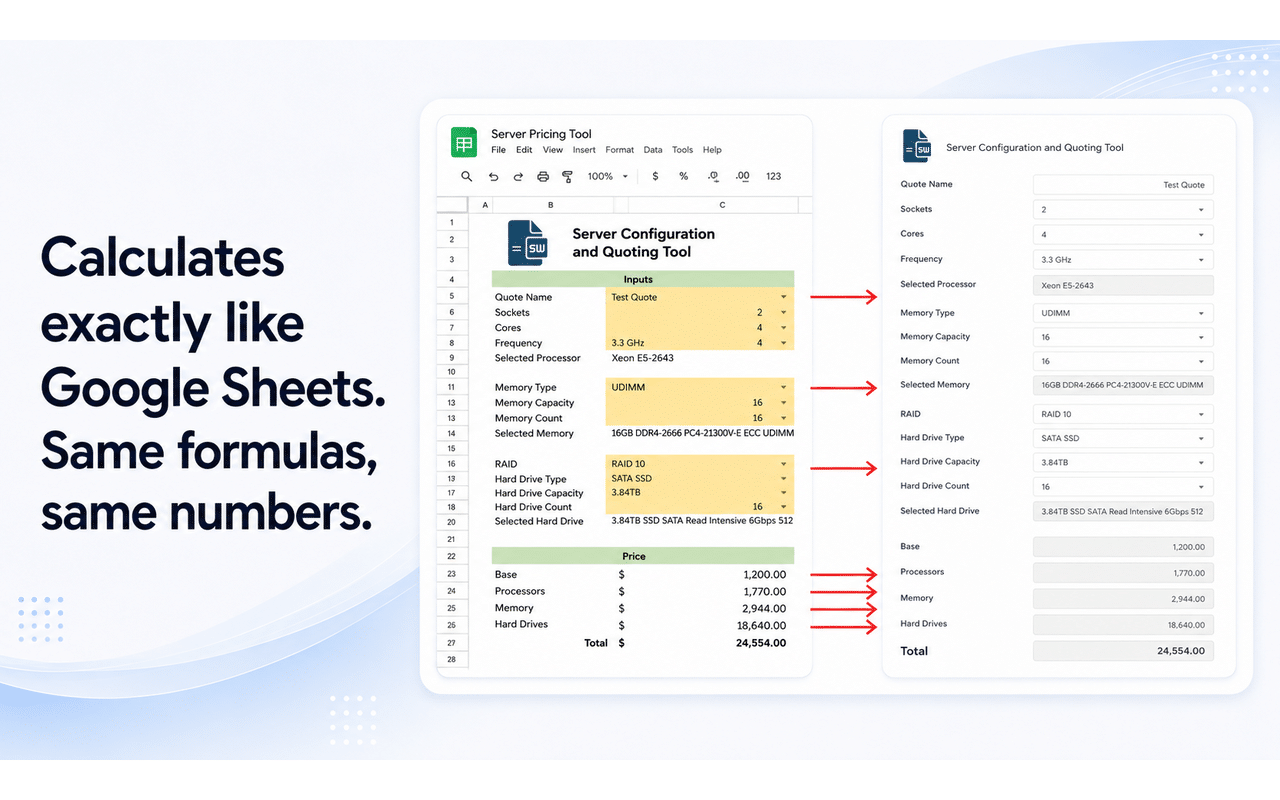
The same file, side by side: your Google Sheet on the left, your published app on the right. Every input, every line item, every total.
The Two Paths
Share the Sheet, or Share the App?
Most people default to sharing the file, because that is what Google Drive makes easy. Here is what each option actually gives the person on the other end.
Sharing the Sheet
Hand Over the File Itself
- Every formula is visible, even with view-only access
- Your cost basis, margins, and price tables are exposed
- Users can edit, break, or copy the model
- They see a grid of cells instead of a usable interface
- Everyone needs a Google account and the right permissions
Sharing a SpreadsheetWeb App
Hand Over a Link to the Tool
- Users see only the inputs and outputs you selected
- Formulas, hidden cells, and raw data are never exposed
- Nothing to break: the underlying file stays yours
- A clean, mobile-friendly interface instead of a spreadsheet
- Anyone can use it in a browser, no Google account required
How It Works
Four Steps From Drive to a Live URL
This is the exact sequence in the video above. Nothing skipped, nothing sped up.
Open With SpreadsheetWeb
In Google Drive, open your Sheet’s menu and choose Open with → SpreadsheetWeb. It only sees the file you pick.
Review What It Detected
Inputs and outputs are detected from the structure of your file. Add anything it missed, remove what you do not need.
Publish
Answer two quick questions about saving user data and interface settings. Your app builds itself from there.
Share the Link
You get a shareable URL and an embed code. Your users interact with the app in any browser, on any device.
What You Can Build
If It Lives in a Sheet, It Can Be an App.
Because formulas run live, calculation-heavy tools work especially well. These are the ones people build most.
Calculators & Pricing Tools
Quote generators, cost and project estimators, ROI and savings calculators, loan and finance calculators, product configurators (CPQ).
Forms & Data Collection
Order forms, registration and intake forms, applications, surveys, and questionnaires that write responses back to your data.
Dashboards & Reporting
KPI dashboards, sales and performance reports, budget and financial views, and visualizations built from your sheet.
Lookup & Search Tools
Product catalogs, price lists, inventory lookups, staff and member directories, and searchable databases.
Business & Workflow Apps
Quoting and invoicing tools, expense trackers, timesheets, booking and scheduling, inventory, lightweight CRM.
Internal Tools
Employee self-service tools, data entry portals, and team apps that replace the shared spreadsheet everyone edits at once.
Common Questions
The Questions a Spreadsheet Person Asks
If you are skeptical about a spreadsheet becoming a web app, these are the things worth asking.
Is it really free?
Yes. The free plan lets you build, publish, and share real apps, and you can install straight from the Google Workspace Marketplace without a credit card. Paid plans add capacity and advanced features when you need them.
Will the numbers really match my Sheet?
That is the entire point of the source-aware engine. A Google Sheets file is calculated the way Google Sheets calculates it, not through an Excel emulation. We have written extensively about where the two platforms diverge and why it matters.
Can my app users see my formulas or my data?
No. The published link exposes only the interface elements you selected: your inputs and your outputs. Formulas, hidden cells, and underlying data are not accessible to the people using your app.
What does SpreadsheetWeb access in my Google account?
Only the sheet you choose, selected through Google’s own file picker or the Open with menu in Drive. It does not scan the rest of your Drive.
What if my file is an Excel file, not a Sheet?
Both work. The engine is source-aware in both directions: Excel files calculate the way Excel calculates, Google Sheets files calculate the way Sheets calculates.
Your Sheet Already Does the Work. Give It an Interface.
Install from the Google Workspace Marketplace, open a Sheet, and have a working web app in minutes. No credit card. No commitment.
Install Free from the Marketplace Schedule a Demo
Free plan included · Works with personal Google accounts and Google Workspace