
Many small and mid-size organizations rely on spreadsheets for generating sales quotes, but emailing Excel files back and forth often leads to version control issues and security risks. SpreadsheetWeb Hub provides a user-friendly platform to convert an Excel-based quoting spreadsheet into a secure, role-based sales quoting portal. By assigning distinct user roles, defining workflows, generating professional proposal documents, storing quote records in a centralized database, and integrating with popular CRM systems, companies can streamline their sales quoting processes while maintaining full control of their logic through familiar spreadsheet interface.
Preparing Your Excel Workbook and Configuring Application
A successful sales quoting portal solution in SpreadsheetWeb begins with a well-structured Excel workbook that contains the logic for calculations, pricing tables, tax rates, or other reference data. Once the workbook is ready, it can be uploaded to SpreadsheetWeb and transformed into a web application, where users interact with intuitive form elements that map to the underlying Excel logic.
In addition to calculating quotes, SpreadsheetWeb can generate complete proposal or quote documents by merging pricing calculations and customer details. These documents can be rendered in PDF or Word format, allowing a professional, consistent layout that incorporates company branding and standard legal terms.
SpreadsheetWeb’s built-in database feature ensures every quote submission and associated document is stored securely. This approach allows Sales People and Sales Managers to retrieve existing quotes, filter them by relevant criteria, and maintain accurate, audit-ready records.
Managing User and Data Access through Identity Templates
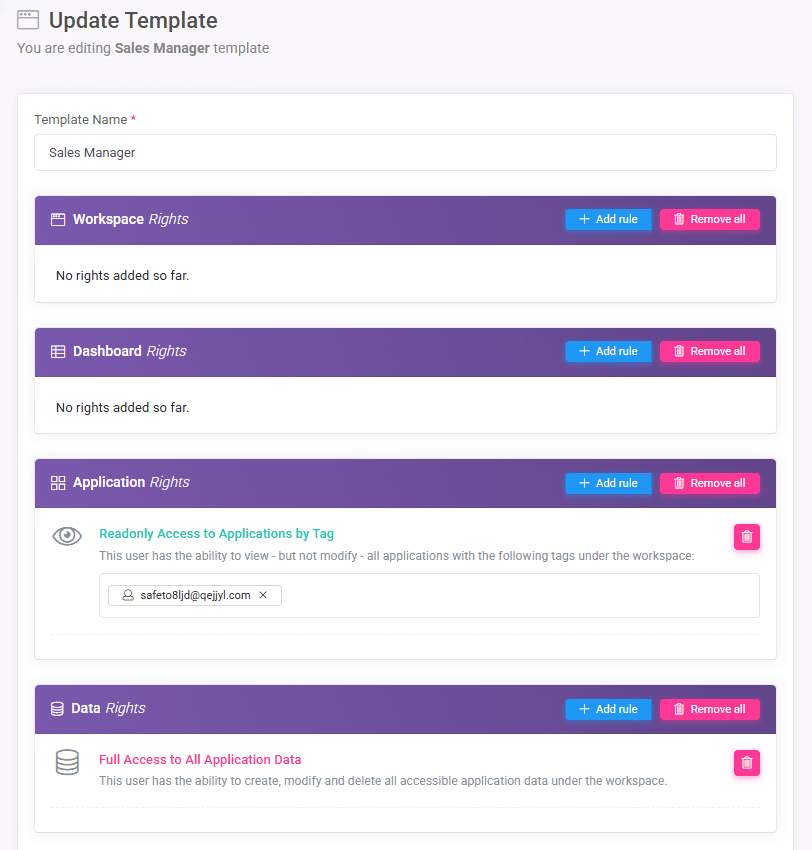
SpreadsheetWeb’s identity templates enable administrators to define access levels, user interfaces, and permissions for different user categories, such as Sales People and Sales Managers. Sales People typically gain the ability to generate, edit, and view only their own quotes, while Sales Managers can oversee and approve all quotes in the system.
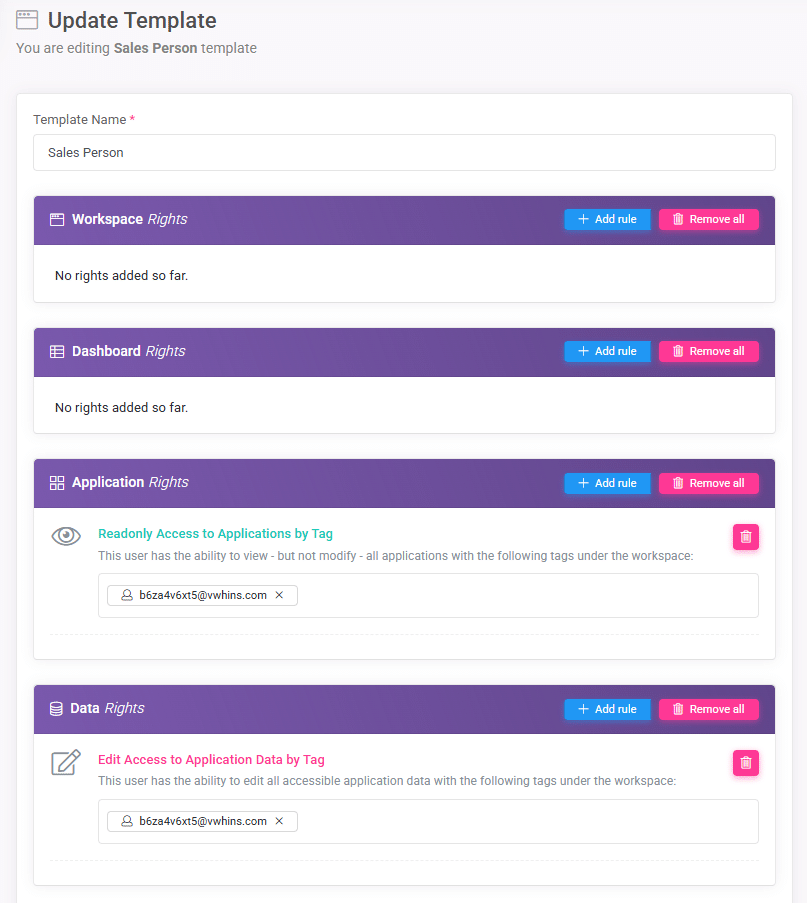
Sales Managers also have permission to upload updated Excel files whenever pricing or discount rules change. By assigning each user to the appropriate identity template at the time of onboarding, a secure and distinct portal interface is automatically provisioned, ensuring that each individual sees only what is pertinent to their job responsibilities.
Adding Users with the Invite Feature
Once the identity templates are configured, SpreadsheetWeb’s user invite capability simplifies onboarding. Administrators send an email invitation along with the relevant identity template to prospective users, who then create their accounts and gain immediate access to the portal with the correct interface and permissions. This process removes the need for administrators to configure permissions for each user manually and eliminates the risk of mistakes that might otherwise expose sensitive data.
Setting Up Permissions and Security
Setting up record-level security allows Sales People to view and work solely on their own quotes, while Sales Managers retain oversight of all quotes. Administrators can grant spreadsheet update privileges exclusively to Sales Managers, preventing unauthorized changes to the underlying Excel logic. This structure ensures consistent pricing and discount rules throughout the organization.
Workflow and Approvals in your Sales Quoting Portal
Sales People typically see a list of quotes showing only their own quotes, with an option to create a new quote using easy-to-fill form fields connected to the Excel logic. They can generate a quote document when they finalize details and then share that document with a customer or save it for reference.
Sales Managers see a more detailed interface that shows all quotes across the team, with a separate approval section where they can review, validate, and either approve or return quotes for further revisions. A dedicated portal page for updating pricing tables or tax rates can also be made available so they can easily replace the underlying Excel file as business needs evolve.
Handling Quote Workflow Using Tags
SpreadsheetWeb allows the creation of custom tags to classify quotes according to the stages of a sales process. Typical tags might include Prospect, Qualified, Quote, Review, Closed Won, and Closed Lost. By labeling quotes with these tags, users can quickly search, group, and filter them, which aids both Sales People and Sales Managers in prioritizing follow-ups and monitoring overall pipeline health. It is also possible to restrict user access to quotes by specific tags only through identity templates.
Built-in Messaging for Collaboration
To reduce reliance on scattered email threads, SpreadsheetWeb offers built-in messaging within the portal. Sales People and Sales Managers can attach notes and comments directly to specific quotes, creating a unified record of all discussions. This integrated messaging feature keeps relevant conversations accessible for easy reference and ensures an organized audit trail if there is ever a need to revisit a quote’s history.
Integrating your Sales Quoting Portal with CRM Systems
SpreadsheetWeb supports integration with external CRM systems like Salesforce, HubSpot, and Microsoft Dynamics through services such as Zapier and Make. When a quote is created, updated, or approved, relevant data can be automatically sent to the CRM to update or create corresponding records. This approach reduces manual data entry, keeps the CRM database aligned with the quoting portal, and enables further automation in the CRM, such as sending email campaigns or assigning follow-up tasks based on quote status.
Best Practices
Organizations often find it helpful to start with a limited pilot group of users, ensuring that workflows and role-based permissions function as intended before rolling out the portal more widely. Clear naming conventions and consistent tag usage prevent confusion when multiple quotes appear at different stages. Scheduling regular updates to the Excel workbook and training the sales team to use the portal thoroughly help maintain accurate quotes and smooth adoption. SpreadsheetWeb’s reporting tools can also be leveraged to create summaries of quotes and track key metrics such as conversion rates or time to close.
Conclusion
By configuring role-based access, utilizing the built-in database for secure record storage, generating polished proposal documents, and integrating with CRM systems, SpreadsheetWeb Hub allows small and mid-size organizations to modernize and centralize their quoting process. With Sales People focusing on quotes pertinent to their customers and Sales Managers approving deals and adjusting pricing logic when needed, businesses can maintain an efficient, scalable, and auditable environment for all quote-related activities. With straightforward user management, a flexible interface, and rich functionality, SpreadsheetWeb Hub proves to be a powerful solution for any team looking to build a sales quoting portal.