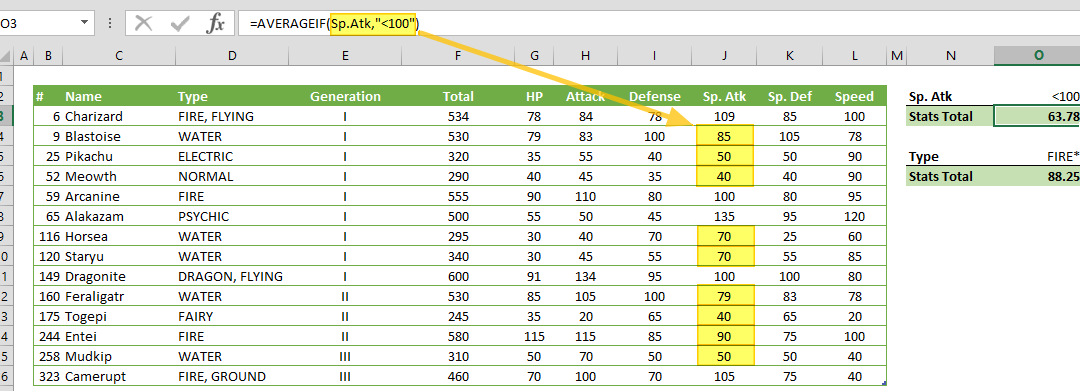
Function: AVERAGEIF

Function: AVERAGEIF

AVERAGEIF function takes the average of the values in a range of cells that match a criteria. In this guide, we’re going to show you how to use the AVERAGEIF function and also go over some tips and error handling methods. Supported versions All Excel versions Syntax...
Function: COUNTIF

Function: COUNTIF

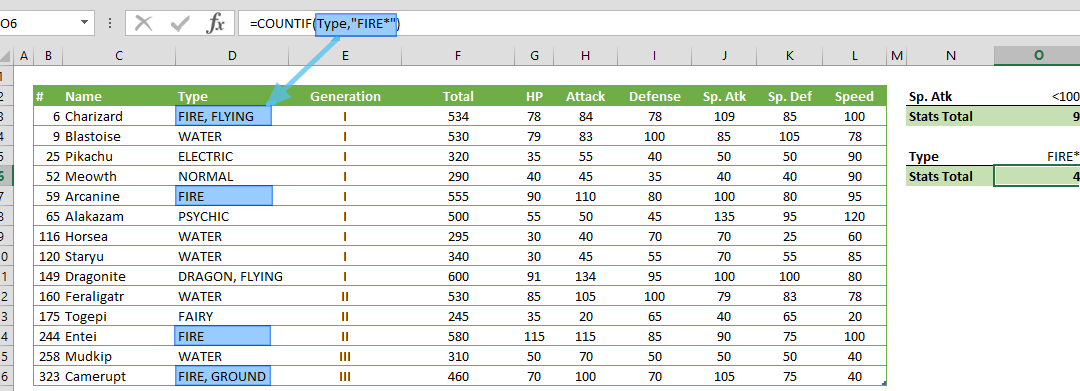
COUNTIF counts the values in a range of cells that match a given criteria. In this guide, we’re going to show you how to use the COUNTIF function and also go over some tips and error handling methods. Supported versions All Excel versions Syntax COUNTIF(range,...
Function: SEARCH

Function: SEARCH

Excel SEARCH function returns an integer that represents the position of a specified character or substring within a text. In this guide, we’re going to show you how to use the Excel SEARCH function and also go over some tips and error handling methods.Supported...
Function: FIND

Function: FIND

Excel FIND function returns an integer that represents the position of a specified character or substring, within a text. In this guide, we’re going to show you how to use Excel FIND function, and also go over some tips and error handling methods. Supported versions...
Function: MID

Function: MID

The MID function returns a sub-string from a string, starting from a specified location. In this guide, we’re going to show you how to use the Excel MID function and also go over some tips and error handling methods. Supported versions All Excel versions Excel MID...
Excel Function: RIGHT

Excel Function: RIGHT

The RIGHT function in Excel is a powerful tool for extracting a substring from a given string, beginning from the right-most character. This function is particularly useful when you need to retrieve specific characters from the end of a text string. In this...
Function: LEFT in Excel

Function: LEFT in Excel

The LEFT function in Excel is a powerful tool for extracting substrings from a given string, starting from the leftmost character. This function is particularly useful when you need to isolate specific portions of text from a larger string. To use the Excel LEFT...
Function: DATE

Function: DATE

The DATE function in Excel returns a date serial number from specified year, month and day values. In this guide, we’re going to show you how to use the DATE function and also throw in some tips and error handling methods.Supported versionsAll Excel versionsDate...
Function: DAY

Function: DAY

This function allows users to isolate and work with specific day values, which can be particularly useful for various date-related calculations and analyses. In this comprehensive guide, we'll walk you through the ins and outs of the DAY function in Excel, providing...