How to Transpose The Rows and Columns of a Data Table

How to Transpose The Rows and Columns of a Data Table

Are you tired of manually transposing rows and columns in Excel? Switching between rows and columns can be tedious, especially with frequently updated data. However, there's a solution: you can efficiently transpose rows and columns in Excel using a single formula....
How to create a random secure password in Excel

How to create a random secure password in Excel

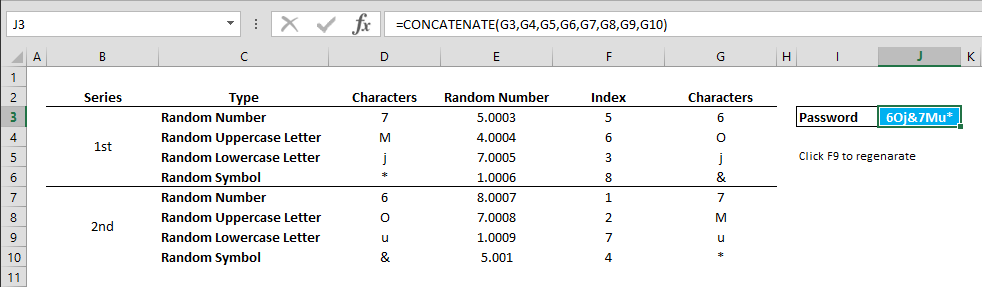
Managing and coming up with strong passwords can be challenging. Let us show you how you can create your own custom password generator in Excel. You can download our sample workbook below. Download Workbook Syntax Random Character Generation =RANDBETWEEN(0,9)...
How to shuffle a list of items in a random order

How to shuffle a list of items in a random order

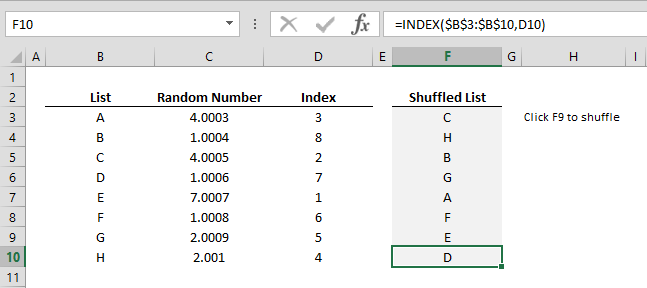
Do you have a list of items or names that you want to sort randomly? Using the RANDBETWEEN, RANK, and INDEX functions in conjunction, you can easily shuffle an item group for a random draw. Syntax =RANDBETWEEN( 1, number of list items ) + ROW() / very large number...
How to add comments into formulas

How to add comments into formulas

In complex models, it is important to write comments explaining how the formulas work. But the limitation of Excel’s Insert Comment feature is that you must type the entire comment in a textbox. There is an alternative. You can use N() formula to insert your...
How to create a calendar that only contain workdays

How to create a calendar that only contain workdays

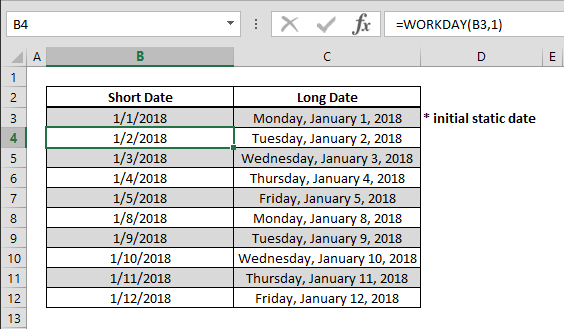
Be it for creating a time card or planning, creating a flexible calendar where you can omit holidays will come in very handy. Using the WORKDAY function you can easily create such a table and incorporate it in your data models. Syntax =WORKDAY(previous date, 1) Steps...
How to find the power of a number

How to find the power of a number

You can always use caret symbol (^) to find a certain power of a number. However, doing this with a formula can be easier to read and identify in nested formula sets. Syntax =POWER(base number, how many times that base number will be multiplied by itself) Steps Begin...
How to get the column index of a cell using the COLUMN function

How to get the column index of a cell using the COLUMN function

Working with Excel’s coordinate system makes building data models extremely easy. You can retrieve the column index information of a cell using the COLUMN function and implement in other formulas. Syntax =COLUMN(cell or range reference you want get its column...
How to get the row index of a cell using the ROW function

How to get the row index of a cell using the ROW function

Working with Excel’s coordinate system makes building data models extremely easy. You can retrieve the row index information of a cell using the ROW function and implement in other formulas. Syntax =ROW(cell or range reference you want get its row number) Steps...
How to calculate payments for a loan

How to calculate payments for a loan

In need of quick money? Well, we can’t tell you how to get that, but we can show you how to use Excel to find out what you’re getting into. Use this easy method to calculate what you would be paying for that shiny new loan. Syntax =PMT(interest rate for...