How to change text orientation in Excel

How to change text orientation in Excel

You can easily increase the column width to fit more contents into a smaller area. However, increasing the column width means that you’re going to be able to use fewer columns. Changing the alignment of the text can help overcome these limitations and allow you...
How to hide zeros in Excel

How to hide zeros in Excel

Hiding zero (0) values in Excel can be especially helpful for de-cluttering your workbooks and in most cases, make them easier to read. In this guide, we’re going to show you how to hide zeros in Excel worksheets, following three different methods. How to Hide Zeros...
Use the ERROR.TYPE to Identify Excel Errors

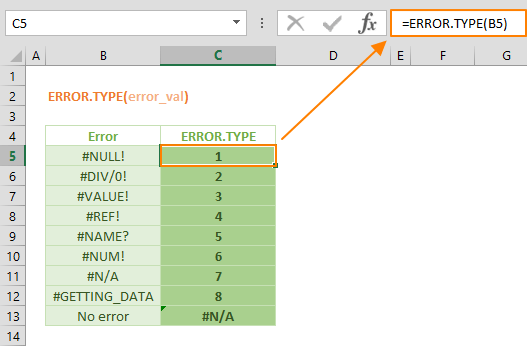
Use the ERROR.TYPE to Identify Excel Errors

The ERROR.TYPE function is an Information formula that returns an index number corresponding to a specific error value in Microsoft Excel. If there are no errors in the target cell(s), the function returns another error value, #N/A. This function can be especially...
Function: NOMINAL

Function: NOMINAL

The Excel NOMINAL function is a Financial formula that calculates and returns the nominal annual interest rate, for a given effective annual interest rate and number of compounding periods per year. The nominal annual interest rate is used for calculating financial...
Excel EFFECT Function

Excel EFFECT Function

The Excel EFFECT function is a Financial formula that calculates and returns the effective annual interest rate, for a given nominal annual interest rate and number of compounding periods per year. The effective annual interest rate is used to compare financial loans...
Function: DURATION

Function: DURATION

The DURATION Excel function is a Financial formula that calculates and returns the annual duration of a security based on the Macauley duration formula. In this guide, we’re going to show you how to use the DURATION function and also go over some tips and error...
Excel YIELD Function

Excel YIELD Function

The Excel YIELD function is a Financial formula that calculates and returns the yield on a security that pays a periodic interest. A common use case for the YIELD function is calculating bond yields. In this guide, we’re going to show you how to use the Excel YIELD...
How to navigate between worksheets in Excel

How to navigate between worksheets in Excel

Clicking on the sheet name on the bottom of the window is the most straightforward way of tab navigation in Excel, but there’s more! Some of the other methods we’re going to take a look at here can be especially helpful when dealing with a large number of...
Function: PRICEMAT

Function: PRICEMAT

The Excel PRICEMAT function is a Financial formula that calculates and returns the price per $100 face value of a security that pays interest at maturity. In this guide, we’re going to show you how to use the PRICEMAT function and also go over some tips and error...