We are excited to announce the latest enhancements to SpreadsheetWeb, bringing powerful new features and improvements designed to elevate your web applications and data management experience.
Power Query Support
Power Query is widely recognized as one of Excel's most powerful tools, enabling users to import, transform, and integrate data from a variety of external sources directly into their worksheets. With its intuitive graphical interface, Power Query automates complex data transformation processes, automating the creation of detailed and dynamic reporting applications.
In our latest release, we have incorporated Power Query support to further empower our users. This new feature enables you to transform your existing Power Query-driven spreadsheets into fully functional web applications—without any coding required.
Given the prevalence of Power Query in enterprise environments, particularly for complex data analysis and reporting across diverse data sources, we've introduced this capability exclusively for private cloud and server licenses. Whether your data originates from databases, web services, or other data repositories, you can now leverage this feature to build powerful, real-time reporting solutions tailored to your organization’s needs.
Font Configuration Enhancements
To enhance the visual presentation and user experience of your applications, we have introduced a dedicated font configuration module under Application Settings. This new module simplifies the process of customizing fonts throughout your V2 applications, giving you greater control over your app's overall aesthetics.
Our current font library supports approximately 30 distinct fonts, enabling you to designate separate fonts for headers and body text. Any adjustments made within this configuration will be reflected in your application at runtime, providing immediate visual feedback. Additionally, we’ve refined the labels in the Label control editor, ensuring clear alignment between header types and their corresponding configuration options.
Enhanced Styles for Form-Based Grids
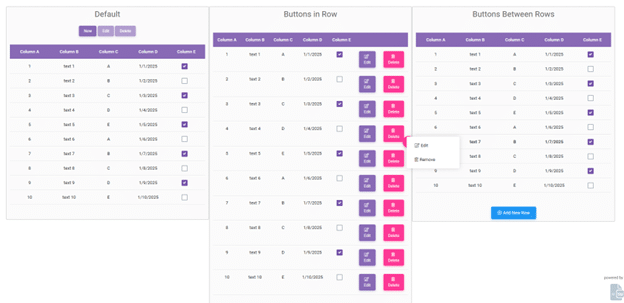
Form-Based grids are uniquely designed to facilitate intuitive data entry, modification, and deletion directly within a structured, user-friendly form interface. To improve usability and functionality, this release introduces two new styles tailored for the Form-Based grid control.
- Buttons in Row: Each row includes clearly visible Edit and Delete buttons.
- Buttons Between Rows: This style integrates a popup menu triggered upon selecting a row, displaying Edit and Remove options.
We hope you enjoy these new features and improvements. Check out our “Build Notes” for a complete list of updates. As always, we encourage your feedback and suggestions, which continually help us enhance SpreadsheetWeb and better meet your needs.