As 2024 draws to a close, it has been an exceptional year for SpreadsheetWeb Hub, marked by the introduction of numerous impactful features that have significantly enhanced the platform's capabilities.
Changes in the Core Application Designer
In 2024, our core designer interface for UI-based applications underwent significant enhancements, including the ability to translate Excel's data validation rules into input controls. Excel's data validation is a powerful feature that governs user input in cells, allowing functionalities such as dropdown lists, restrict input to specific ranges and custom popup messages to alert users when invalid information is entered. These validations are essential for ensuring data accuracy and preventing common entry errors. With this new capability, SpreadsheetWeb now enables users to seamlessly transfer these validation rules from Excel into applications, allowing for the creation of sophisticated data validation systems with minimal effort.
Another important feature is interactive execution, which allows users to input formulas directly into a textbox control instead of static values. The application automatically recognizes the input as a formula and calculates the result as if the user had entered the computed value. This powerful functionality is particularly useful in scenarios such as applications, where agents may need to enter measurements on the field. For instance, instead of manually summing multiple distances, a user can input =27.5+14.25+33.75, and the system will perform the calculation, simplifying data entry and ensuring accuracy.
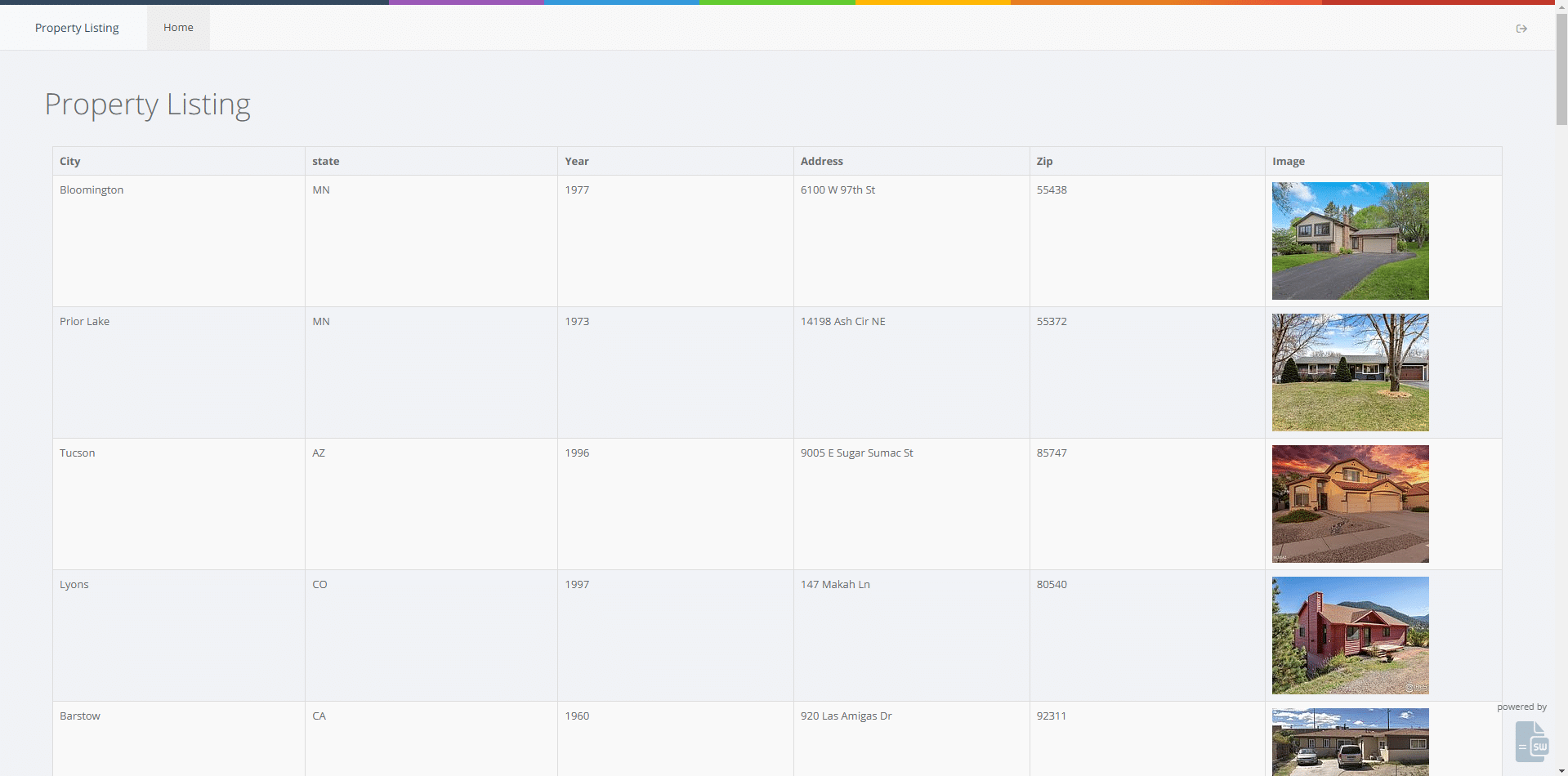
This year, we continued our commitment to supporting new formulas as Microsoft introduced additional capabilities into Excel. We integrated support for several new functions, including TRIMRANGE, GROUPBY, REGEXTEST, REGEXEXTRACT, REGEXREPLACE, and IMAGE, into our calculation engine. The IMAGE formula, in particular, stands out for its ability to render URL-based images directly within cells. We further enhanced this functionality by extending it to grid controls, enabling columns to display images from URLs when the IMAGE formula is used in the associated Excel file. This feature opens up numerous possibilities, from creating real estate applications with visual property listings to building pricing tools for companies managing extensive product inventories.
This year, we introduced support for dynamic button labels, a powerful feature that allows button text to be linked to Excel formulas. With this capability, users can create applications where button labels dynamically update based on formula outputs. A common usage of this feature is in building multi-language applications, where lookup formulas generate button labels that adapt to the user's selected language in real-time.
API Improvements
Accessing applications via API continues to be a key use case for our platform, with many companies integrating Excel formulas into their in-house systems through our API. While any UI-based application can be accessed via API, we introduced a new interface in 2024 specifically for designing API-only applications. This feature simplifies the process, enabling users to easily configure features such as access controls, database integration, Excel exports, and PDF printing.
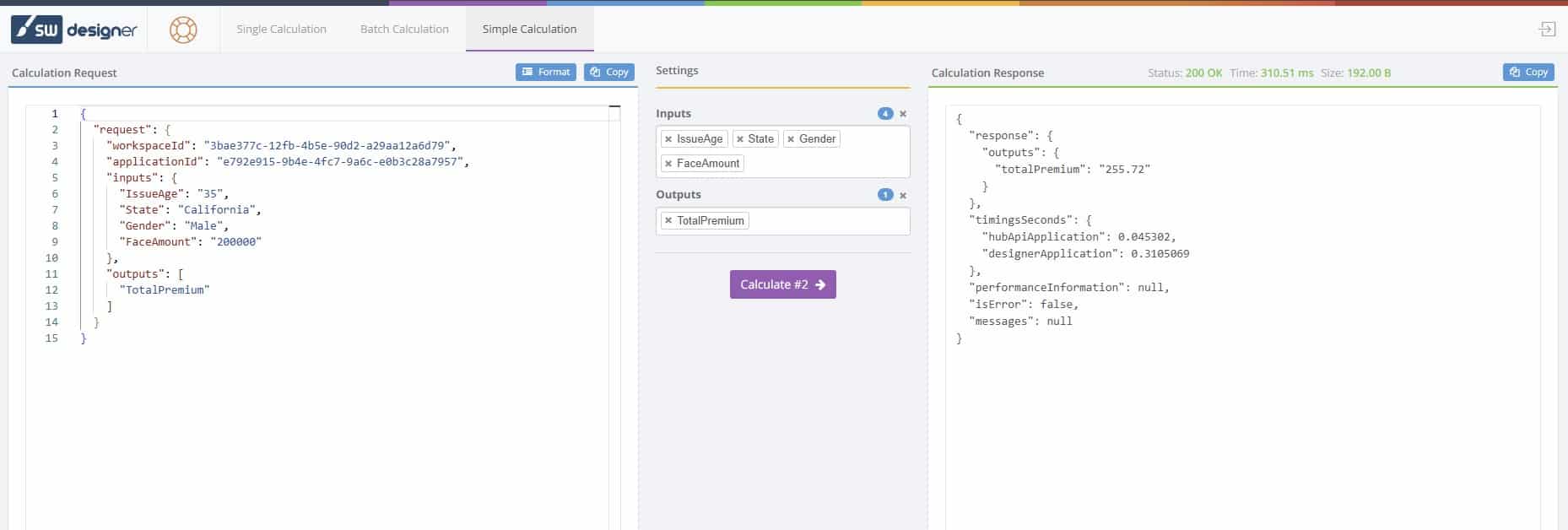
Another significant addition this year is our API Toolkit, which enhances developers' ability to test applications through APIs. The toolkit offers a user-friendly configuration interface for adding inputs and outputs, making API testing quicker and more efficient. While it includes features akin to traditional tools like Postman, it is tailored specifically for SpreadsheetWeb applications. Additionally, the API Toolkit includes functionality to export Postman collections, catering to developers who prefer using Postman for testing or generating code for further integration. These advancements have greatly enhanced the API development and testing experience, making it more versatile and accessible.

The API Toolkit was further enhanced with the addition of batch execution, a powerful feature that allows developers to perform multiple consecutive API calls. When combined with interactive execution, this capability enables testing across a wide range of scenarios. For example, developers can input a formula like =RANDBETWEEN(18,80) into a field requiring customer ages between 18 and 80. During batch execution, the system dynamically generates a random value within this range for each API call. This feature extends to multiple inputs, enabling the creation of realistic and dynamic testing environments for a variety of applications.
Our API endpoints are designed with extensive capabilities, including formatting controls and formula overrides, empowering developers to create robust applications. However, these advanced features can result in a JSON structure that is overly complex for universal REST API modules in no-code platforms. To address this, we introduced a simplified API endpoint in 2024. This endpoint provides a simplified JSON structure with limited capabilities, making it easier for no-code platforms like Bubble.io, Quickbase, PowerApps, and Zano to integrate complex Excel calculations into their applications without requiring custom coding.
Version control has been a longstanding feature of our platform, allowing developers to invoke different versions of the underlying Excel file using a transaction ID parameter. This year, we further simplified this process by introducing a transaction date parameter. This enhancement is particularly useful in scenarios where Excel files are updated periodically, such as monthly data revisions. By including a transaction date in the API call, developers can ensure that the correct version of the Excel file is used, reducing complexity and improving efficiency in application workflows.
Changes to SpreadsheetWeb Hub
SpreadsheetWeb Hub serves as the central web interface where users can manage their applications, access saved data, and control user permissions and access privileges. Acting as the control panel for all SpreadsheetWeb operations, it saw several key enhancements in 2024. One of the most significant additions was the ability to configure custom email domains, enabling businesses to send all SpreadsheetWeb-related emails—whether from the Hub or applications—using their own domain. This feature enhances branding for organizations.
Another major improvement was the introduction of built-in Single Sign-On (SSO) support, compatible with popular identity management platforms such as Okta, Microsoft Entra, Google, and Auth0. This functionality, available exclusively for private cloud and server licenses, simplifies user authentication and improves security.
Integration options for SpreadsheetWeb have also expanded significantly. Users can embed underlying Excel files with platforms that support REST APIs, utilize integration platforms like Zapier and Make to connect SpreadsheetWeb applications with external systems, or establish direct integrations using platform-specific API capabilities. This year, integrations with Monday.com and Hubspot were added, allowing SpreadsheetWeb applications to be embedded directly into these platforms. These integrations enable applications to load with prepopulated inputs and outputs mapped to the platforms’ databases, delivering seamless, real-time interaction and a streamlined user experience.
These highlights represent just a portion of the advancements made in 2024. In addition to these major updates, we introduced numerous smaller features and resolved hundreds of bugs to enhance the platform's overall functionality and reliability.