
How to Build an Online Tip Calculator Without Coding?
After a long and hectic day, you soften by having a delightful meal at a restaurant. You savor your favorite dish, enjoying the flavors and the ambiance, allowing the day's stress to melt away. As the meal ends and you ask for the check, a familiar question arises – how much should you tip the waiter? In today's digital era, finding quick solutions to everyday questions has become the norm. One common scenario we encounter after enjoying a meal at a restaurant involves the often-debated question of tipping. How much should you tip for the service received? While this might seem simple, it carries a range of answers depending on cultural norms, service quality, and personal generosity. It's in moments like these that technology comes to the rescue. A quick search online reveals numerous websites equipped with a tip calculator, a tool designed to simplify this decision. But what exactly is a tip calculator, and why should you consider building one?
What is a Tip Calculator, and Why Should We Build One?
The strategic incorporation of online calculators, such as a tip calculator, into a website, can be a game-changer for web administrators looking to boost site traffic and generate significant advertising revenue. This approach capitalizes on the practical and everyday need for quick, accurate calculations related to tipping in various service industries. By targeting a keyword as commonly sought-after as "tip calculator," websites position themselves to attract a substantial volume of organic search traffic. This is not just about offering a helpful tool; it's about leveraging search engine optimization (SEO) strategies to meet the direct needs of internet users.
When a website ranks high on Google searches for a term like "tip calculator," it becomes one of the first resources that users encounter during their search. Given the frequent dining-out culture and the tipping standards, individuals often turn to Google to find quick answers for etiquette. By providing a valuable and easy-to-use tip calculator, websites can capture this audience, leading to over 40,000 monthly visitors in some cases. This level of traffic is substantial, especially for websites looking to increase their visibility and user engagement metrics.
The direct correlation between site traffic and advertising revenue must be balanced. High traffic volumes make a website an attractive platform for advertisers, ensuring a broad audience for their advertisements. Utilizing a pay-per-click (PPC) advertising model or displaying ads from networks like Google AdSense allows website owners to monetize their traffic effectively. With an engaging tool like a tip calculator, users will likely spend more time on the site, increasing the chances of ad clicks. This engagement translates into higher ad income, with potential earnings exceeding $6,000 monthly, depending on the website's ad network configuration, click-through rates, and the keyword's competitiveness in ad auctions.
Furthermore, a tip calculator can enhance user experience, contributing to repeat visits and positive word-of-mouth. Satisfied users will likely share the tool within their social circles or through social media, further amplifying the website's reach and potential for ad revenue generation. Additionally, the data collected from the calculator (such as average tip percentages or popular bill amounts) can provide:
- Insights for creating targeted content.
- Further optimizing the site for search engines.
- Attracting more visitors.
Integrating a tip calculator on a website can serve a dual purpose by fulfilling a user need and optimizing for a high-traffic keyword. This strategic move can effectively boost site traffic and ad revenue, making it a win-win solution for web administrators looking to enhance their site's profitability and user engagement. By catering to the practical needs of the website's audience, this feature can tap into the lucrative online advertising market and create a potent formula for success.
Creating a Tip Calculator in Excel: A Simple Guide
Excel is ideal for creating a tip calculator that's easy to use, regardless of your spreadsheet expertise. It's excellent for simplifying financial calculations, like figuring out how much to tip after a meal.
Now, let's learn how to build a simple tip calculator in Excel. Start by downloading the example Excel file below:
In this calculator, you will enter the total invoice amount in cell B3, then change the data type to currency. Add the tip rates allocated to cells A6 through A21 for the different tip percentages you may consider.
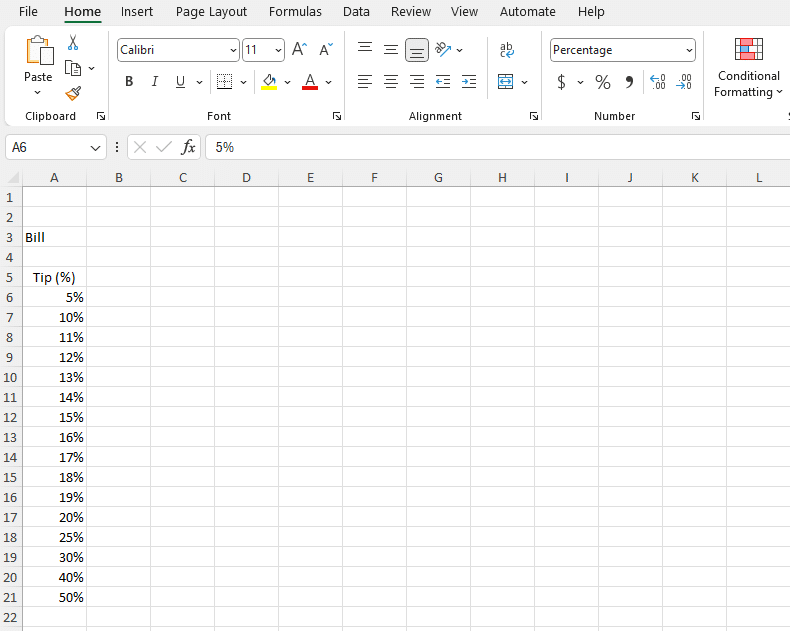
To calculate the Total Amount, you just need to find the total of the Bill and Tip Amount. First, select the Total Amount range. After selecting the Total Amount, go to the formula bar again. After starting your formula with =, select the Invoice cell and press +. Finally, select the Tip Amount range.

Remember, there's a practical feature in cell E3: a TRUE or FALSE statement regarding the bill entry. This can quickly verify if a bill amount has been entered, enhancing the calculator's functionality and user experience. The formula =IF(Bill>0,TRUE,FALSE) checks if the value in the "Bill" cell is greater than 0. If yes, it returns TRUE; otherwise, it returns FALSE. It's used to determine whether "Bill" has a positive value.

In addition, do not forget to add named ranges to your Excel file. This will allow you to create a web application, which we will explain how to do it later.

To set up named ranges, simply navigate to the Data tab and click on the "Define Name" button. From there, you can assign names to specific ranges you wish to define. For this Tip Calculator, it's important to establish the following cells and ranges as named ranges: Bill, IsResults, Results.
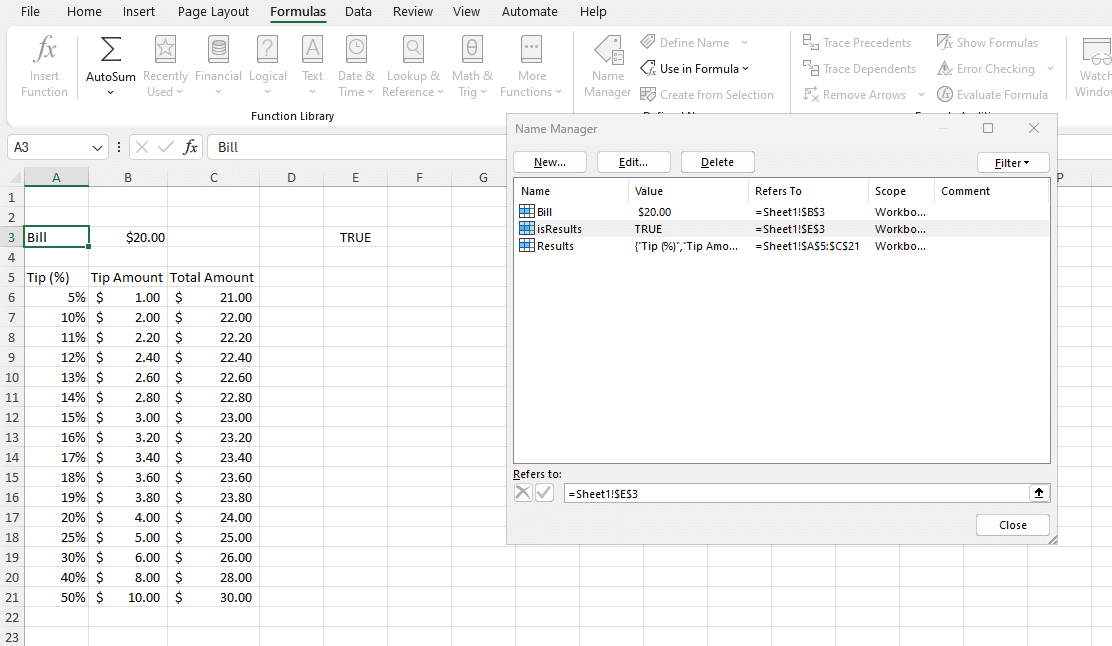
Using Excel for a tip calculator is easy because it updates by itself. If you change the bill amount or pick a new tip percentage, the amounts for the tip and total bill change automatically. No need to do the math again for each change.
Turning an Excel Application into a Web App with SpreadsheetWeb.
SpreadsheetWeb is a no-code platform that allows you to turn Excel applications into interactive web applications. In this case, it helps you move your calculator from Excel to the Internet, making it accessible to more people.
Here's how it works: You start by signing up for SpreadsheetWeb and uploading your Excel file that has the tip calculator. This file is what you'll use to create your web app. SpreadsheetWeb Hub is designed to be easy to use, allowing you to set up your app's look and functionality without knowing how to code. You can choose how your calculator will look to users and adjust everything only using the drag and drop feature.
We mentioned earlier that you need to define named ranges while you develop your Tip Calculator. It's because SpreadsheetWeb automatically recognizes your Excel file's content with the help of those named ranges.
SpreadsheetWeb also uses an automated app generator to suggest design ideas, which helps make sure your app is easy for people to use. These suggestions are based on what's in your Excel file, so the app works well without needing a lot of adjustments. It makes creating online applications even easier without using our No-Code platform. You can visit our design to see an example for this Tip Calculator.

Once your calculator is online as a web app, anyone can use it from any device with internet access, like phones or computers, thanks to the SpreadsheetWeb's responsible design. This means your calculator can be used by more people in more places. You can even embed it into your website using iframe! To learn more about how to embed an application to your website, click here.
SpreadsheetWeb lets you take an Excel calculator and turn it into a web app that's easy for anyone to access and use. This process doesn't require advanced technical skills, making it a practical option for bringing Excel-based tools to a broader audience.